Holyoaa
April 16, 2024
Solved

The preview is blurry, when you zoom in everything is fine. What's the problem?

  • April 16, 2024
  • 25 replies
  • 3066 views

Everything is fine in the browser version. Idk what happens
This topic has been closed for replies.
Best answer by Licelia

Hi, I experienced this same issue -
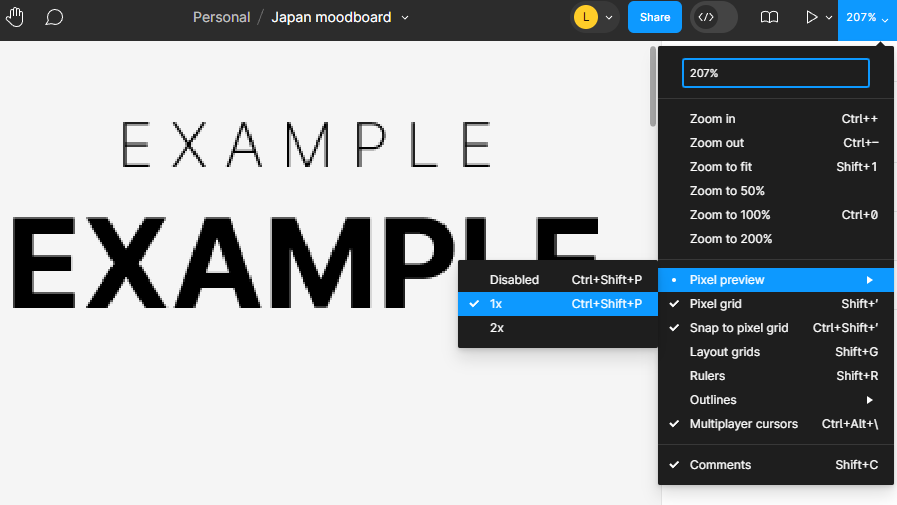
For me at least changing the Preview Settings solved it:
In the top right corner under Zoom dropdown > Pixel Preview > Disable

Image shows pixelation if “1X” is selected, and it goes away once Disabled.
Hope this helps anyone.

25 replies

neek
April 23, 2024

Hey @dvaliao, thanks for looking into this! I made a quick video to show you what’s happening: Dropbox - figma glitch on zoom.mov - Simplify your life

I tested it on every device and platform I have, and I see this glitch on the Figma app for both a MacBook M3 Pro and a Windows PC, as well as in Chrome and Safari on both Mac and Windows.

djv
Figmate
Community Support
April 23, 2024

Thanks, @neek! I’ll pass this onto the team.

So far, we’ve been able to reproduce, so now, we’re proactively looking into and working on fixing this bug.

djv
Figmate
Community Support
May 6, 2024

Hey All, thanks for your patience!

Our team pushed a fix for this. Can you please refresh your tabs and check how things look now?

Let us know if you run into any further issues!

LiceliaAnswer
June 5, 2024

Hi, I experienced this same issue -
For me at least changing the Preview Settings solved it:
In the top right corner under Zoom dropdown > Pixel Preview > Disable

Image shows pixelation if “1X” is selected, and it goes away once Disabled.
Hope this helps anyone.

June 5, 2024

djv
Figmate
Community Support
June 6, 2024

Thanks for the suggestion, @Licelia! 🙂

jo1
New Participant
June 19, 2024

Has there been a fix on this yet? My prototypes are all fuzzy now when i preview from mac to a monitor. Started a week or two ago. It can only be fixed by setting the mac displays to ‘more space’. I cannot work at that display size.

djv
Figmate
Community Support
June 19, 2024

Hey @jo1, the team already launched a fix for this!

If you’re still having issues after refreshing your tabs, please also try the solution listed above! ☝️

jo1
New Participant
June 19, 2024

Hi dvaliao
thanks for your response. I have already tried the fix above, have disabled pixel preview. My prototypes have gone fuzzy a couple of weeks ago and I have to change my mac setting to ‘more space’ to get them unfuzzy, but this is not a good option when it used to work so perfectly. any other suggestions please?

djv
Figmate
Community Support
June 19, 2024

Thanks for the additional context, @jo1!

This may be a regression or new issue. Are you able to share a screen recording or example file with us here? https://help.figma.com/hc/en-us/requests/new

Please use your Figma account email, include a link to the file, and share edit access with support-share@figma.com, so our team can take a closer look.