Holyoaa
April 16, 2024
Solved

The preview is blurry, when you zoom in everything is fine. What's the problem?

  • April 16, 2024
  • 25 replies
  • 3066 views

Everything is fine in the browser version. Idk what happens
This topic has been closed for replies.
Best answer by Licelia

Hi, I experienced this same issue -
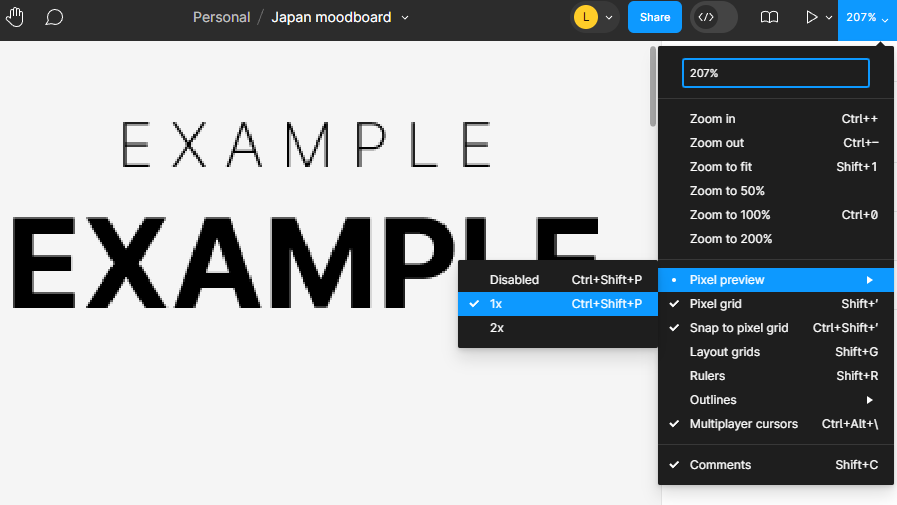
For me at least changing the Preview Settings solved it:
In the top right corner under Zoom dropdown > Pixel Preview > Disable

Image shows pixelation if “1X” is selected, and it goes away once Disabled.
Hope this helps anyone.

25 replies

ksn
Figmate
Community Support
April 17, 2024

Hey @Holyoaa - can you provide more details? Apologies, but I’m not sure if I understand the issue exactly.

When you say preview, is the prototype rendering as blurry? I was looking at your screenshot, and I’m not understanding – is the screenshot you posted above one where you’re zoomed in?

Can you share a screen recording and a copy of the file you’re working with so I can better visualize the problem?

Equinusocio
April 17, 2024

You probably have a ui zoomed. I had the same issue and resetting the UI zoom to 100% fixed the issue (even if now I have issues due to the small UI and screen distance)

Paco
New Member
April 18, 2024

I got same problem and it started from this morning

Kennet1
New Participant
April 19, 2024

I’m not sure when this started as I haven’t used Figma for a while but since returning to it yesterday, whenever I zoom around the canvas and zoom into different screens, the text or images are blurry or not rendering properly until I zoom in enough or click into a layer which sometimes fixes it until I zoom out again. This is very strange behaviour. Refer to the images where you can see the subtle difference. You can also see the zoom level is the same in both screenshots. Does anyone else have this problem or know how to fix it?

Fuzzy/blurry: Screenshot1 hosted at ImgBB — ImgBB
Normal: Screenshot2 hosted at ImgBB — ImgBB

gn00me
April 19, 2024

Same, I’ve had it since yesterday. Disabling FFX in the nvidia control panel does not help.

Adrian42
April 20, 2024

Noticed the same problem, very annoying 😕

neek
April 23, 2024

Same problem, it is blurry on both Macbook and PC

Konstantin_K
New Member
April 23, 2024

Same problem.
Rendering text changes after selecting frame, graphics after moving frame.
Desktop App 116.17.13, mac OS 10.15.

Valery_Vydrin
April 23, 2024

Same issue:

Screenshot 2024-04-23 at 18.30.06

djv
Figmate
Community Support
April 23, 2024

Hey All, thanks for flagging this!

Is this happening both in browser and using the desktop app? We’ve already flagged this over to the team to try to reproduce and work on a fix.