October 11, 2023
Solved

Removing Plugins

  • October 11, 2023
  • 24 replies
  • 11633 views

I have already searched online, but those solutions don’t work anymore. I’ve tried everything, and I can’t find an uninstall or remove button, as shown in the tutorials.

Does anyone know how to remove plugins?

This topic has been closed for replies.
Best answer by djv

Hey All, sorry for the trouble and confusion!

After removing a plugin from your Saves, the list of recent plugins is still stored in Local Storage, which is why you’ll still see it. Clearing this storage will clear out the list of recent plugins and other Figma settings.

Here’s how to clear the desktop app cache on a Mac:

  1. Quit the Figma desktop app
  2. Open Terminal.app and enter the following command: rm -rf "$HOME/Library/Application Support/Figma"
  3. Try opening the desktop app again

And here’s how to clear the desktop app cache on Windows:

  1. Close the Figma desktop app
  2. Open the Start menu, and paste in this, followed by enter: %APPDATA%\Figma
  3. In the window that opens, delete the Desktop and DesktopProfile folders if they exist
  4. Launch the desktop app again

As for plugin subscriptions, if you subscribed to a plugin using a third-party payment site, you’ll need to contact the creator directly to manage your subscription.

If you purchased a plugin subscription using Figma’s payment platform, you can manage your subscriptions from your Stripe customer portal. From your Stripe customer portal, you can:

  • Cancel or renew your subscriptions
  • Update your payment method
  • Change your billing information
  • Review your purchase history

To access your Stripe customer portal:

  1. Open Figma in the file browser.
  2. Select your avatar in the top-right corner to open the account menu.
  3. Click Settings.
  4. Select the Community tab.
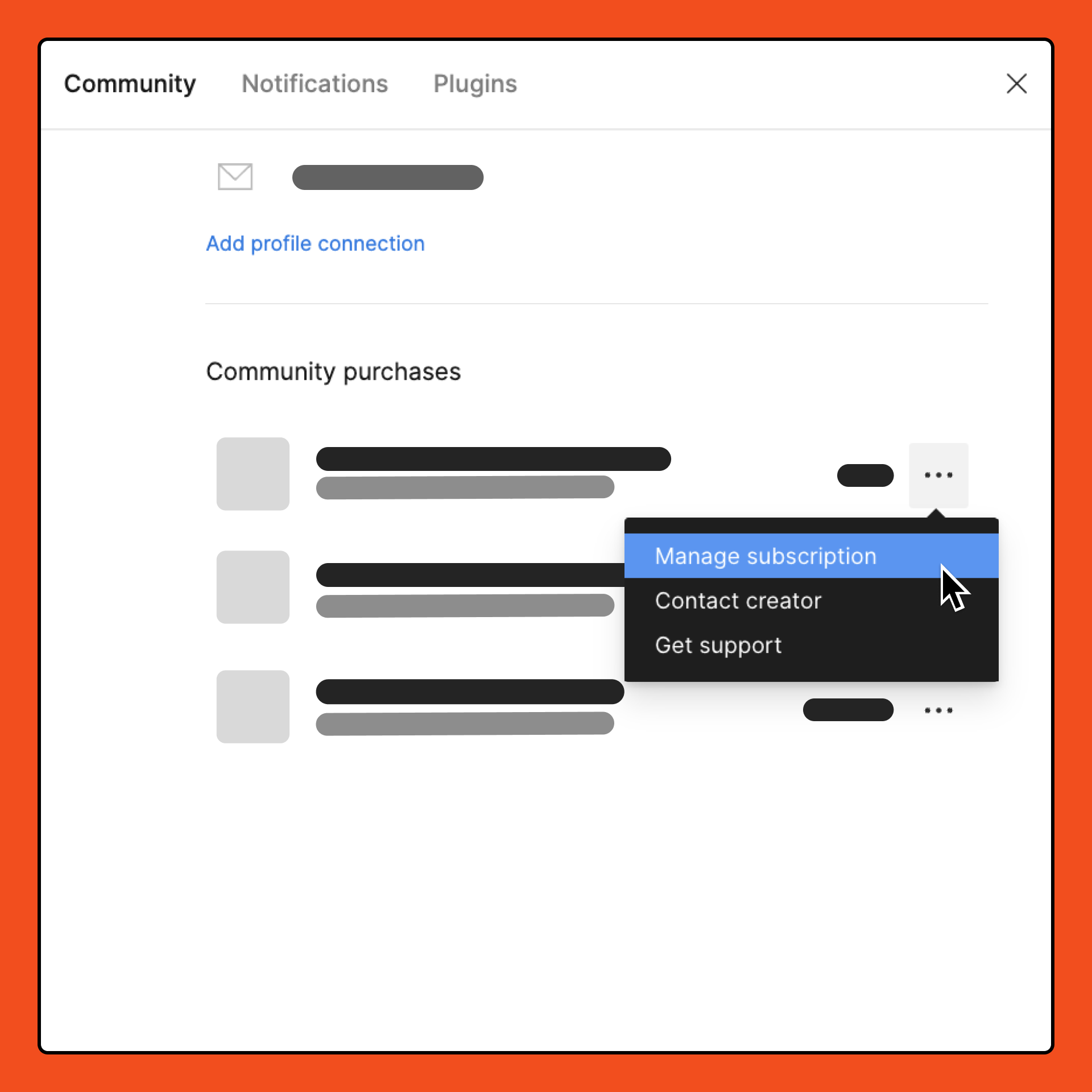
  5. Under Community purchases, locate the subscription you want to manage.
  6. From the dropdown, select Manage subscription. You are redirected to your Stripe customer portal. You can use the settings to manage your subscriptions.

Note: Plugin subscriptions are not refunded when canceled. You can cancel a plugin subscription to prevent it from being automatically renewed, so you will still be able to access the plugin until the end of your current billing cycle.


24 replies

Thanawalla_Aneeta
March 22, 2024

Yes, what the what? Why is it impossible to delete / uninstall a plugin. Always looked up to and admired Figma for experience and thoughtfulness towards users. What an unnecessary dark pattern 😦

Chris_P_UX
April 3, 2024

Even if you remove any saved items it still appears on the list of plugins (recent or otherwise). At least with Sketch (locally installed) you could easily manage and remove any plugin you wanted. I have yet to see the ( - ) minus option to remove any plugins.

Pete_Radocaj
April 8, 2024

Exactly!!! im being charged for one I cant get rid of! WTF, scam!!

Pete_Radocaj
April 8, 2024

I want a refund! and they dont answer any of their support messages.

djv
Figmate
djvAnswer
Community Support
April 8, 2024

Hey All, sorry for the trouble and confusion!

After removing a plugin from your Saves, the list of recent plugins is still stored in Local Storage, which is why you’ll still see it. Clearing this storage will clear out the list of recent plugins and other Figma settings.

Here’s how to clear the desktop app cache on a Mac:

  1. Quit the Figma desktop app
  2. Open Terminal.app and enter the following command: rm -rf "$HOME/Library/Application Support/Figma"
  3. Try opening the desktop app again

And here’s how to clear the desktop app cache on Windows:

  1. Close the Figma desktop app
  2. Open the Start menu, and paste in this, followed by enter: %APPDATA%\Figma
  3. In the window that opens, delete the Desktop and DesktopProfile folders if they exist
  4. Launch the desktop app again

As for plugin subscriptions, if you subscribed to a plugin using a third-party payment site, you’ll need to contact the creator directly to manage your subscription.

If you purchased a plugin subscription using Figma’s payment platform, you can manage your subscriptions from your Stripe customer portal. From your Stripe customer portal, you can:

  • Cancel or renew your subscriptions
  • Update your payment method
  • Change your billing information
  • Review your purchase history

To access your Stripe customer portal:

  1. Open Figma in the file browser.
  2. Select your avatar in the top-right corner to open the account menu.
  3. Click Settings.
  4. Select the Community tab.
  5. Under Community purchases, locate the subscription you want to manage.
  6. From the dropdown, select Manage subscription. You are redirected to your Stripe customer portal. You can use the settings to manage your subscriptions.

Note: Plugin subscriptions are not refunded when canceled. You can cancel a plugin subscription to prevent it from being automatically renewed, so you will still be able to access the plugin until the end of your current billing cycle.
omar_berbza
May 14, 2024

How about people who using Figma online??

djv
Figmate
Community Support
May 14, 2024

Hey @omar_berbza,

Figma is only available online. Can you please verify what you’re having trouble with?

omar_berbza
May 16, 2024

What I mean is using Figma in navigator because it’s seems like you talking about Figma on desktop because I use Figma on navigator
Thank you for your response

djv
Figmate
Community Support
May 16, 2024

Thanks for clarifying, @omar_berbza!

Similar to the solutions already listed above, using Figma in browser, you’ll want to:

  1. Click Resources in the toolbar.
  2. Select the Plugins or Widgets tab.
  3. To remove a plugin, click Remove from saves. (Your saved resources display under Saved and recent at the top of the modal.)

Then, you’ll want to clear your browser cache to clear your local storage and prevent the unsaved plugins from appearing as recent.

June 15, 2024

@dvaliao I’m having the same issue. I’m using Figma in my browser and don’t see how to remove a plugin. Can you provide a screenshot of where I can find the resources toolbar? I don’t see it anywhere on my dashboard.