

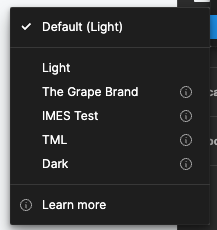
Old variable modes showing on page level with "errors"
Setup:
-
Foundations library which contains all color variables (and currently 4 modes, 1 deleted mode (The Grape Brand)).
-
The Foundations library is used in a Components library and several design files
-
The Components library is also used in the same design files
Issue
When i’m in my Components file and select variable mode on page level it shows 5 modes (4 current and 1 old mode) and except for the default mode it shows exclamations marks behind all of them.
When i’m in the Components file but select a layer and change the mode on layer level I see the 4 correct modes and no exclamation marks.
If I open a design file which uses both the Components and Foundations library I get the 4 correct modes and no exclamation marks on both page and layer level.
It’s not that big an issue that I cannot change the mode on page level for the Components library file but i’d rather have it resolved.
Anyone have any idea what’s going on?
Especially why the mode “The Grape Brand” is still showing while it’s deleted in the Foundations library?
I’ve updated and republished all library files but that didn’t change anything so far and also went over all used variables in my Components and they’re all linked to the correct Foundations file & variables…
Variable Mode - Page level
Thanks in advance!
Cheers