

arnederynck
New Member
January 25, 2024
Question

Old variable modes showing on page level with "errors"

  • January 25, 2024
  • 16 replies
  • 1449 views

Setup:

  • Foundations library which contains all color variables (and currently 4 modes, 1 deleted mode (The Grape Brand)).

  • The Foundations library is used in a Components library and several design files

  • The Components library is also used in the same design files

Issue
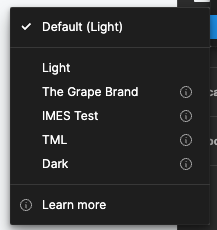
When i’m in my Components file and select variable mode on page level it shows 5 modes (4 current and 1 old mode) and except for the default mode it shows exclamations marks behind all of them.

When i’m in the Components file but select a layer and change the mode on layer level I see the 4 correct modes and no exclamation marks.

If I open a design file which uses both the Components and Foundations library I get the 4 correct modes and no exclamation marks on both page and layer level.

It’s not that big an issue that I cannot change the mode on page level for the Components library file but i’d rather have it resolved.

Anyone have any idea what’s going on?
Especially why the mode “The Grape Brand” is still showing while it’s deleted in the Foundations library?

I’ve updated and republished all library files but that didn’t change anything so far and also went over all used variables in my Components and they’re all linked to the correct Foundations file & variables…

Variable Mode - Page level
Screenshot 2024-01-25 at 16.21.19

Thanks in advance!
Cheers

This topic has been closed for replies.

16 replies

y_toku
Figmate
Community Support
January 26, 2024

Hi there,

Thank you for bringing this to our attention. It looks like you’ve already taken the necessary steps to handle variable conflicts as outlined here: https://help.figma.com/hc/en-us/articles/15343816063383#conflicts.

As a final check, could you try refreshing the design file tab to see if the warning symbol disappears? If this doesn’t resolve the issue, don’t hesitate to contact our support team at https://help.figma.com/hc/en-us/requests/new. When reaching out, please provide the relevant details and file links, and invite support-share@figma.com to your file. This will allow our team to thoroughly investigate the matter. Don’t worry, inviting the support-share email won’t impact your billing.

Thanks,
Toku

Tingting_Cheng
New Participant
January 31, 2024

I have a very similar issue, did you find a way to solve it? It’s driving me nuts

arnederynck
New Member
February 5, 2024

Hi,

I haven’t been able to follow up on this with Figma Support yet but all the steps mentioned above did not resolve anything.

I’ll try and get in touch with Figma this week if I figure it out i’ll keep you posted.

In case you’ve found a solution by now, feel free to share!

Cheers

Meg4
February 20, 2024

Hello,
I am facing the same problem as you described. Tried to contact support but so far given help is not really bringing any results.
I was informed that I am using old variables and should relink them to correct ones, but I am unable to identify which ones are the old ones.

I would be grateful on any update if you managed to find a way.

March 28, 2024

Very same issue. None of the layers are using those old variables but they don’t automatically disappear but stay as error

Shoval_Ozeri
April 3, 2024

Same exact issue… 😭 I think it would have been helpful to have an option to see where each token is applied. If someone managed to solve it pls share with us the solution

Harsha_Hassan_Ravindra
New Member
April 11, 2024

Our team is facing the same issue. Did anyone manage to solve this ?

Bonnie_Mercer
April 18, 2024

Also experiencing this issue. Would love a solution!

Anna_Frey1
May 15, 2024

same for me. I even created a duplicate Component Figma File. Deleted everything in it. And still I can see the modes which I deleted long time ago on page level. I spent more than a day to figure out why. But it seems Figma variables & modes are still pretty bugy and not out of beta yet. It’s impossible to see e.g when a border radius variable is not connected right anymore.

Thomas_Kaplanek1
New Member
July 31, 2024

Experiencing this bug also …