

Alina_Trussova
New Participant
September 8, 2023
Solved

Nested component, instance swap and stroke scaling issue

  • September 8, 2023
  • 26 replies
  • 4501 views

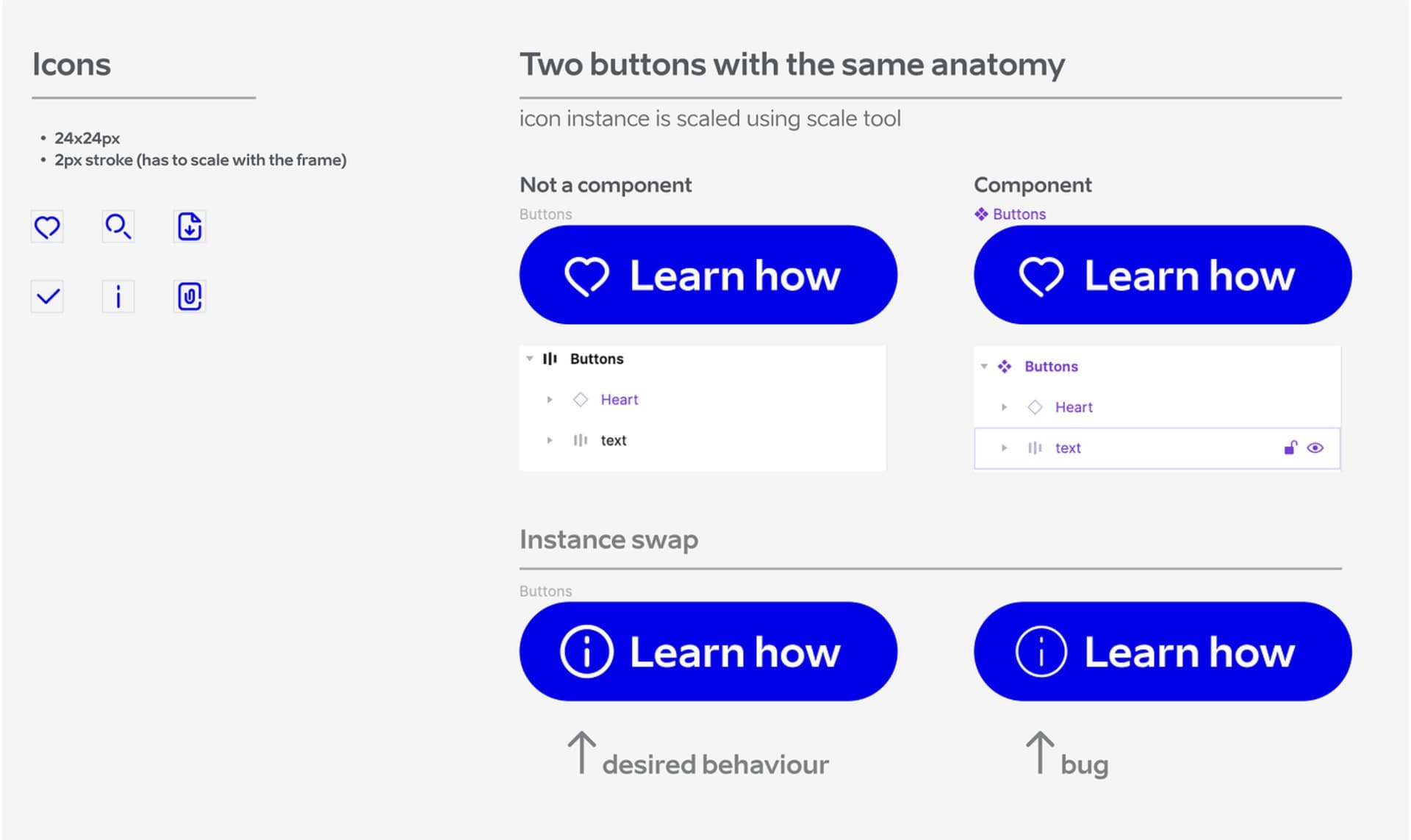
Icon stroke width behaves as expected inside the button (it scales with the canvas). However, as soon as it’s turned into a component and the icon is swapped, the stroke resets to a default value of 2px. The frame size behaves as expected.
Icon is resized using scale tool.

Problem appears both ways:
– creating button from scratch (works), make is a component (does not work).
– creating button component with same anatomy from scratch (does not work). Detach the same component (works).

Creating different sizes with variants for each icon is not an option due to the extensive icon library.

Is this a bug, or what could be causing this issue?
This topic has been closed for replies.
Best answer by tank666

Most likely you need to override the icon stroke weight in each button variant.

26 replies

George22
New Member
January 21, 2025

you saved me a tons of time man, I was strugling the whole day with it! Thank you!! Scaling doesn’t work guys, do resizing manually (just put the text in border width) and it will work!

S.T
Active Member
February 5, 2025

I just ran into this. Material Symbols doesn’t have this issue. Definitely a bug that needs fixing on strokes.

George22
New Member
February 8, 2025

I just ran into this. Material Symbols doesn’t have this issue. Definitely a bug that needs fixing on strokes.

check naming of the layers also, it plays a huge role in this problem, all icons vector layers should be named exactly the same

Dan Flynn
New Member
May 21, 2025

I found an interesting work-around for this

Was using the Lucide icon kit, which uses strokes for all the lines. By default they came as 24px, but I needed various icon sizes for the different size buttons. After adding icons to the buttons, whenever an icon was overridden with a different variation the stroke would reset.

I tried many different variations and finally what worked was to create an intersticial component that contained instances of the icon but at different sizes and stroke widths. I determined what the stroke should be scaled to…

24px Icon = 2px stroke (default from icon kit)
16px Icon = 1.33px stroke
14px icon = 1.17px stroke

By manually overriding the strokes of this icon component and THEN embedding in the button component, my instance swap finally maintained the stroke width.


S.T
Active Member
May 21, 2025

​@George22 I went through this with support and they admitted there was a bug and it isn’t working as it should.

habimuhammad
New Member
October 16, 2025

It’s SOLVED for me when I made the resizing of the icon by changing it’s DIMENSIONS rather than SCALE property before it using for another components like buttons. Attached images that may help other. Hopefully!.

Image 1


Image 2
