

Alina_Trussova
New Participant
September 8, 2023
Solved

Nested component, instance swap and stroke scaling issue

  • September 8, 2023
  • 26 replies
  • 4501 views

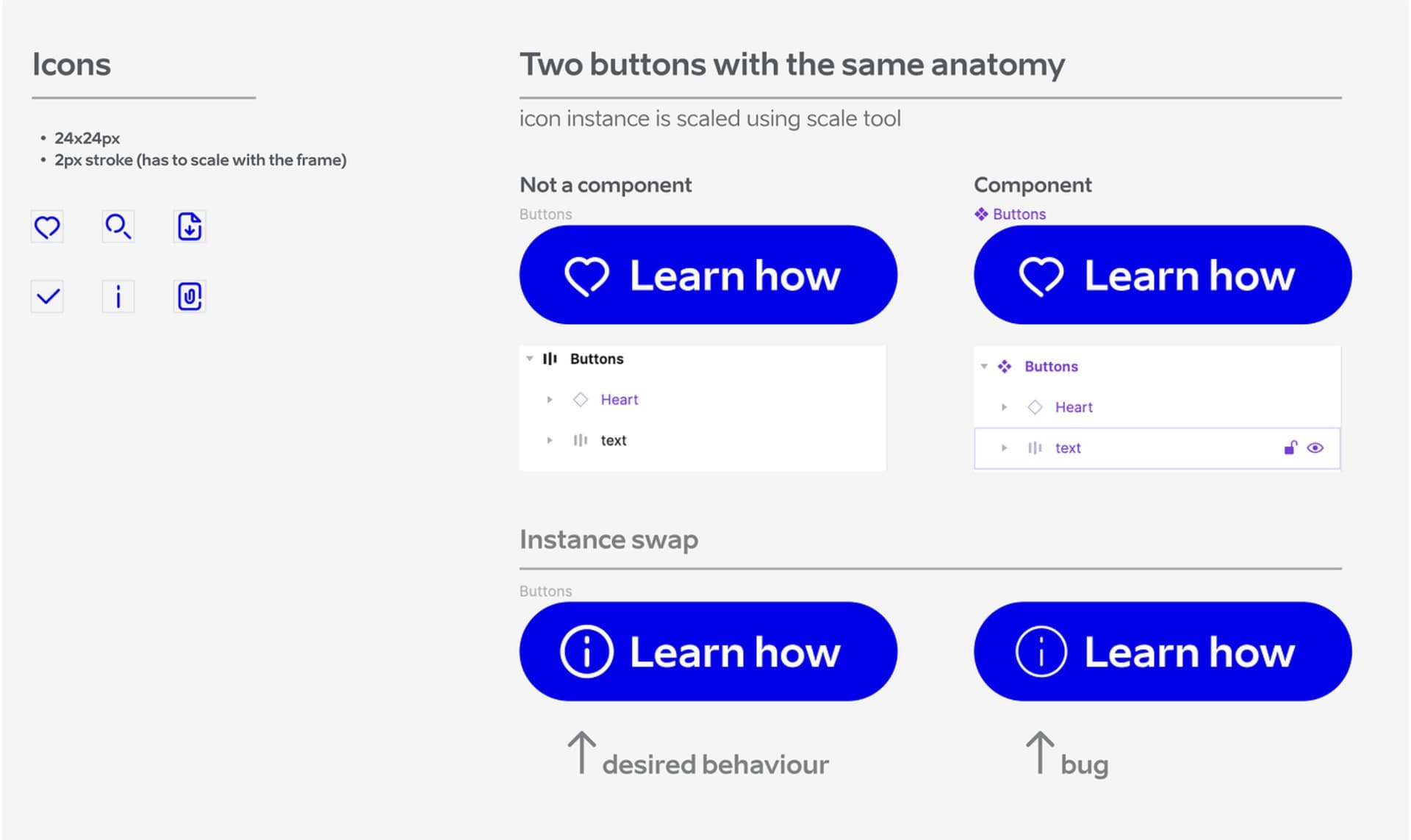
Icon stroke width behaves as expected inside the button (it scales with the canvas). However, as soon as it’s turned into a component and the icon is swapped, the stroke resets to a default value of 2px. The frame size behaves as expected.
Icon is resized using scale tool.

Problem appears both ways:
– creating button from scratch (works), make is a component (does not work).
– creating button component with same anatomy from scratch (does not work). Detach the same component (works).

Creating different sizes with variants for each icon is not an option due to the extensive icon library.

Is this a bug, or what could be causing this issue?
This topic has been closed for replies.
Best answer by tank666

Most likely you need to override the icon stroke weight in each button variant.

26 replies

y_toku
Figmate
Community Support
March 27, 2024

Thanks for flagging. I’ve shared this internally, but I can’t guarantee that it will be prioritized. Thank you for your understanding!

March 29, 2024

Kapture 2024-03-29 at 15.37.37
Here is an example. Figure (Scooter) stroke did not scale correctly when it swapped to another figure (Bike) smaller inside a parent instance.

Matt_Barron
April 18, 2024

yep can also confirm this with stroke widths not resizing!

Heres a rough test trying to get icons to behave at different sizes with stroke weights. I was trying to get away with not having to do full individual variant icon sets for each size/stroke, but looks like the above issue is at play here…

Fe_Van_de_Vyver
July 23, 2024

Still an issue july 2024

July 23, 2024

Also still having issue!!

Robby_Prada_DCT
September 18, 2024

Still have the same issue in September!

yoursharif
New Member
October 21, 2024

Still have the same issue in September! 🙁

Yeazey
New Participant
October 30, 2024

After six months of working on DS and icon Lib we faсed this issue with interactive prototype after changing default instanced icon to different one from same lib.

TLDR: First instance (preffered icon) always keep their setting no matter of what. But swapping this icon to different one and then changing states reset all overrides

Stroke width from nested instance always resets to its default state with any state changes even root component.
For example: default icon 24px, 2px stroke, color #000
button with this icon, with overriden stroke to 1.5px, and color #fff stays the same when static, stays the same if button state changed let say to hover. but if i place this button in card component, and changing card state to hover or changing it density to compact Overriden 1px #fff stroke in button component stay as intended till i change preffered (base) icon to different one from same lib, then icon reset to it default 2px #000

Yeazey
New Participant
October 31, 2024

Founded temporary workaround, till Figma support, maybe y_toku look and fix Figma’s nested stroke override hallucinations.

Why i call it hallucination? bc

  1. placeholder icon in nested components always keeps all overrides.
  2. stroke color and width always reset to default only after swap placeholder to new icon.
  3. stroke width override after icon swap always behave as intended only after manually changing value to new one and then changing it to old one (which was specified in first override)

1. Stroke color reset can be fixed thru masking icons and change color of that mask instead of stroke.
2. Stroke width reset can be fixed thru changing stroke width to different then changing it back to desired. for example:
if you have icon library with 2px stroke, and .icon from that library has been overriden in .button component let say to 1.5px. And then you placed .button into .card or any other dynamic component (hover states / variants / compact versions etc)

To avoid stroke width reset,
a) Swap placeholder icons to desired icon in .card > .button
b) Change stroke width from 1.5 to 1 or 2, then change it to 1.5 (i found stroke width variables can help do this quickly)

Nikola_Radovanovic
New Member
December 28, 2024

Don’t scale, change the width and height and then change the stroke width.
