Jarek
August 25, 2023
Solved

How to clear “Used variables” that don’t exist in the file anymore?

  • August 25, 2023
  • 102 replies
  • 14114 views

Hi folks!

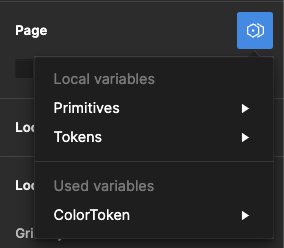
I used some components from other files in my project, and even though I removed them, I still see some Variables available in the “Page → Modes”. They are not available anywhere else. It doesn’t affect the project; when I select one, change the page, and then return to it, that mode is selected.

I checked my file, and nothing leads to the other file anymore – no styles, variables, components, etc.

It seems like a bug, and I see some variables pulled from another file, but can I remove it somehow?

image

Best answer by djv

Hey All, sorry for the continued trouble and frustration!

If the Detach deleted variables quick command does not work, the remaining ghost variables you’re seeing are still present because they’re still actively being used from collections within your design components and/or deleted color styles.

Be sure to review your file for variables that are being used across multiple pages. We understand how this can be confusing, especially when you have multiple collections with similar names and modes, making it difficult to differentiate between them.

Unfortunately, the team confirmed that we don’t have an automatic solution to fix this or a simple way to view which variables come from what collections. But in order to completely remove ghost variables, you’ll need to manually remove all instances of those variables from your file.

If you need help locating old variables that are still being referenced in nodes on the canvas and are able to share your file with us, please do so here: https://help.figma.com/hc/en-us/requests/new

Be sure to use your Figma account email, include a link to the file, share edit access with support-share@figma.com, and our Technical Quality team can help you locate and remove the old variables.


102 replies

jamiefang
New Participant
October 16, 2024

I deleted every page, but there are still two ‘Used variables’ collections in this file. It’s really frustrating.

umer
New Member
October 18, 2024

The same issue here it is still in UI3. I tried the quick command but it does not work.
I am still facing this Ghost variable issue Does anyone know how to remove them? Will appreciate thanks

image

Schaefer_Christian_SGRE_TE_PPS
October 23, 2024

yeah it is kind of ridiculous that after 2y this bug still exists … some heavy flaws in the modelling here …

Paco_Lara
October 31, 2024

Please, Figma, Fix this issue. I want to copy components from a file to another and it’s impossible to make it without importing a full set of ghost variables. I’ve tried to use a “bridge new document” where I remove manually all the variables, and then, copy and paste the components in the Figma file I need… and variables are still in there. No makes sense at all.

Paco_Lara
October 31, 2024

I’m trying to be creative: I created a history version point. Then import the components, remove manually the variables of every single layer. Once all the layers have any link with any variable, copy all the components again. After that, I restored the history version I created previously and paste the cleaned components… And it seems to work but some layers are removed and don’t appear. It’s clear that you have a real bug with this.

amatawc
November 5, 2024

Hey, just to add to the pain point here: bringing in components from files with the same variable architecture will NOT allow the file-specific variables to overwrite the previous mode(s). Won’t see the local variables, on any level. First test was to try to apply mode in mass; the local modes were literally not available in the dropdown. Go to the most granular level and build up by applying the specific, new-file, updated-design variable, which then show up and LOOK right, will not reset what modes are listed as available or note the local variables are attached in Figma. Using Tokens Studio, and that add-on CAN see and CAN change and what’s developed out of it WILL work. It’s just Figma.

It impacts as I build, as others come in to use the libraries I’m building, as devs try to develop from the libraries I’m building, and as we try to ensure that tokens will be applied in production in a way to absorb design chances fluidly. It’s not a little thing. It really needs attention.

Mikael_Cederbom
Active Member
November 7, 2024

Hi, as a Figma user I would like to easily detach all components, styles, and variables on selected frame (hidden layers included), so that I can hand over my design from one project to another without the risk to mess up a different design system.

Thanks! 🙏

Leter
February 12, 2025

as a Figma user I would like to easily detach all components, styles, and variables on selected frame (hidden layers included), so that I can hand over my design from one project to another without the risk to mess up a different design system.


Agreed, this is a must-have. Right now moving components from one design system to another is extremely messy and hard to clean up when using variables and styles across my component libraries.

Danielle_Flinn
New Member
April 16, 2025

I am also experiencing this issue in a design system library file – I spent over 2hrs of attempting to manually go through each page of the file and relink variables correctly, find hidden layers referencing other file variables and have barely made a dent in the issue. There really needs to be a way to “remove all variables not created in this file from all visible and hidden layers” option.

Better yet, being able to detect the variables that are being referenced and a way to map them to variables created in that file. 

Travis Tinney
New Member
May 2, 2025

Although there seems to be a range of issues people are experiencing in this thread, some of them may be resolved with the aid of a new plugin I built that can help identify stray variables or components that are still attached to a node somewhere in your file. You may have to run the plugin one page at a time for bigger files for now (it can timeout on whole file scans if the project file is large). Hoping this helps some others like it did for me. 

Stray Component & Variable Finder