Jarek
August 25, 2023
Solved

How to clear “Used variables” that don’t exist in the file anymore?

  • August 25, 2023
  • 102 replies
  • 14114 views

Hi folks!

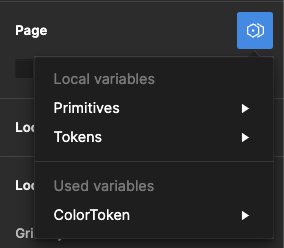
I used some components from other files in my project, and even though I removed them, I still see some Variables available in the “Page → Modes”. They are not available anywhere else. It doesn’t affect the project; when I select one, change the page, and then return to it, that mode is selected.

I checked my file, and nothing leads to the other file anymore – no styles, variables, components, etc.

It seems like a bug, and I see some variables pulled from another file, but can I remove it somehow?

image

Best answer by djv

Hey All, sorry for the continued trouble and frustration!

If the Detach deleted variables quick command does not work, the remaining ghost variables you’re seeing are still present because they’re still actively being used from collections within your design components and/or deleted color styles.

Be sure to review your file for variables that are being used across multiple pages. We understand how this can be confusing, especially when you have multiple collections with similar names and modes, making it difficult to differentiate between them.

Unfortunately, the team confirmed that we don’t have an automatic solution to fix this or a simple way to view which variables come from what collections. But in order to completely remove ghost variables, you’ll need to manually remove all instances of those variables from your file.

If you need help locating old variables that are still being referenced in nodes on the canvas and are able to share your file with us, please do so here: https://help.figma.com/hc/en-us/requests/new

Be sure to use your Figma account email, include a link to the file, share edit access with support-share@figma.com, and our Technical Quality team can help you locate and remove the old variables.


102 replies

Povilas_Reklaitis1
New Member
May 9, 2025

Although there seems to be a range of issues people are experiencing in this thread, some of them may be resolved with the aid of a new plugin I built that can help identify stray variables or components that are still attached to a node somewhere in your file. You may have to run the plugin one page at a time for bigger files for now (it can timeout on whole file scans if the project file is large). Hoping this helps some others like it did for me. 

Stray Component & Variable Finder

Finally, you solved it! Thank you!

Maya4
New Participant
May 12, 2025


It’s not working for me. I have many text variables that I need to detach, but with the plugin scan I was only able to find components and not variables. The variables were brought in from the file called Website Refresh when I copied over some elements. What am I doing wrong?


Travis Tinney
New Member
May 12, 2025


It’s not working for me. I have many text variables that I need to detach, but with the plugin scan I was only able to find components and not variables. The variables were brought in from the file called Website Refresh when I copied over some elements. What am I doing wrong?


If by ‘only able to find components’ you are talking about your second screenshot - The index library tab is used solely to ‘whitelist’ or ignore components and variables you don’t want to be identified as stray. So if the file that you are in right now ‘saltbox pitch deck’ does not have any variables created in it then it won’t show any on the index tab. If you are using the plugin to scan for variables in the ‘pitch deck’ file and it isn’t coming up with any results even though you know there are variables in it, then that would be an issue i’d have to look into.
Hope this help; if you are still having issues then maybe you can duplicate the target file, delete most of the content so there is only a small sampling of the text you are scanning that is not being recognized and share it and i can try and identify what is going wrong.

Aster_Ng
New Participant
May 14, 2025

Finally removed ghost variables (manually check) – hope this helps!


Hi! Just want to share my experience dealing with ghost variables in Figma — those deleted variables that still show up in the mode dropdown even though they’re no longer in the file.

I ran into this while cleaning up my file. I deleted and recreated some variables, but found that old/ghost variables still existed in the dropdown. 


At first, I went page by page to check if any layer was still using the old variable. But that didn't remove the ghost variable collection. I tried a few plugins and checked hidden layers too — because if a layer is hidden, Figma doesn’t show the variable info in the right panel, so it's easy to miss.


Page - Apply variable mode


Appearance - Apply variable mode

Later, I used the "Apply Variable Mode" tool. I checked each page — if the ghost variable still showed up in the dropdown, I clicked into each section, then frame by frame, layer by layer, until I replaced everything. It took 2 full days, but finally the ghost variable disappeared from the dropdown.


Luckily my file isn't too big yet — just around 8 pages with 6–7 UIs per page. I’ve only used Figma for 6 months (I was an Adobe XD user for 7 years), and overall I really like Figma, even though it's still a bit buggy sometimes (well… my product has bugs too haha).


--

My tip: If you're starting a design system, plan early and plan big. Or else you’ll end up like me… keep fixing and adjusting over and over 😂

Connie5
New Participant
July 25, 2025

while i love the ingenuity everyone has shown with filling the gaps, whether they’re plugins or manually (and painstakingly) going through things layer-by-layer, this shouldn’t be the expected outcome for a tool that’s supposed to help us do our work? anyway, posting cause i don’t think this is solved because i have to actually involve support in my file to fix AND it keeps happening. please fix this.

Naomi_Adkins
New Participant
August 20, 2025

Although there seems to be a range of issues people are experiencing in this thread, some of them may be resolved with the aid of a new plugin I built that can help identify stray variables or components that are still attached to a node somewhere in your file. You may have to run the plugin one page at a time for bigger files for now (it can timeout on whole file scans if the project file is large). Hoping this helps some others like it did for me. 

Stray Component & Variable Finder

THANK YOU - this WORKS!

Ariel11
New Member
January 30, 2026

First I've gotta give props to the plugin makers: Stray Component & Variable Finder is great, Variable Sherlock helped me out a lot too.

That being said, Figma approach to this bug is terrible. The problem is not a lack of file reviewing, its some sort of cache. I've deleted all pages of a given file and created a brand new empty one and there is still the Apply Variable Mode selector there.

Honestly, my company spends a lot in figma for this kind of lame simple bug to steal so much time from us.

Naomi_Adkins
New Participant
February 5, 2026

Part of the issue is that Figma embeds Variable tokens at such a deep level sometimes (eg: a colour set as an underline on a component variant for hover state), and it doesn’t make it clear where you’re even pulling in the variables. Having a “select instances that use this variable value” type selector available directly from Figma is essential.


Figma: Why is this topic marked as solved, when it’s clearly not!

robinvey
New Member
April 16, 2026

@figma how can such a huge bug stick around for more than two years? 

at least give us some insight into this weird caching you are doing so we can write a plugin that fixes this.

robinvey
New Member
April 16, 2026


related issue