Jarek
August 25, 2023
Solved

How to clear “Used variables” that don’t exist in the file anymore?

  • August 25, 2023
  • 102 replies
  • 14114 views

Hi folks!

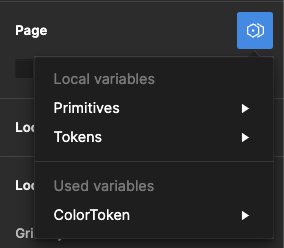
I used some components from other files in my project, and even though I removed them, I still see some Variables available in the “Page → Modes”. They are not available anywhere else. It doesn’t affect the project; when I select one, change the page, and then return to it, that mode is selected.

I checked my file, and nothing leads to the other file anymore – no styles, variables, components, etc.

It seems like a bug, and I see some variables pulled from another file, but can I remove it somehow?

image

Best answer by djv

Hey All, sorry for the continued trouble and frustration!

If the Detach deleted variables quick command does not work, the remaining ghost variables you’re seeing are still present because they’re still actively being used from collections within your design components and/or deleted color styles.

Be sure to review your file for variables that are being used across multiple pages. We understand how this can be confusing, especially when you have multiple collections with similar names and modes, making it difficult to differentiate between them.

Unfortunately, the team confirmed that we don’t have an automatic solution to fix this or a simple way to view which variables come from what collections. But in order to completely remove ghost variables, you’ll need to manually remove all instances of those variables from your file.

If you need help locating old variables that are still being referenced in nodes on the canvas and are able to share your file with us, please do so here: https://help.figma.com/hc/en-us/requests/new

Be sure to use your Figma account email, include a link to the file, share edit access with support-share@figma.com, and our Technical Quality team can help you locate and remove the old variables.


102 replies

Josh22
Active Member
August 15, 2024

I found that a problem is that I run the command for detach all variables and it says 0 instances found / 0 detached. But after digging into the component I find a reference somewhere buried deep into the component.

As an example, I copy a component from our design system library over (not an instance) because I want to experiment with an alternative layout or design. It doesn’t seem to have the problem as of late (maybe the updates fixed it for me), but this was where the issue typically came from.

For instance, I would see the variable modes (light, dark) as an option even know all references to it seemed to be removed. And I could apply that mode and it would work. Maybe it’s fixed now but if I come across the problem again I will mention it.

Barnes_Alison_M
New Member
August 20, 2024

I’m having the same issue.
I have “used” variables in my file that are not local but pulling from an entirely different file that I do not have access to. I would like to remove / detach them but I’m not able to do so after following the above recommendations.

Seems a bit silly to offer this powerful feature of variables but not provide solution for bugs when users have been expressing this issue for a year.

Kengwei_Lu1
August 20, 2024

Totally agree. At least provide an option to disconnect those old modes. It also helps to identify and reconnect variables/tokens if the old modes is removed.

carrie_notte1
New Member
August 28, 2024

I have the same issue and it has not been solved. The quick command to detach deleted variables does not work when using bringing in components for other files or libraries. This is common practice in larger organizations and you end up with a list (often with duplicates) of “Used” variables in your files that are ghosts. Why hasn’t this issue been fully addressed and will it ever? I was hoping the new version would have addressed this… but it’s still there. PLEASE HELP

gmcisaac
New Member
September 4, 2024

I am having the same issue. I am making a design system and have rebooted the project a few times but some things got copied over with old variables or variables from other design system component brought into the file. Very frustrating!!

Nouela
New Participant
September 4, 2024

I don’t think “detach deleted variables” does anything. Please help.

Nouela
New Participant
September 4, 2024

How did this help? Does this not just toggle the variables panel open/closed?

Nouela
New Participant
September 4, 2024

This simply does not work. Should I submit a bug or are the hundreds of other folks who submitted bugs enough?

Tyran_Van_Zyl
New Participant
September 11, 2024

Happening to me too, no plugins seem to work. Also the “detach” with CMD+P does NOTHING

richpaul15
September 18, 2024

We’re still getting this too – same use case as most people on here: Page Variables that can’t be removed, and ghost ones appearing despite it being a new ‘clean’ document. Definitely an issue that still needs fixing.