This topic has been closed for replies.
tank666
tank666Solution
Mar 23, 2023 1:29 PM UTC


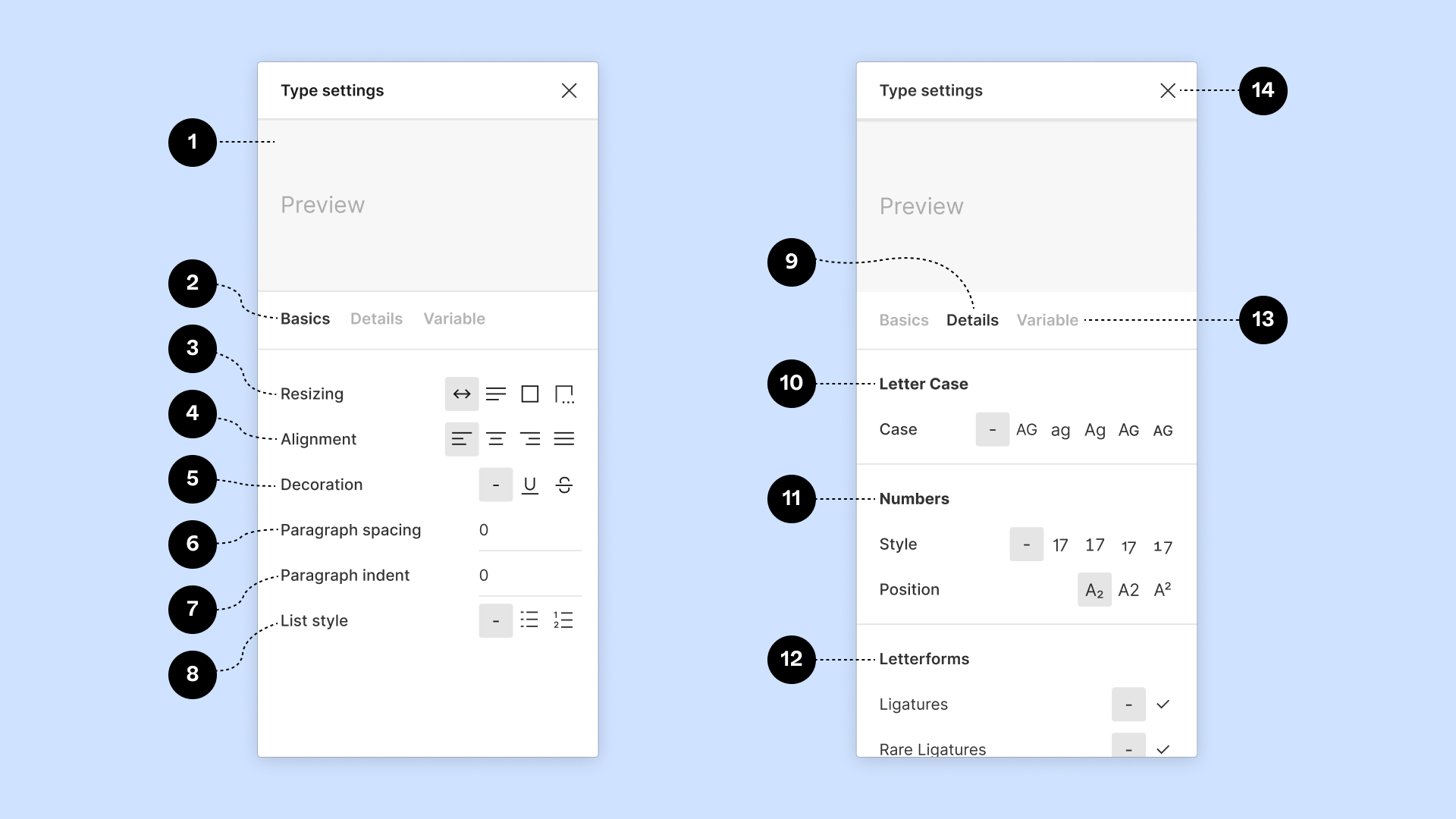
Change the value of the Paragraph Indent property (№7 in the screenshot).

Figma Help Center
UX/UI designer. Figma expert. Creator and developer of plugins and widgets for Figma and FigJam. Check out my resources in Figma Community: figma.com/@tank

7 replies

tank666
tank666Solution
Mar 23, 2023 1:29 PM UTC


Change the value of the Paragraph Indent property (№7 in the screenshot).

Figma Help Center
UX/UI designer. Figma expert. Creator and developer of plugins and widgets for Figma and FigJam. Check out my resources in Figma Community: figma.com/@tank
Jeremy_Chevallier
Sep 13, 2023 9:06 PM UTC

This feature appears to have been moved under Details now, however it doesn’t seem to allow negative values, which means I can’t put lines 2-n in a hanging indent like this:

Would like to see this use case supported.

Sep 22, 2023 5:42 AM UTC

Agreed! Hanging indent would be super useful!

Timothy_Moyer
Nov 8, 2023 5:20 PM UTC

Agreed. Not resolved. Although I found Indent, changing value doesn’t seem to have effect. Why burry this within submenu?

This functional upgrade should be paired with larger request to copy & paste from say, Word document and maintain indentation/paragraph styles.
I copy content from other tools all the time into Figma.


Timothy_Moyer
Nov 8, 2023 5:22 PM UTC

Correction: It appears Indent doesn’t work when Unordered List is active. My intention is to indent the ordered list item - create child item.

mikilili
Feb 24, 2024 10:04 AM UTC

Why can’t see the Paragraph indent option on my Type settings panel? Could anyone help please? Thank you!

Gayani_S
Figmate
Community Support
Feb 26, 2024 2:10 PM UTC

Hey @mikilili, thank you for reaching out!
You might not see the option because your text is not aligned to the left?

Paragraph indentation offsets the text in the first line to the right. You can only apply Paragraph indentation to text that uses Text-Align Left.

You can find more information in our Help Center article: Paragraph indent

Let me know if what solves your issue, if not can you please share a screenshot of what you’re seeing on your end?