
July 11, 2024
Solved

Get Back to Old View

  • July 11, 2024
  • 49 replies
  • 21556 views

Hello, I would like to change the view. Currently, the editing toolbar is located centrally at the bottom of the screen. Previously, this toolbar was located at the top left. In the old view, the options such as “Create Component” etc. were also at the top center. How can I switch back to that view? I am still learning from older YouTube videos, which is why the new view is a bit confusing for me. Thank you!

This topic has been closed for replies.
Best answer by djv

Hey All,

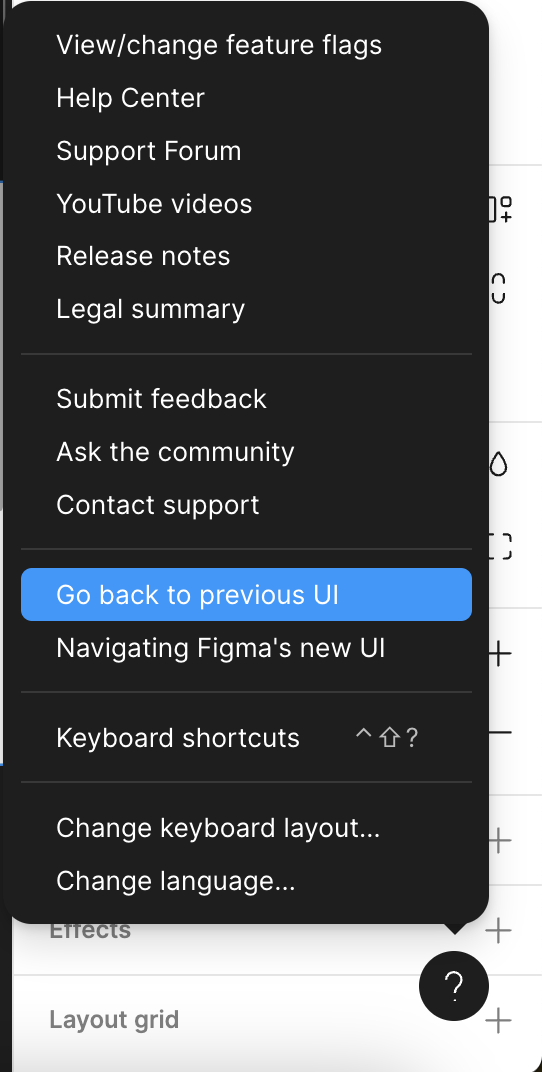
With the rollout of UI3 to 100% of users today, the capability to Go back to the previous UI has been added for all users.

Be sure to refresh your tabs to ensure you see the option. A good rule of thumb if you already had UI3 beta access, your panels will revert from floating to fixed.

Then, from within a Figma file, click the ? Help icon in the lower, right-hand corner > Go back to previous UI.

49 replies

Isabel_Quiles_UOC
New Member
September 10, 2024

Super!!!
Thanks a lot!! 😉

djv
Figmate
Community Support
September 11, 2024

You’re welcome, @Isabel_Quiles_UOC! 🙂

Henrik_Asteberg
New Participant
September 20, 2024

I agree about the floating panels, I find that the margins on their outer side is distracting for the eye compared to panels that go all the way to the edge.

Doug5
September 22, 2024

I’d just like to add that I’ve been monitoring this topic for several months on Reddit. To date out of the hundreds of comments I’ve read about the the UI there hasn’t been not even one person who has anything good to say about it. In fact it’s been very disruptive for so many people.

Honestly Figma, what the hell are you doing? Your customer base is telling you clearly you’ve made a mistake and need to unbreak what was not broken. Thet was zero reason to “fix” it.

I’ve been in the industry for over 25 years. I’m telling you if a new tool comes along that is better than Figma and if you continue not to listen to your customer base your customers are going to jump ship and you will be redundant.

Evgenia2
September 23, 2024

Thank you so much, I worked with the new UI for a day and I had to spend double the time I usually do for the same amount of work…

Usman_Naeem
September 24, 2024

The new UI3, this concept of hover overside bars is not at all user friendly for neurodivergent users. The little view of the back with rounded corner siderbar). It triggers OCD, and problems for users with aphasia, lazy eyes and wandering eyes. Its a poorly thought out design design decision and trend followed by a lot of platforms insensitive to users with comprehension issues as well.

Hafiz_Ibrahim1
September 30, 2024

I want to go Go back to previous UI

Pia_Blumenthal
New Member
October 10, 2024

I also want to go back to the previous UI. This forced update is much harder to use and I don’t appreciate the sudden roll out.

djv
Figmate
djvAnswer
Community Support
October 10, 2024

Hey All,

With the rollout of UI3 to 100% of users today, the capability to Go back to the previous UI has been added for all users.

Be sure to refresh your tabs to ensure you see the option. A good rule of thumb if you already had UI3 beta access, your panels will revert from floating to fixed.

Then, from within a Figma file, click the ? Help icon in the lower, right-hand corner > Go back to previous UI.

Sepi
October 11, 2024

Thanks a bunch! The new UI was giving me a headache!