
July 11, 2024
Solved

Get Back to Old View

  • July 11, 2024
  • 49 replies
  • 21556 views

Hello, I would like to change the view. Currently, the editing toolbar is located centrally at the bottom of the screen. Previously, this toolbar was located at the top left. In the old view, the options such as “Create Component” etc. were also at the top center. How can I switch back to that view? I am still learning from older YouTube videos, which is why the new view is a bit confusing for me. Thank you!

This topic has been closed for replies.
Best answer by djv

Hey All,

With the rollout of UI3 to 100% of users today, the capability to Go back to the previous UI has been added for all users.

Be sure to refresh your tabs to ensure you see the option. A good rule of thumb if you already had UI3 beta access, your panels will revert from floating to fixed.

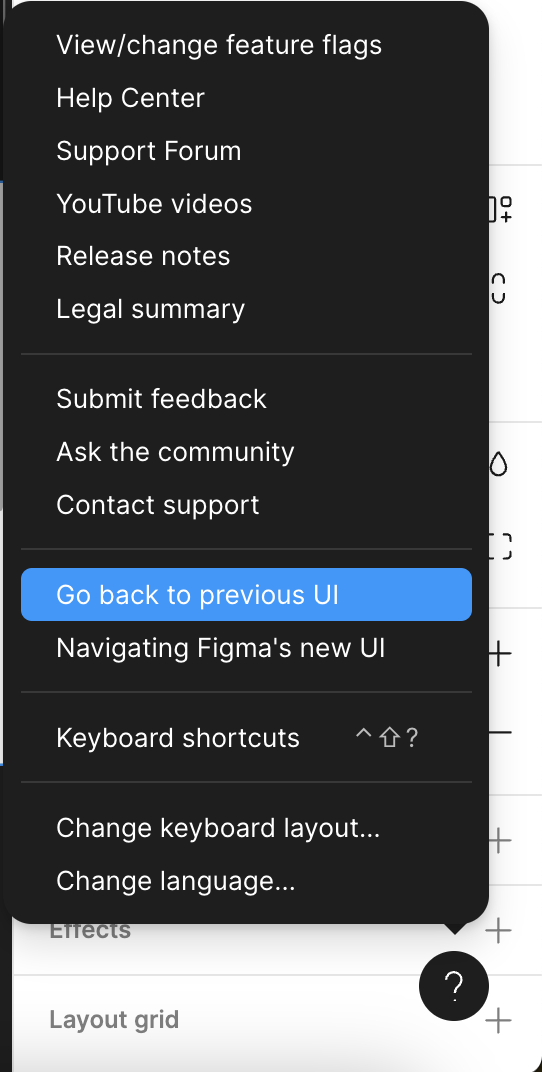
Then, from within a Figma file, click the ? Help icon in the lower, right-hand corner > Go back to previous UI.

49 replies

Design_VA_Oy_Mainostoimisto
New Member
October 11, 2024

Hi dev team. I would recommend to ease in the new features to users instead of bombarding all new stuff for us at once. It would be easier to learn the new ui and embrace it if you cut it into pieces and roll in one at a time. thanks.

-mildly annoyed user

dennsi
Active Member
October 11, 2024

Adding an important note:
If you checked “Hide help UI” it is not so obvious how to change back.
Because the options are not showing up in the Figma menu “Help and account”.

I strongly suggest adding these options in the menu for users who hide the help button.

Nellya
Power Member
October 11, 2024

Actually you can do it through Actions menu

11-10-2024 144750

dennsi
Active Member
October 11, 2024

Ah, good catch didn’t realize this. Still my suggestion remains unchanged.

akiss
October 11, 2024

Thank you, I have successfully returned, and it has been useful for me. 🤗

Hi team, the forced UI change is impacting new users, as the documentation and tutorials are still based on the old UI. It’s also slowing down development as we need time to learn the new interface. The ‘Go back’ feature is very useful.

djv
Figmate
Community Support
October 11, 2024

Hey @akiss, thanks for the feedback!

Our product education team is already hard at work trying to update all Help Center articles and YouTube Tutorials. Until then, your best resource will be our Navigating UI3: Figma’s new UI Help Center article.

camila_soledad_da_la_serna
October 14, 2024

Oh, thank God.

Thank you for this, this new UI was driving me mad, making my everyday job utterly frustrating, and completely slowing my workflow.

Tom_Auger1
New Participant
October 23, 2024

Agreed. I’m not seeing any appreciable benefits to the new UI other than they’ve added the “AI” tool (like everyone else jumping on the AI bandwagon).

There was no compelling reason to move the toolbar to a new position down below. Some features are more buried than they were before (like multi-edit), most of the right sidebar is less clear than it was before, and I’m doing a lot more scrolling in it to edit component properties etc.

Some of the right-hand bar reorg isn’t horrible, I like the Appearance grouping - that actually makes sense.

The ability to hide the left-hand UI is not new CMD/CTRL+. already did that, so that’s not too exciting either.

The new Actions tab is absolutely brutal. More keystrokes or clicks to insert components, which is really the only consistent use case for it.

I too am a UX professional of 25+ years, and a very advanced Figma user, and as much as I was excited about a new UI, this one doesn’t seem like it was well researched.

Slava_Yakovlev
New Member
November 1, 2024

Just reverted first time since launch of UI3.
My god, what a relief.

Best new feature so far!