
July 11, 2024
Solved

Get Back to Old View

  • July 11, 2024
  • 49 replies
  • 21556 views

Hello, I would like to change the view. Currently, the editing toolbar is located centrally at the bottom of the screen. Previously, this toolbar was located at the top left. In the old view, the options such as “Create Component” etc. were also at the top center. How can I switch back to that view? I am still learning from older YouTube videos, which is why the new view is a bit confusing for me. Thank you!

This topic has been closed for replies.
Best answer by djv

Hey All,

With the rollout of UI3 to 100% of users today, the capability to Go back to the previous UI has been added for all users.

Be sure to refresh your tabs to ensure you see the option. A good rule of thumb if you already had UI3 beta access, your panels will revert from floating to fixed.

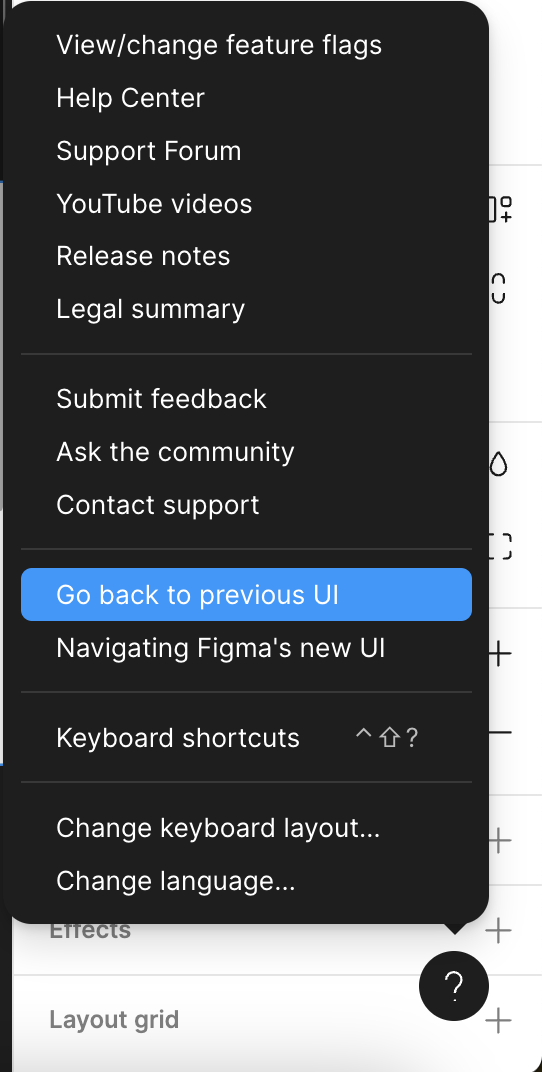
Then, from within a Figma file, click the ? Help icon in the lower, right-hand corner > Go back to previous UI.

49 replies

RuCaUa
September 4, 2024

now you can make some money on selling old accounts. New UI is ugly from any point of view

Isabel_Quiles_UOC
New Member
September 5, 2024

Hello, I have an old account and it won’t let me go to the old version!
Does the same thing happen to anyone else?

djv
Figmate
Community Support
September 5, 2024

Hey @Isabel_Quiles_UOC, this definitely seems odd!

What OS are you using and are you using Figma in the browser or desktop app? Can you share a wider screenshot of your canvas, including the toolbar?

Isabel_Quiles_UOC
New Member
September 6, 2024

Hello! Thanks for answering. Always use Figma in the browser. And I use MacOS BigSur.
I share a wider screenshot.

Isabel_Quiles_UOC
New Member
September 6, 2024

HI!

Does anyone know how long we will be able to have the option to switch to the old interface in Figma?

On the other hand, I have the new version and it does not let me switch to the old one. I do not have that option. NOW FIGMA LOOKS LIKE ADOBE, THE SAME ERRORS.

Aziza1
September 8, 2024

@dvaliao Hello! I want to return the old version. How can I do this? I don’t have the button.

Viktor_Hapala
September 9, 2024

I’m dealing with the same problem in windows on both desktop and browser - I can’t see the option to go back to older UI withing new and few years old files.

djv
Figmate
Community Support
September 9, 2024

Hey @Isabel_Quiles_UOC, thanks for providing the screenshot!

As we expected, you’re using the UI3 extension for Chrome.

Your account has not been added into the UI3 beta yet, so all you need to do is remove the Chrome extension to go back to the previous UI.

djv
Figmate
Community Support
September 9, 2024

Hey @Aziza1, sorry for the trouble!

As mentioned above, if you created your Figma account after June 2024, you will not see an option to “Go back to previous UI”.

Your account seems to be brand new; created in September 2024. You can check out the Help Center article here for more info.

djv
Figmate
Community Support
September 9, 2024

Hey @Viktor_Hapala, sorry for the trouble!

Same as Isabel, it looks your account hasn’t been included in the UI3 rollout yet. Are you by any chance using the Chrome UI3 extension as well?

If so, all you need to do is remove the Chrome extension to go back to the previous UI.