
July 11, 2024
Solved

Get Back to Old View

  • July 11, 2024
  • 49 replies
  • 21556 views

Hello, I would like to change the view. Currently, the editing toolbar is located centrally at the bottom of the screen. Previously, this toolbar was located at the top left. In the old view, the options such as “Create Component” etc. were also at the top center. How can I switch back to that view? I am still learning from older YouTube videos, which is why the new view is a bit confusing for me. Thank you!

This topic has been closed for replies.
Best answer by djv

Hey All,

With the rollout of UI3 to 100% of users today, the capability to Go back to the previous UI has been added for all users.

Be sure to refresh your tabs to ensure you see the option. A good rule of thumb if you already had UI3 beta access, your panels will revert from floating to fixed.

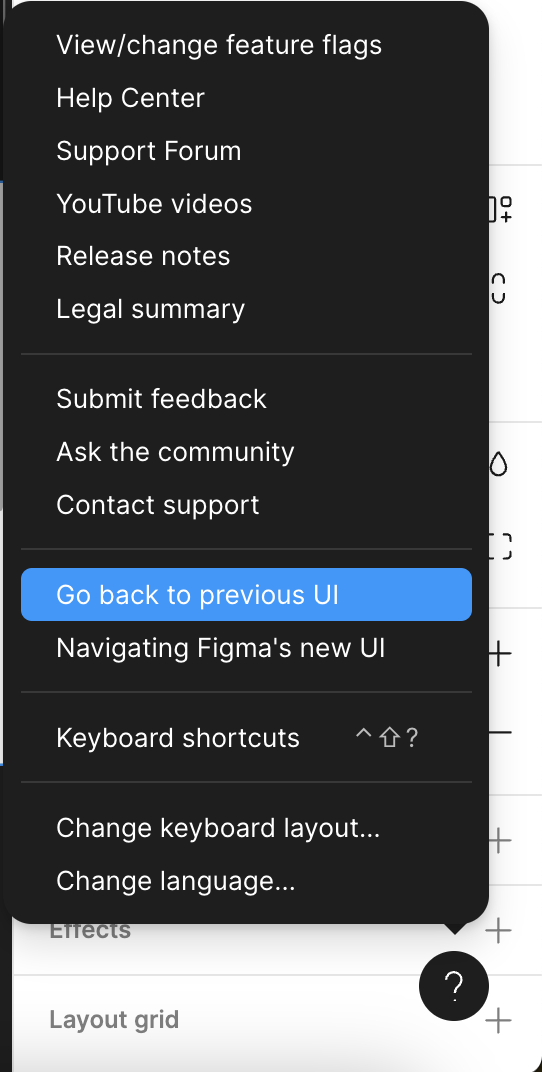
Then, from within a Figma file, click the ? Help icon in the lower, right-hand corner > Go back to previous UI.

49 replies

July 11, 2024

So to make clear what exactly I mean. I would like to have this view:

Bauke_Schildt
Active Member
July 11, 2024

What you call your “view” is called UI3, Figma’s redesigned UI

To switch back to the old UI, Click on the Round button with a “?” on the bottom right (It isn’t visible in your screenshot, but it’s below “Export”.)

Click that and then select “Go back to previous UI”.

Screenshot 2024-07-11 at 16.23.24

July 11, 2024

Thank you so much! Very much appreciated 🙂

djv
Figmate
Community Support
July 11, 2024

Thanks for helping out here, @Bauke_Schildt! 🙂

Let us know if we can help with anything else, @Jacob_Struck!

Matthew30
July 18, 2024

Why don’t I have this option?

July 22, 2024

How do I Go back to the old UI in FigJam?
There is no such an option?

djv
Figmate
Community Support
July 22, 2024

Hey @Grigory_Uglanov, sorry for the confusion!

You can’t go back to previous UI within a FigJam file. You need to access the Help Menu “?” in a Figma file to see the option.

Joao_Marcos2
July 22, 2024

Hi, I do not have the option to go back to old UI. I’m on a new company, working on their account and I need to finish a design in some hours and I was not expecting to learn Figma from scratch here, because on my personal account, I still have the old UI. Anyway, things are not looking good, too many changes at once, a lot of things are now hidden.
I need to return to old UI as soon as possible.
image

July 23, 2024

There is no such option in FigJam or Figma.
Any tips?

July 23, 2024

In the following section, the same problem was addressed as in my case. Maybe you will find additional tips and assistance there! 🙂