
August 29, 2023
Solved

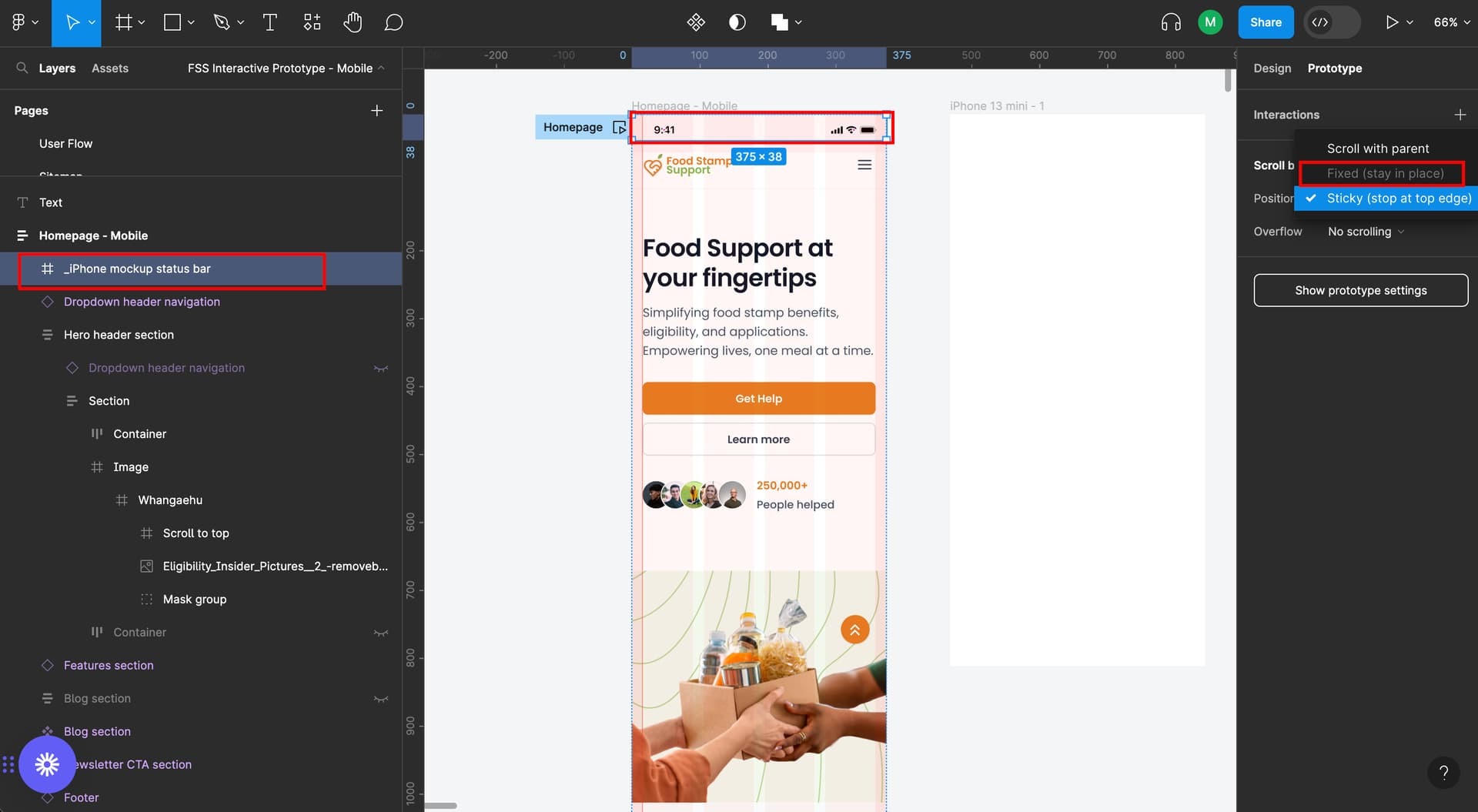
"Fixed stay in place" is disabled in Figma

  • August 29, 2023
  • 25 replies
  • 50163 views

Hello! I’m trying to:

  1. make the screen scrollable vertically; and
  2. make the iPhone status bar and “scroll to top” arrow fixed stay in place

I’ve managed to make the screen scrollable vertically, however, I’m having a hard time making the iPhone status bar and “scroll to top” arrow to be fixed. The “fixed stay in place” is disabled on my end.

Please help me. I’m getting frustrated and can’t wrap my head about this 😦
This topic has been closed for replies.
Best answer by tank666

25 replies

tank666
tank666Answer
August 29, 2023
UX/UI designer. Figma expert. Creator and developer of plugins and widgets for Figma and FigJam. Check out my resources in Figma Community: figma.com/@tank
Amanda_Ovando
November 29, 2023

mine still doesn’t work. it’s quite frustrating

djv
Figmate
Community Support
November 30, 2023

Sorry to hear that, @Amanda_Ovando!

Are you able to share a screenshot, screen recording, or the link to your file, so we can take a closer look?

December 17, 2023

Also had the disabled Prototype option “Fixed (stay in play)”

Took a couple of hours or less, figured out besides the other recommendations. The base frame cannot use "Auto Layout.
Once you shut that off select the frame you want to “no scrolling” and go to the prototype settings and the “Fixed” option is now available

I have both a header & footer fixed, with content scrolling the middle.

Tom

December 17, 2023


This image shows another detail.

The fixed objects need to be outside of the main content, also the footer must come first, followed by the main-header, then inside is a header and subheader row.

How this helps.

I created a demo-fig file, but since I a “newbie” I am not allowed to upload/add attachments.

Tom

djv
Figmate
Community Support
December 18, 2023

Thanks for the screenshot. It’s hard to be sure what’s happening though. Please reach out to the support team directly via this form for help: https://help.figma.com/hc/en-us/requests/new

Be sure to use your Figma account email, include a link to the file, and share it with support-share@figma.com, so they can take a closer look.

Erick_dos_Santos_Vieira
December 27, 2023

In the base frame, set the Scroll Behavior / Overflow to “Vertical”.

January 7, 2024

image

Fixed is disabled?

Fix while scroll was easy to use. Why to complicate simple functions?

Mae_Abigail_Banquil
New Member
February 1, 2024

Hi I figured out why Fixed is Disabled in Figma.

  1. First, make sure your frame is not under another frame. It should be on its own.

It should look like this in the layers:
image

Then in Prototype > Scroll Behavior > Position Fixed can now be selected

February 28, 2024

Hello, I also had the same issue and JUST FIGURED IT OUT RN IM SO HAPPY!
So I the fixed position wasnt letting me click it and i realized it was because the frame that I wanted to make fixed was clipped inside another frame other than the parent frame. when I pulled it out of the other frame and just left the layer under the parent frame, it immediately let me choose the fixed position!!! I just won in life muahahahahah:)
