

ahmad_tabby
New Member
March 29, 2022
Solved

Figma Mirror app doesn't render the design correctly

  • March 29, 2022
  • 69 replies
  • 7290 views

When using mirroring on my phone, the design doesn’t show properly. Sometimes there are missing elements, or elements that are not fully visible.

This happens even when I open Figma Mirror on my phone’s browser.

Here’s how my design shows up:
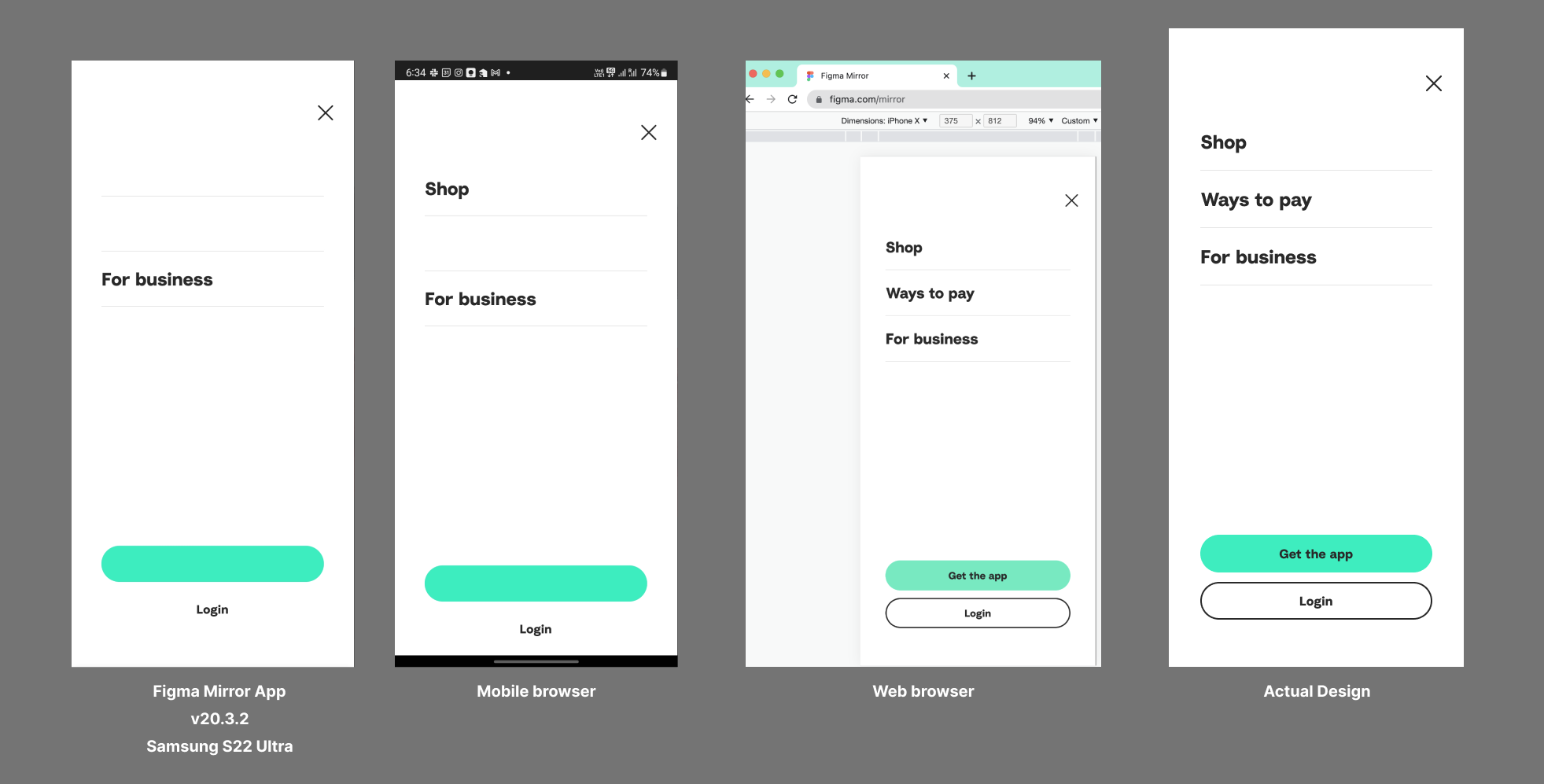
I’m using the Samsung Galaxy S22 Ultra. Already tried re-installing the app and clearing the cache.

This topic has been closed for replies.
Best answer by John_L

Hi all,

We’ve pushed a fix that we think may help with the S23 issues you’ve reported. Can you let us know if things seem to be better or if you are still having trouble?

Thanks,
John

69 replies

Brian_Warren
November 25, 2022

I am experiencing this issue as well on an S22. Most of the design renders correctly, but I have issues with some images and SVGs not showing up. Also some text occasionally as well.

Brian_Warren
November 25, 2022

This appears to only happen to elements that have interactions applied to them. For an example. I had a static button that rendered properly, but once adding an interaction to it, the text in the button no longer appears.

Marty_Meowsi
January 31, 2023

I’m having render issues on Xiaomi 12. I don’t believe this issue is fixed. Xiaomi 12 has Snapdragon 8 gen 1 processor.

gemmy
New Member
February 20, 2023

Any update? It’s a waste of time to “Exit” and “Begin mirroring” every now and then.

Jordan_Smith2
February 22, 2023

Still seems to be an issue. I’m having a lot of similar issues on my s23.

Vinizera
New Member
February 23, 2023

It has improved a lot but still occurs frequently, especially in frames with many elements.
Xiaomi 12 Pro.

March 6, 2023

I have a similar problem with s23 ultra both in browsers and in the native application. maybe there is a way to make figma work on s22 and s23?

djv
Figmate
Community Support
March 6, 2023

Hey All,

While our mobile team does periodically check this thread, your best bet would be submitting a bug report directly to our team via the form here:
https://help.figma.com/hc/en-us/requests/new?ticket_form_id=360001744374

March 6, 2023

I did it, thank you.

TheKing
March 10, 2023

same issue on s23+