

ahmad_tabby
New Member
March 29, 2022
Solved

Figma Mirror app doesn't render the design correctly

  • March 29, 2022
  • 69 replies
  • 7290 views

When using mirroring on my phone, the design doesn’t show properly. Sometimes there are missing elements, or elements that are not fully visible.

This happens even when I open Figma Mirror on my phone’s browser.

Here’s how my design shows up:
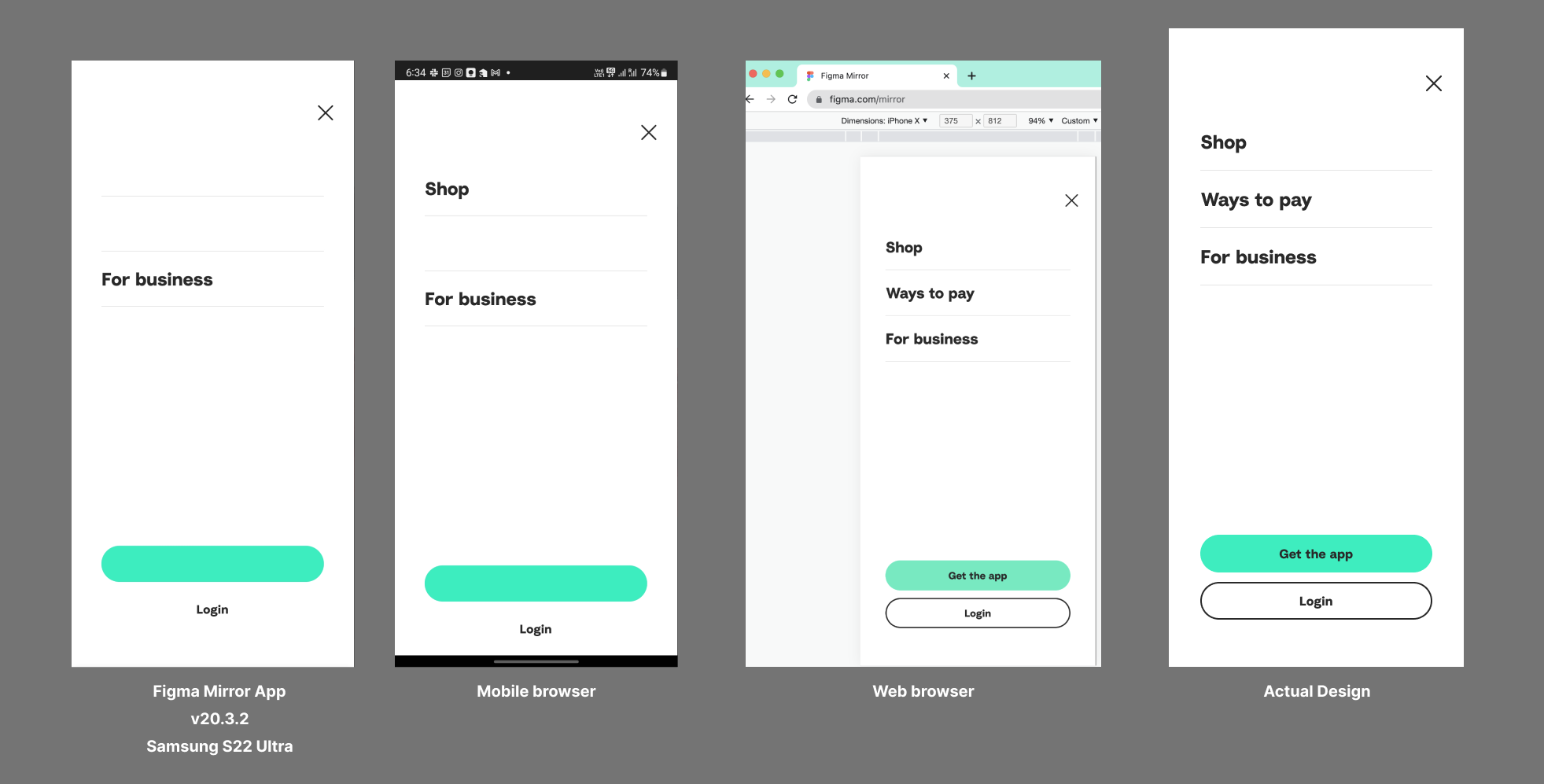
I’m using the Samsung Galaxy S22 Ultra. Already tried re-installing the app and clearing the cache.

This topic has been closed for replies.
Best answer by John_L

Hi all,

We’ve pushed a fix that we think may help with the S23 issues you’ve reported. Can you let us know if things seem to be better or if you are still having trouble?

Thanks,
John

69 replies

ahmad_tabby
New Member
July 31, 2022

Hi John,
Any update on the fix please? I’ve been using a borrowed phone to use the Figma app. So annoying that I can’t use my own device.

John_L
Figmate
Figmate
August 2, 2022

Hi everyone,

Thanks for your patience as we continue to look into this issue. We were able to reproduce the issues locally and have tried some fixes that try to workaround some issues that are specific to these lines of devices. Can you let us know if things are working better and if you are still running into problems?

Thanks!
John

Jonathan_Narvaez
August 2, 2022

EDIT: This is the Chrome Browser version 103.0.5060.129

Operation System: Android 12; SM-S906U

Figma Mirror App Version 21.11.1

Same issue on both platforms. The example images are from Chrome.

Man like John!

It’s about 99% better overall. Elements aren’t being hidden and it looks like they’re in the right place. Only thing left is that it looks like the text layers are interfering with the stroke pattern for shapes/other objects.


This is how the rectangle is supposed to look


This is how it looks with a text layer next to it.


This is what it looks like without the text layer.


Another with the text layer


Same rectangle without the text layer.

That really seems to be the only thing going on, but everything else looks awesome

John_L
Figmate
Figmate
August 3, 2022

Thanks for taking a look and the detailed feedback, @Jonathan_Narvaez ! If you are willing, can you DM me the URL of your file and share it with support-share@figma.com ? That can help us track down the remaining issue that you are seeing.

Thanks,
John

John_L
Figmate
Figmate
August 16, 2022

Hi everyone,

We’ve pushed out some additional fixes here. Let us know if you are still seeing specific problems.

Thanks!
John

Jonathan_Narvaez
August 17, 2022

Yup, definitely noticed changes a few days ago. Didn’t want to jinx it and mention it until you gave an update first lol.

Everything definitely looks to be in 100% working order on my end. That’s both the Chrome browser and the Figma mirror app.

Hopefully people come back and report the same.

Thanks @John_L and the team for the constant updates and the fix! You’ve been awesome!

ahmad_tabby
New Member
August 18, 2022

Hi John,
It seems to be working fine most of the time. However, I still see broken elements here and there. Sharing some screenshots below (all the text is blurred out):


It seems that this is happening only for stroke/divider lines. It also doesn’t happen for all strokes, just some of them, which is weird.
Another thing to add is, when I see these same screens again on my Figma mirror app after a few mins, some of them were fixed and looked fine.

P.S. I hope I’m not on an older version of the app that hasn’t received the fixes yet. My app version is v21.11.1

John_L
Figmate
Figmate
August 18, 2022

Thanks @ahmad_tabby for the report. If you are willing, can you DM me a link to the file and share it with support-share@figma.com ? That would be the most helpful from a debugging perspective as we can see if we can reproduce internally. Thanks!

ahmad_tabby
New Member
August 18, 2022

I’ve just shared the Figma file with you in DM and also on the email address.

John_L
Figmate
Figmate
August 26, 2022

Thanks @ahmad_tabby for sharing your file. We’ve pushed out some additional fixes. Are things fully resolved now?

Thanks,
John