

ahmad_tabby
New Member
March 29, 2022
Solved

Figma Mirror app doesn't render the design correctly

  • March 29, 2022
  • 69 replies
  • 7290 views

When using mirroring on my phone, the design doesn’t show properly. Sometimes there are missing elements, or elements that are not fully visible.

This happens even when I open Figma Mirror on my phone’s browser.

Here’s how my design shows up:
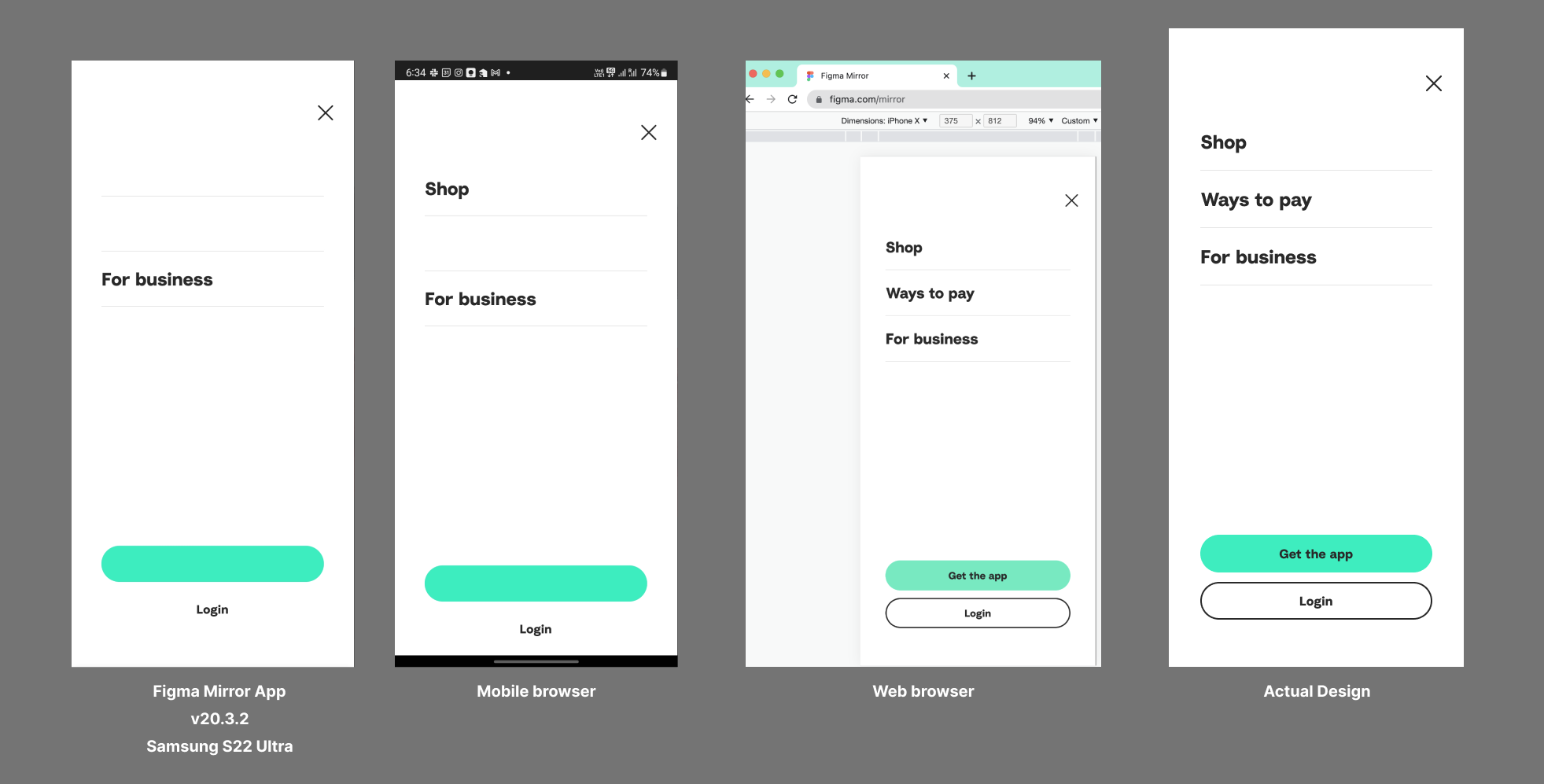
I’m using the Samsung Galaxy S22 Ultra. Already tried re-installing the app and clearing the cache.

This topic has been closed for replies.
Best answer by John_L

Hi all,

We’ve pushed a fix that we think may help with the S23 issues you’ve reported. Can you let us know if things seem to be better or if you are still having trouble?

Thanks,
John

69 replies

John_L
Figmate
John_LAnswer
Figmate
March 22, 2023

Hi all,

We’ve pushed a fix that we think may help with the S23 issues you’ve reported. Can you let us know if things seem to be better or if you are still having trouble?

Thanks,
John

Samuel_Mackay
May 19, 2023

Still having major issues on my S23 - Icons/text not showing up but no pattern to it, completely random what renders or not

July 25, 2023

i got same issue on poco f5 (snapdragon 7+ gen2) john.

Raj_kumar1
November 15, 2023

Happening almost all time on S23 Ultra. Funny my another entry level phone Moto G renders it perfectly.

The only temporary fix I found is to clear app data in android settings and re-login.

Awaiting a solution asap.

yinghuan
December 22, 2023

I’m having render issues on Xiaomi 14.

January 4, 2024

same issue here on xiaomi 14

Chen_Lyn
March 6, 2024

Open the shared prototype in mobile browser. The chrome, Firefox, edge, and Line built-in browsers of Samsung S22 and S23+ all have this problem, but the display is normal when using Samsung Internet Browser and Facebook’s built-in browser.

April 16, 2024

Same issue with Xiaomi Redmi Note 13 Pro.

Jaxon
July 1, 2024

Honor 200 also has the same problem. Incomplete preview display, random loss of content