

ahmad_tabby
New Member
March 29, 2022
Solved

Figma Mirror app doesn't render the design correctly

  • March 29, 2022
  • 69 replies
  • 7290 views

When using mirroring on my phone, the design doesn’t show properly. Sometimes there are missing elements, or elements that are not fully visible.

This happens even when I open Figma Mirror on my phone’s browser.

Here’s how my design shows up:
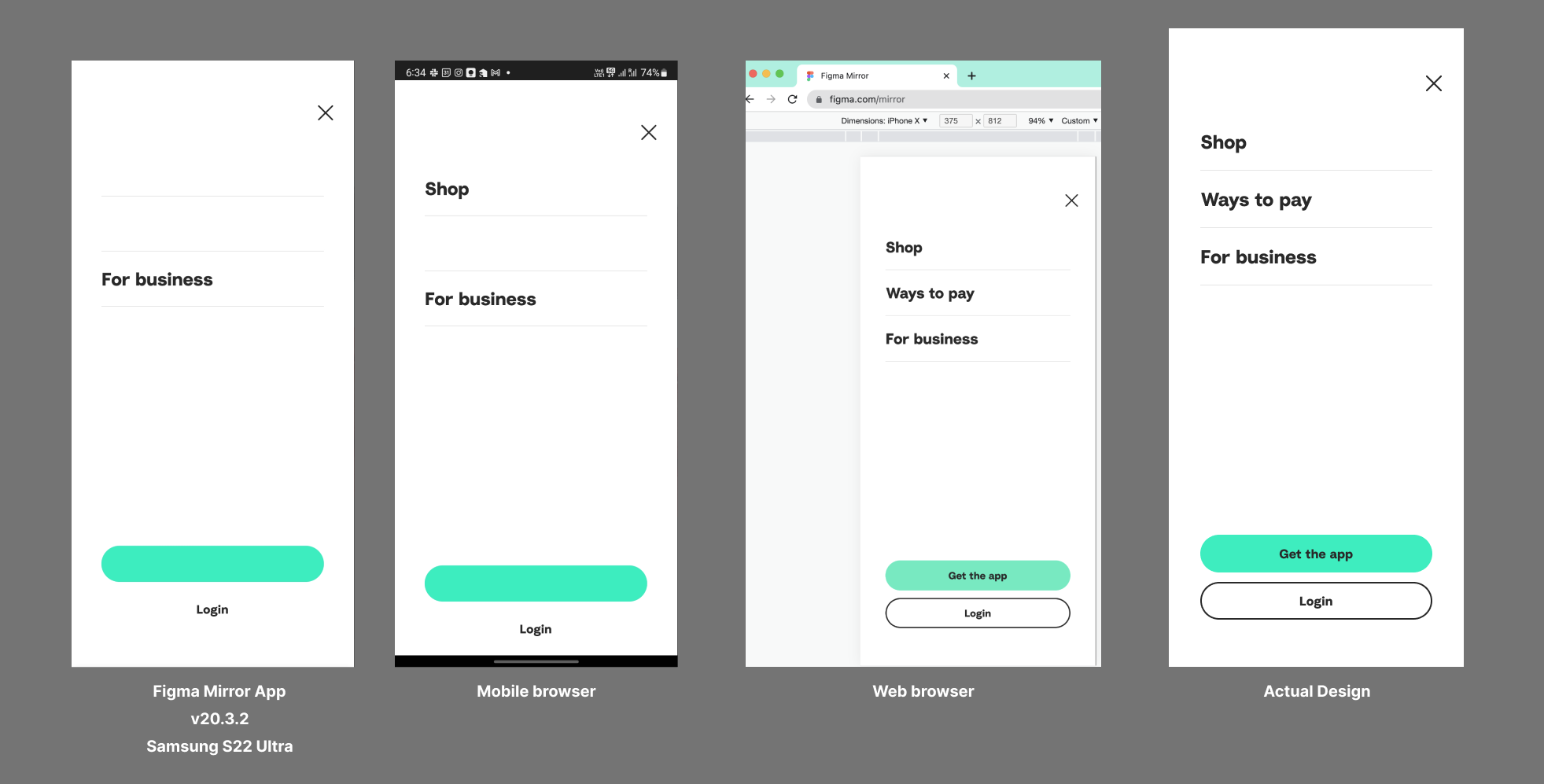
I’m using the Samsung Galaxy S22 Ultra. Already tried re-installing the app and clearing the cache.

This topic has been closed for replies.
Best answer by John_L

Hi all,

We’ve pushed a fix that we think may help with the S23 issues you’ve reported. Can you let us know if things seem to be better or if you are still having trouble?

Thanks,
John

69 replies

lushnis
June 29, 2022

Sorry, I didn’t even know Figma Mirror is available through Figma Mirror until I saw your explanation, I always thought it was a standalone app. I tried Firefox and Samsung Browser and the problem is still the same.

John_L
Figmate
Figmate
June 29, 2022

Hi - Thanks for trying it out, that is very helpful information! Based on the issue it seems like it might be some subtle interaction with the hardware since it reproduces across different browser stacks as well. We are actively looking into reproducing this ourselves and will see if there are workarounds we can identify. The other thing I can think of is to see if this is something we can report to Samsung since it seems so specific to this device line.

–John

ahmad_tabby
New Member
June 29, 2022

Hi John,
Thanks for your reply on this thread. I’ve made a screen recording for how one of my designs shows in Figma app, Figma mirror on chrome and Figma mirror on Firefox mobile browsers.

Here’s how the actual design is:


Link to Figma file

And here’s how it shows up on my S22 Ultra:

If you notice, there’s different behavior on each app.

Hope this helps.

John_L
Figmate
Figmate
June 29, 2022

Thanks for doing that ahmad_tabby, that is helpful information, thanks for taking the time to do that.

Jonathan_Narvaez
June 29, 2022

Man like John here to save the day!

@John_L I actually have a support ticket open where I’ve added Support-Share@figma.com as an editor to a file. Would that be of any use to you?

We’ve previously gone through the steps that you have recently suggested and were just waiting on updates.

Brock_W
June 30, 2022

Same Issue S22 Ultra

TheQuatum
July 5, 2022

This issue is reproducible on all Snapdragon 8 Gen 1 devices. Regardless of device, Figma mirror does not render any content from devices with that chipset correctly.

Have your team pick up an 8 Gen 1 device and it will happen every single time.

John_L
Figmate
Figmate
July 6, 2022

Thanks everyone for the info here. Update on our side – we’re getting one of these devices and looking to reproduce / see if there are any possible work arounds.

evan_lightner
July 15, 2022

Same problem here folks. S22 ultra

D119
July 26, 2022

Again here on S22 ultra.

Seems this issue has been going on for a very long time.

It’s particularly frustrating when sending prototypes to clients and cannot be sure what hardware they are using nor clear about what devices not to be reviewing on… shall we preface “The Figma protype may or may not display accurately on your device” Rather poor UX from experts in UX.

Sending Figma teams ‘healing vibes’ to help fix and end the suffering… 🙂