

Abram
June 7, 2021
Solved

Figma Helper (Renderer) is using excessive memory, why?

  • June 7, 2021
  • 107 replies
  • 24590 views

Hello everyone, I’m trying to discern what the underlying issue is here. This has only been really presenting itself as a problem in the past few days, but for some reason almost any Figma project I have open winds up consuming essentially all of my system memory.

I’ve noticed that this happens regardless of how many project files I have open. While I’m not experiencing any crashing of the application, it does bring my work laptop to a grinding halt and creates an essentially unusable experience. Is there any reason Figma is utilizing so much memory? Are our working files just too large?
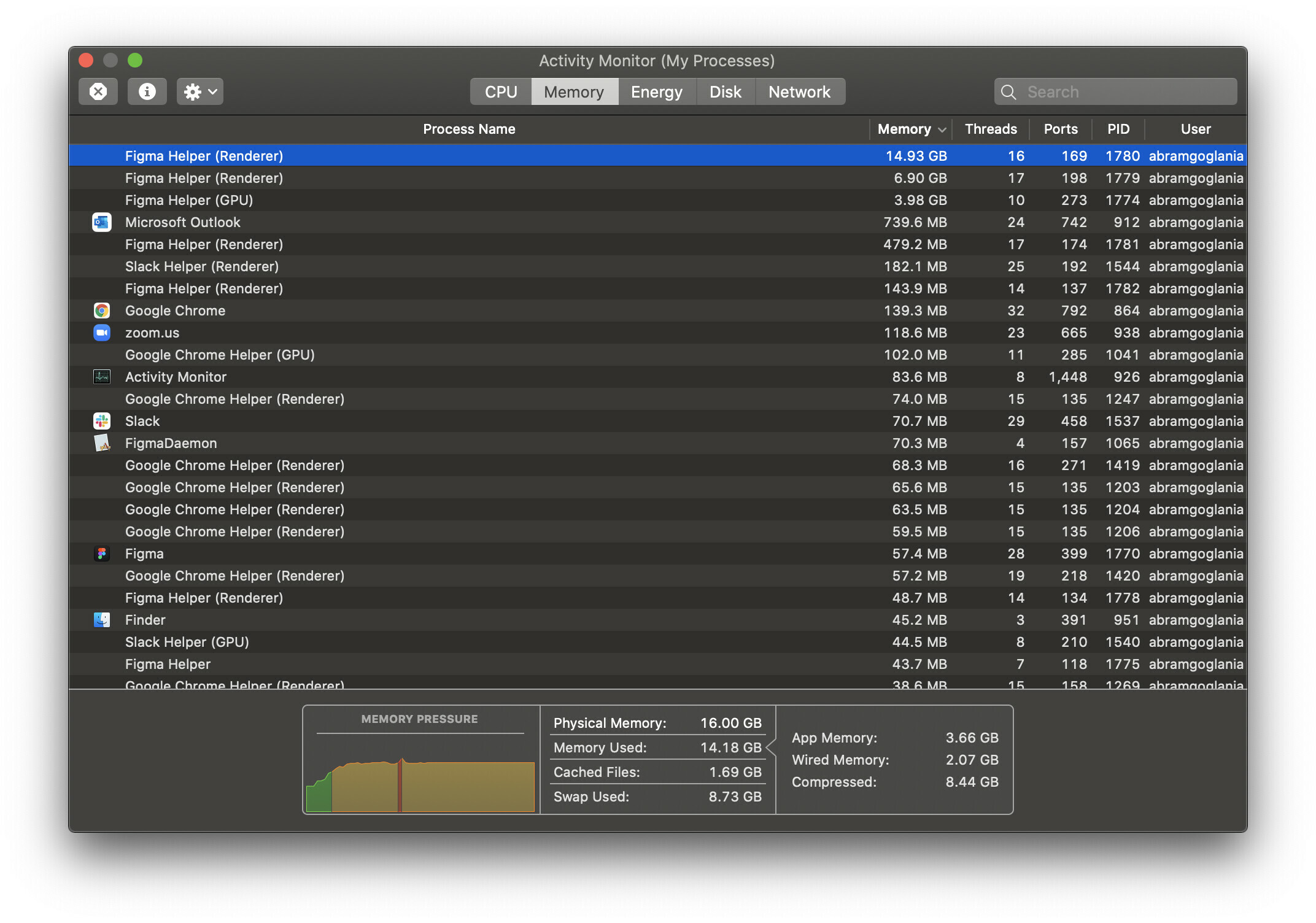
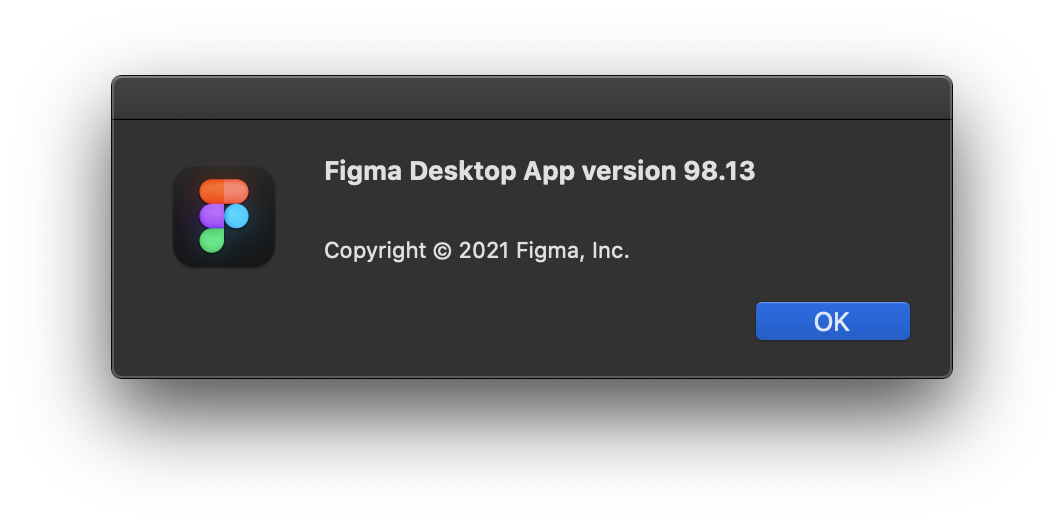
For reference, I’m using the desktop app on macOS 10.15.7 and as far as I am aware this is the latest version available.
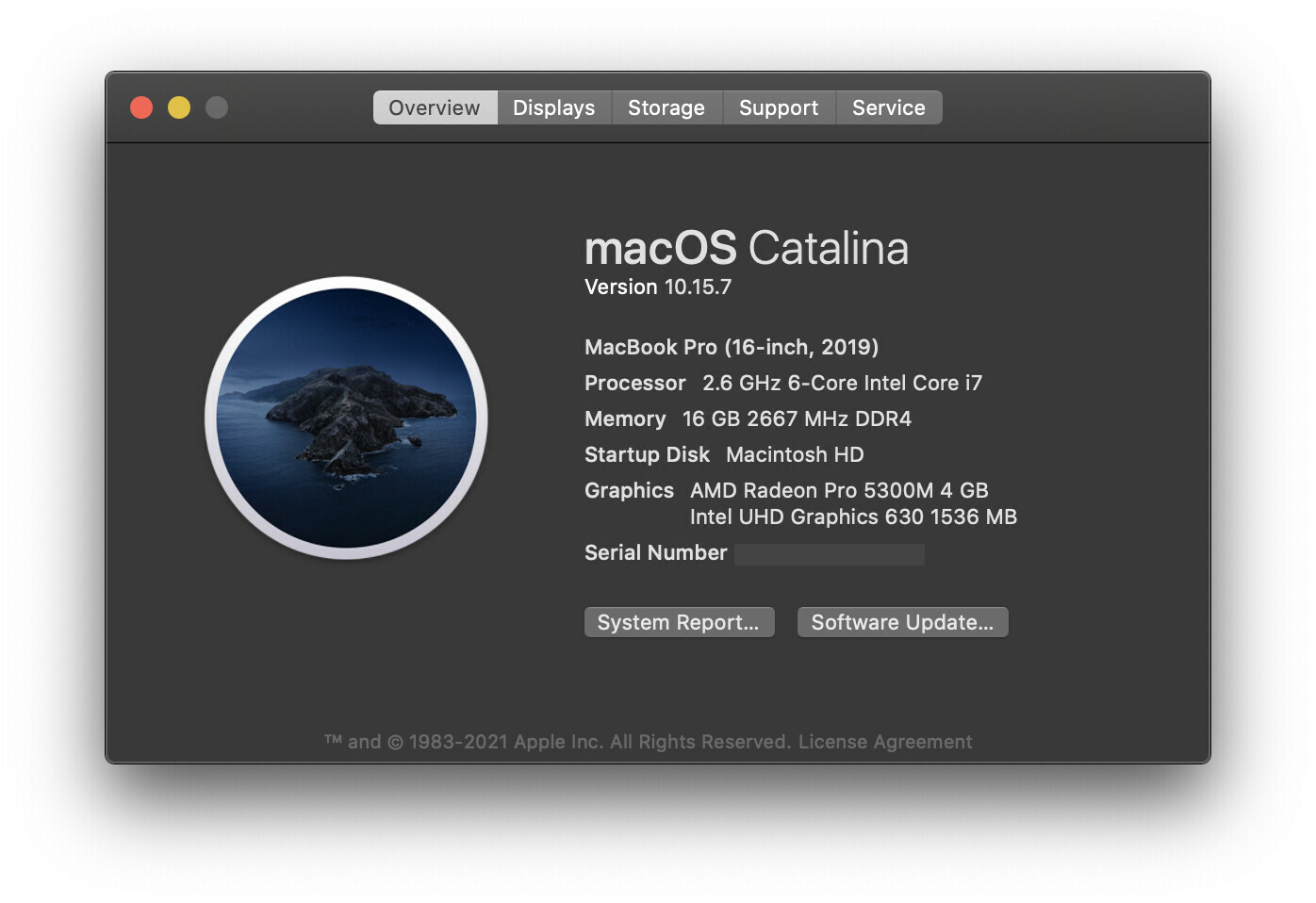
I’m really scratching my head over this one as to why it’s popped up as an issue so suddenly. Granted this Macbook Pro is just a base configuration, so it may just be a performance limitation, but I wouldn’t expect Figma to be stressing the machine out worse than Adobe’s Creative Suite. Any insight is most welcome! Please let me know if you need any specific information.

Thanks Figma Community!

This topic has been closed for replies.
Best answer by djv

Hey All, sorry for the lack of acknowledgement here!

Historically, the forum has been primarily run by the community, and I didn’t start at Figma until August 30th, 2021.

As a browser-based app, Figma uses available browser memory (~2GB per browser tab) while loading and saving, but it shouldn’t use much CPU.

Where you’re seeing the Agent or Helper using a lot of your available CPU, we suggest clearing the cache on your browser and/or desktop app. And if that doesn’t help, use an app cleaner to fully uninstall all Figma apps and then reinstall from our Downloads page.

Here’s how to clear the desktop app cache on a Mac:

  1. Quit the Figma desktop app
  2. Open Terminal.app and enter the following command:
    rm -rf "$HOME/Library/Application Support/Figma/"{Desktop,DesktopProfile}
  3. Try opening the desktop app again

And here’s how to clear the desktop app cache on Windows:

  1. Close the Figma desktop app
  2. Open the Start menu, and paste in this, followed by enter: %APPDATA%\Figma
  3. In the window that opens, delete the Desktop and DesktopProfile folders if they exist
  4. Launch the desktop app again

If this doesn’t help, can you reach out directly to our technical quality team here: https://help.figma.com/hc/en-us/requests/new

Please use your Figma account email, and let us know if this is affecting the Desktop app, browser or both, and provide a screenshot of your Activity monitor.

If this is affecting the Desktop app, please also save and send over your Desktop App debug info file. On Mac you can find this in the Help menu under Troubleshooting, and on Windows, you can find this under the toggle-arrow at the right of the top toolbar under Help > Troubleshooting.

Lastly, the community moderation team here on the forum does not own Figma_support, so please note that tagging this profile will not notify us.

107 replies

jonasbroms
New Participant
November 2, 2023

@jao_renzo_miranda: @Figma_Support won’t do anything. I lost a client because of this error. I got no help basically, or the little to none help I got didn’t solve the issue.

If I were you I would try to buy or get a new design system that has no affiliation with the old, and redo everything in a new files and in a new project folder. It’s not fun but maybe you can save the client relationship by doing so.

Ellu
November 13, 2023

I had to delete long lists and animations to overcome this; then I split the work into multiple files. The per-file limit is a problem but was much less pronounced when there is only one designer working on the file at a time.

111392
December 14, 2023

Dec 2023, the same problem. Figma take 10gb of 8gb on my mac. Mac uses swop and get freezing and lags.

@Figma_Support

December 14, 2023

Same here: @Figma_Support

Justin_Henry
December 31, 2023

So… no support from Figma yet? #classic

Alexey12
January 8, 2024

Same problem. Of course, I don’t know the solution, but maybe the problem is with automatic saving? Figma saves every few seconds. If the Internet goes out, she still manages to save everything. She probably saves everything all the time and doesn’t delete it. When you open Figma there is still a lot of memory. But the longer you work in Figma, the memory becomes less and less. Is there any way to delete your save history somewhere?

Alina_Brender
January 23, 2024

@jonasbroms
I have the same problem. Figma is lagging every action is so slow it is almost impossible to work. I had 16GB memory Macbook and the app was freezing all the time, so Our IT support provide me with a 32 GB memory it improved a little bit but still it start to lagging after 5-10 minute of work, every action takes a lot of time, even zoom in and out, dive in to the component.

I have reinstalled


the desktop app several times. My project memory usage is 27%.

My laptop:
Macbook PRO
2.4 GHz 8-Core Intel Core i9
AMD Radeon Pro 5500M 4 GB
Intel UHD Graphics 630 1536 MB

32 GB 2667 MHz DDR4

Screenshots attached. Sometime it taked 5-8 GB of memory inly Figma GPU and the lot of renderer everyone of the 500-1,5 GB

@Figma_Support, It is almost impossible to work that way. It impact my works directly. Even presenting design to others is hard. Please help!

jonasbroms
New Participant
January 23, 2024

@Alina_Brender Really sorry to hear that you’ve gotten this issue.
It’s important to recognize that, regardless of added memory to your physical machine, Figma’s functionality is capped at 2GB due to WASM web browser limitations. This applies even to the Figma “native” app, as it essentially operates within a web browser framework.
The Figma team can uncap it to a maximum of 4GB… for me, it didn’t do any wonders unfortunately.

From my experience, it’s unlikely that Figma support will offer any good solution in this scenario.

Another challenging aspect is that you probable need to overhaul your entire design system, a process that is both time-intensive and complex. Because that is how you actually solve this issue.

@Alina_Brender @Alexey12
A practical approach to manage complexity and memory demands might be the adoption of “Slot components” in your design. For guidance, these videos could be useful:

Currently, I’m not under any contract, so I’m available for a mentor session. I’d be glad to examine your issue in a video call and provide assistance. However, I must be upfront about the complexity of this situation and the limited documentation available, so I can’t guarantee a definitive solution.
Me at ADPList Mentorship

For additional insights:

Alina_Brender
February 7, 2024

Where I can request for it?Actually I asked other designer in my company, and even opened my file from their laptop and it perfomed better…

jonasbroms
New Participant
February 7, 2024

@Alina_Brender You have to talk to Figma support. Which isn’t easy and takes ALOT of time.