Deniz Boomsma
New Member
December 7, 2025
Solved

Connecting Figma MCP Server with Google Antigravity

  • December 7, 2025
  • 33 replies
  • 57109 views

Hi all,


Is there anyone able to connect Figma MCP Server with Google Antigravity (I know it is not supported tool yet)?
 

I tried using client ID and secret, but I am receiving the following error:

Invalid scope: mcp:connect


Thanks a lot for comments!

Best answer by aaronjellis

I was able to get it working via the latest Antigravity… 

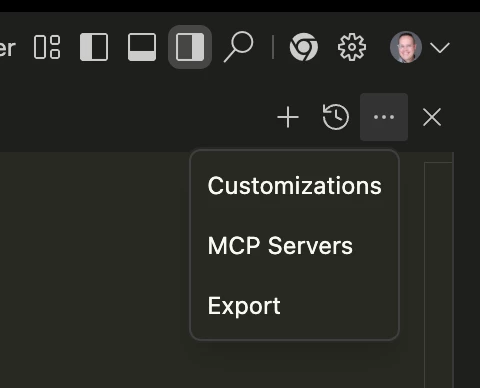
Just had to go into the editor, then hit these 3 dots and select MCP servers. It will ask you to install the Figma MCP config, then you should be able to run it just fine without much additional config. (easier than configuring claude code 😅). 


33 replies

January 23, 2026

I think it’s still not working for linux. I get this while installing figma mcp via antigravity gui:
 

rror: [77271] Using automatically selected callback port: 14118 [77271] Discovering OAuth server configuration... [77271] [77271] Connecting to remote server: http://127.0.0.1:3845/sse [77271] Using transport strategy: http-first [77271] Connection error: TypeError: fetch failed at node:internal/deps/undici/undici:13502:13 at process.processTicksAndRejections (node:internal/process/task_queues:105:5) at async StreamableHTTPClientTransport.send (file:///home/user/.npm/_npx/705d23756ff7dacc/node_modules/mcp-remote/dist/chunk-F76MHFRJ.js:18464:24) { [cause]: Error: connect ECONNREFUSED 127.0.0.1:3845 at TCPConnectWrap.afterConnect [as oncomplete] (node:net:1634:16) { errno: -111, code: 'ECONNREFUSED', syscall: 'connect', address: '127.0.0.1', port: 3845 } } [77271] Fatal error: TypeError: fetch failed at node:internal/deps/undici/undici:13502:13 at process.processTicksAndRejections (node:internal/process/task_queues:105:5) at async StreamableHTTPClientTransport.send (file:///home/user/.npm/_npx/705d23756ff7dacc/node_modules/mcp-remote/dist/chunk-F76MHFRJ.js:18464:24) { [cause]: Error: connect ECONNREFUSED 127.0.0.1:3845 at TCPConnectWrap.afterConnect [as oncomplete] (node:net:1634:16) { errno: -111, code: 'ECONNREFUSED', syscall: 'connect', address: '127.0.0.1', port: 3845 } } : calling "initialize": EOF.


January 26, 2026


Solution: Just install node.js https://nodejs.org/en/download/current, once installed restart your device for the path to work.

Reinstall the mcp.

 I had version 22 of the node, then updated to 25 and it's still not working. Any other tips?
 

OS: Ubuntu 25.10
Antigravity Version: 1.14.2
VSCode OSS Version: 1.104.0
Commit: 450b6b28083d737992adc5d19637f22c95ffba7b
Date: 2026-01-13T02:07:24.766Z (1 wk ago)
Electron: 37.3.1
Chromium: 138.0.7204.235
Node.js: 22.18.0
V8: 13.8.258.31-electron.0
OS: Linux x64 6.17.0-8-generic
Language Server CL: 855455936

Nguyễn Thanh Hưng
New Member
January 28, 2026


Solution: Just install node.js https://nodejs.org/en/download/current, once installed restart your device for the path to work.

Reinstall the mcp.

I can’t even i use latest nodejs but issue still happen :(

cedricdsadas
New Member
February 13, 2026
Every AI is stumped by this problem. 😅

Anyone know how do I fix this?

Check if you open up your FIGMA MCP (dev mode)

Hung Nguyen
New Member
February 13, 2026

I think it’s still not working for linux. I get this while installing figma mcp via antigravity gui:
 

rror: [77271] Using automatically selected callback port: 14118 [77271] Discovering OAuth server configuration... [77271] [77271] Connecting to remote server: http://127.0.0.1:3845/sse [77271] Using transport strategy: http-first [77271] Connection error: TypeError: fetch failed at node:internal/deps/undici/undici:13502:13 at process.processTicksAndRejections (node:internal/process/task_queues:105:5) at async StreamableHTTPClientTransport.send (file:///home/user/.npm/_npx/705d23756ff7dacc/node_modules/mcp-remote/dist/chunk-F76MHFRJ.js:18464:24) { [cause]: Error: connect ECONNREFUSED 127.0.0.1:3845 at TCPConnectWrap.afterConnect [as oncomplete] (node:net:1634:16) { errno: -111, code: 'ECONNREFUSED', syscall: 'connect', address: '127.0.0.1', port: 3845 } } [77271] Fatal error: TypeError: fetch failed at node:internal/deps/undici/undici:13502:13 at process.processTicksAndRejections (node:internal/process/task_queues:105:5) at async StreamableHTTPClientTransport.send (file:///home/user/.npm/_npx/705d23756ff7dacc/node_modules/mcp-remote/dist/chunk-F76MHFRJ.js:18464:24) { [cause]: Error: connect ECONNREFUSED 127.0.0.1:3845 at TCPConnectWrap.afterConnect [as oncomplete] (node:net:1634:16) { errno: -111, code: 'ECONNREFUSED', syscall: 'connect', address: '127.0.0.1', port: 3845 } } : calling "initialize": EOF.


Update mcp_config.json to this works for me. I don’t use local mcp server

{
"mcpServers": {
"figma-dev-mode-mcp-server": {
"command": "npx",
"args": [
"mcp-remote",
"https://mcp.figma.com/mcp"
],
"env": {}
}
}
}


Dominik Golenia
New Member
February 25, 2026

Everything works. 😀 I'm an amateur at this sort of thing, so I pasted a screenshot of the problem into Google Gemini Pro. It gave me step-by-step instructions on how to run MCP and connect Figma<->Antigravity. I recommend it.

ay.mourad
New Member
March 1, 2026

this work fine with me for development tools.

Yubal Oliveras
New Member
March 26, 2026

this work fine with me for development tools.

This worked for me wonderfully, thanks!

Amanullah Menjli
New Member
May 29, 2026

this work fine with me for development tools.

Thank you it worked for me on linux.

camara
New Member
July 13, 2026

For me what worked was: 

{
"mcpServers": {
"figma-developer-mcp": {
"command": "npx",
"args": [
"-y",
"figma-developer-mcp",
"--stdio"
],
"env": {
"FIGMA_API_KEY": "your-personal-access-token-here"
}
}
}
}