Deniz Boomsma
New Member
December 7, 2025
Solved

Connecting Figma MCP Server with Google Antigravity

  • December 7, 2025
  • 33 replies
  • 57113 views

Hi all,


Is there anyone able to connect Figma MCP Server with Google Antigravity (I know it is not supported tool yet)?
 

I tried using client ID and secret, but I am receiving the following error:

Invalid scope: mcp:connect


Thanks a lot for comments!

Best answer by aaronjellis

I was able to get it working via the latest Antigravity… 

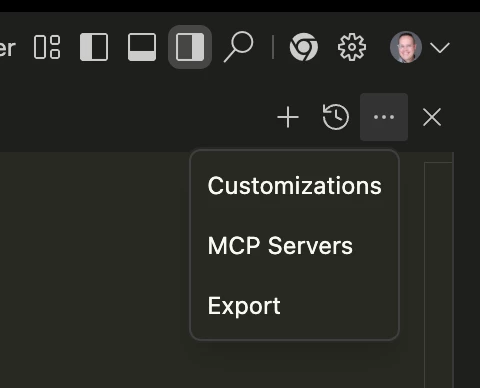
Just had to go into the editor, then hit these 3 dots and select MCP servers. It will ask you to install the Figma MCP config, then you should be able to run it just fine without much additional config. (easier than configuring claude code 😅). 


33 replies

camara
New Member
July 13, 2026

this work fine with me for development tools.

Thank you it worked for me on linux.

This work fine for me as well.

Mikael Meira
New Member
July 28, 2026


rashmik
New Member
August 17, 2026
{
"mcpServers": {
"figma": {
"command": "npx",
"args": [
"-y",
"figma-mcp"
],
"env": {
"FIGMA_API_KEY": "####"
}
},
"figma-dev-mode-mcp-server": {
"command": "npx",
"args": [
"-y",
"figma-mcp"
],
"env": {
"FIGMA_API_KEY": "#####"
}
}
}
}

Worked for me, the authorization part