Deniz Boomsma
New Member
December 7, 2025
Solved

Connecting Figma MCP Server with Google Antigravity

  • December 7, 2025
  • 33 replies
  • 57105 views

Hi all,


Is there anyone able to connect Figma MCP Server with Google Antigravity (I know it is not supported tool yet)?
 

I tried using client ID and secret, but I am receiving the following error:

Invalid scope: mcp:connect


Thanks a lot for comments!

Best answer by aaronjellis

I was able to get it working via the latest Antigravity… 

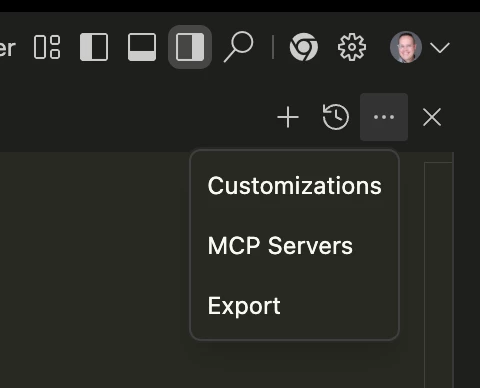
Just had to go into the editor, then hit these 3 dots and select MCP servers. It will ask you to install the Figma MCP config, then you should be able to run it just fine without much additional config. (easier than configuring claude code 😅). 


33 replies

soap
New Member
December 23, 2025

Has anyone tried connecting to a cloud MCP server?

I tried using the official config:
{
  "mcpServers": {
    "Figma": {
      "url": "https://mcp.figma.com/mcp"
    }
  }
}

and also switching to Antigravity’s format:
{
  "mcpServers": {
    "Figma": {
      "serverUrl": "https://mcp.figma.com/mcp"
    }
  }
}

Result in the error:
Error: streamable http connection failed: calling "initialize": sending "initialize": Unauthorized, sse fallback failed: missing endpoint: first event is "", want "endpoint".

Looks like I must give it access token, but where to set it?
 

soap
New Member
December 23, 2025

Has anyone tried connecting to a cloud MCP server?

I tried using the official config:
{
  "mcpServers": {
    "Figma": {
      "url": "https://mcp.figma.com/mcp"
    }
  }
}

and also switching to Antigravity’s format:
{
  "mcpServers": {
    "Figma": {
      "serverUrl": "https://mcp.figma.com/mcp"
    }
  }
}

Result in the error:
Error: streamable http connection failed: calling "initialize": sending "initialize": Unauthorized, sse fallback failed: missing endpoint: first event is "", want "endpoint".

Looks like I must give it access token, but where to set it?
 

I ended up building this repo locally: https://github.com/GLips/Figma-Context-MCP.git
Using the absolute path for Node (since I'm using NVM and Antigravity couldn't find it some how...),
and clearing out the welcome messages that break the protocol.

{
  "mcpServers": {
    "figma-context": {
      "command": "/bin/sh",
      "args": [
        "-c",
        "FIGMA_API_KEY='your key' NODE_ENV=cli /home/{user}/.nvm/versions/node/v22.21.1/bin/node /home/{user}/ws/Figma-Context-MCP/dist/bin.js 2>/dev/null"
      ]
    }
  }
}

lison song
New Member
December 24, 2025
{
"mcpServers": {
"FigmaAIBridge": {
"command": "npx",
"args": [
"-y",
"figma-developer-mcp",
"--stdio"
],
"env": {
"FIGMA_API_KEY": "#####"
}
}
}
}

这样配置就可以了

MiaChen
New Member
December 26, 2025

I tried {

"mcpServers": {

"figma": {

"command": "npx",

"args": [

"-y",

"@modelcontextprotocol/server-figma"

],

"env": {

"FIGMA_PERSONAL_ACCESS_TOKEN": "XXXXX"

}

},

"figma-dev-mode-mcp-server": {

"command": "npx",

"args": [

"mcp-remote",

"http://127.0.0.1:3845/sse"

],

"env": {}

}

}

}

seems working

soap
New Member
December 30, 2025
{
"mcpServers": {
"FigmaAIBridge": {
"command": "npx",
"args": [
"-y",
"figma-developer-mcp",
"--stdio"
],
"env": {
"FIGMA_API_KEY": "#####"
}
}
}
}

这样配置就可以了

謝謝 這個配置比build第三方套件簡單多了
不過我還是抓不到npx所以改用sh+絕對路徑
(Alternative setup for those encountering "Error: exec: "npx": executable file not found in $PATH." errors.)
{
  "mcpServers": {
    "figma-dev-mode-mcp-server": {
      "command": "/bin/sh",
      "args": [
        "-c",
        "PATH=$PATH:/home/{user}/.nvm/versions/node/{version}/bin /home/{user}/.nvm/versions/node/{version}/bin/npx -y figma-developer-mcp --stdio"
      ],
      "env": {
        "FIGMA_API_KEY": "xxx"
      }
    }
  }
}

Rainiel
New Member
December 30, 2025

Solution: Just install node.js https://nodejs.org/en/download/current, once installed restart your device for the path to work.

Reinstall the mcp.

Chayanoon Ahpaiwong
New Member
January 7, 2026


Rainiel
New Member
January 7, 2026


Solution: Just install node.js https://nodejs.org/en/download/current, once installed restart your device for the path to work.

Reinstall the mcp.

alexey.duzhev
New Member
January 7, 2026

for remote servers it needs to know who you are.  Just add you PAT into mcp_config.json

    "figma": {
"command": "npx",
"args": [
"-y",
"figma-mcp"
],
"env": {
"FIGMA_API_KEY": "YOUR_PERSONAL_TOKEN"
}
}

to get token go to figma - profile - settings - security and generate new token

ARIEF BUDIMAN NASUKO
New Member
January 12, 2026


Solution: Just install node.js https://nodejs.org/en/download/current, once installed restart your device for the path to work.

Reinstall the mcp.

Yap, it works, min using node 22+