

Morgan_Hewitt
March 31, 2021
Question

Can't round rectangle corners

  • March 31, 2021
  • 4 replies
  • 6173 views

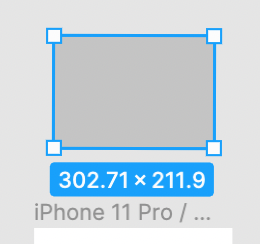
I’m not going to pretend I know what I’m talking about, but the four dots which usually appear in the inside of rectangles, so you can pull the corners simultaneously, aren’t appearing.

As it stands I can’t round the corners of my rectangles.

Any help would be appreciated!

Thanks
Screenshot 2021-03-31 at 08.50.14

    This topic has been closed for replies.

    4 replies

    tank666
    March 31, 2021
    UX/UI designer. Figma expert. Creator and developer of plugins and widgets for Figma and FigJam. Check out my resources in Figma Community: figma.com/@tank
    Morgan_Hewitt
    March 31, 2021

    I’m really sorry, but that means nothing to me!

    I’ve just started a new project board and the same thing applies. No nodes to edit the rectangle corners.

    Gleb
    Power Member
    March 31, 2021

    You can edit corners in the right panel. It looks like the zoom level might be too little for corner controls to show. If you zoom in more and this is a real rectangle and not a simple vector, you will see corner markers too.

    ata_kan
    New Member
    September 16, 2023

    Hi @Morgan_Hewitt
    I am a starter and faced same problem.
    Thanks for your question above.
    I noticed that if you double click on corner marks, it switches between 2 mode.
    2 modes : With corner circle mark (editable corner angle) and without circle mark (only editable at side panel).