Solved

What is the latest version of Figma?

  • October 16, 2023
  • 15 replies
  • 9232 views

JulsQQ

Hi, I’m trying to figure out if I’m using the latest version of Figma. If I click the check for Updates button nothing is happening. The current version I’m using is 116.14.4

Best answer by djv

Hey @Dave_House1 and @MarkT, sorry for the delayed reply!

On macOS, you can see the Figma version you’re using by clicking Figma > About Figma. To check if you’re using the latest version, you can select Figma > Check for Updates…
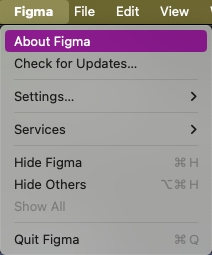
Screenshot 2024-06-17 at 10.47.39 AM

On Windows, to the left of the window controls, select the ⌄ icon. In that dropdown menu, select About Figma for the version number or Check for Updates… to see if there is a newer version.

This topic has been closed for replies.

15 replies

djv
Figmate
  • Community Support
  • October 18, 2023

Hey Juls, are you using Figma in browser or using the desktop app? Or are you possibly using Figma Beta? Also, what OS?

From our end, we’re using the latest desktop app version 16.13.3 and beta version 116.15.


Dave_House1

@dvaliao Hey Denise, How can we find out what the latest version number is at any time? The release notes do not include the version number.


MarkT
  • New Participant
  • June 17, 2024

Any update on @Dave_House1 question regarding where we locate version numbers ?


djv
Figmate
  • Community Support
  • Answer
  • June 17, 2024

Hey @Dave_House1 and @MarkT, sorry for the delayed reply!

On macOS, you can see the Figma version you’re using by clicking Figma > About Figma. To check if you’re using the latest version, you can select Figma > Check for Updates…
Screenshot 2024-06-17 at 10.47.39 AM

On Windows, to the left of the window controls, select the ⌄ icon. In that dropdown menu, select About Figma for the version number or Check for Updates… to see if there is a newer version.


MarkT
  • New Participant
  • June 17, 2024

Thanks Denise. Much appreciated.


M-Haris
  • August 13, 2024

Same problem i am using windows 11 and Figma latest version but its not the layouts are the same their is no UI3 module i can see please help!! i can’t do anything i am interested in new update.


djv
Figmate
  • Community Support
  • August 13, 2024

Hey @M-Haris, sorry for the confusion!

We launched an early access waitlist for UI3 to get it into the hands of users as fast as possible for early feedback. But due to high interest, the waitlist quickly reached capacity and all available slots were filled.

We’ve moved from waitlist to a multi-week rollout. We’re taking this approach so that we can collect your feedback and make adjustments along the way.

This means that UI3 is now rolling out gradually to all users—regardless of waitlist status, plan, or seat type. It doesn’t matter if you’ve updated to the latest version Figma, you won’t see UI3 until it’s been rolled out to you, and we notify you that you now have access.


djv
Figmate
  • Community Support
  • August 19, 2024

A post was split to a new topic: Where is absolute position?


Pugazh
  • August 29, 2024

What is the latest version number of Figma that released on Jul 26, 2024. @dvaliao


Anya_indesign

Hello! Tell me how to return to the previous version of the interface? I heard about the advice "click on “Go back to previous UI”, but I do not have such a function when clicking on the icon with a question mark


Abhi_UIUX
  • August 29, 2024

I am a professional member of Figma, but I am still unable to use the updated version for Figma’s new UI3 and AI features. Could you please help me out? @dvaliao


Celine_
Figmate
  • Community Support
  • August 29, 2024

Hi there! Thanks for your interests on UI3 and Figma AI features. They will be rolling out gradually to users over the next few months. Figma will send you a notification when it’s your turn to explore the new UI and Figma AI features. Stay tuned!

More information here:

Figma Learn - Help Center

Brian_Duchek1
  • New Participant
  • October 31, 2024

In a secure IT environment, many users operate without Admin access on their machines.

It’s both common and helpful to publish the version numbers and history of when desktop app versions are released and updated, so that we can coordinate messaging to our users, or provide updates on their behalf.

Can Figma adopt this practice for us?


tank666
  • October 31, 2024

Brian_Duchek1
  • New Participant
  • November 8, 2024

Ooo! After learning about the RSS feeds (TY to @tank666)

I found this article in help, which pointed me to the a spot in product that has a download link, the release date and version number available to admins.

Figma Learn - Help Center