

bart13
New Participant
June 22, 2023

Variables: Color alias with alpha / opacity (rgba ideally)

  • June 22, 2023
  • 113 replies
  • 13890 views

hey there!

variables seems to be super nice but what i am missing is that if i make a colour alias to a specific collection - i can’t set the opacity separately (e.g. colour 50 with 20% opacity)

So basically i want the colouyr to be from another collection and i want to set the alpha seperatly (controlled as rgba - since i dont need it as opacity)
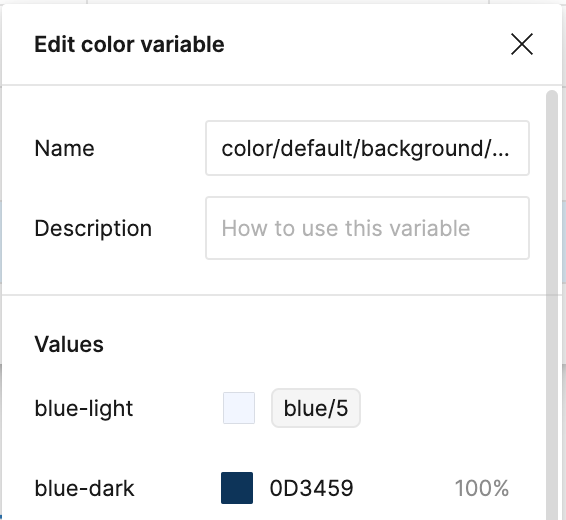
Example how we can fix this in token studio:

image

So what i want is that i can set blue/5 and then the opacity (which i dont want to capture in another colour variable)
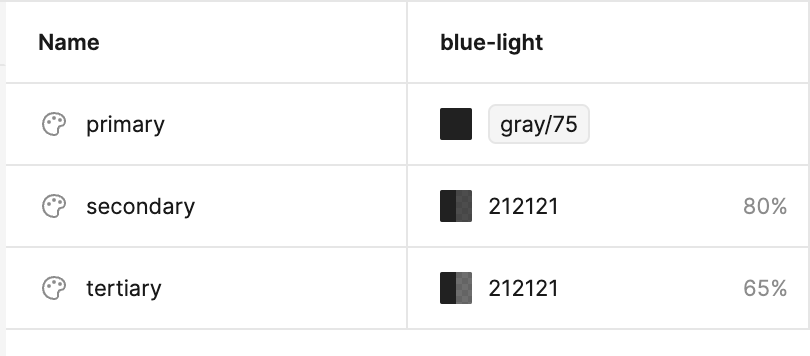

Now its only possible if i break the link with gray/75 - and then i loose the reference to that colour

113 replies

Jacob_Kersh
June 20, 2024

+1 to this, would use it every day

June 25, 2024

+1, would be so helpful!

Nathalie_Gouzee1
July 4, 2024

+1, please !

Jesse_Penico
July 5, 2024

+1 Not sure why this wouldn’t be similar to how number variables are applied to font size/line height/corner radius/etc.

This is an issue I keep running into, especially for components I create that use auto-layout, which assimilates the container & border into the frame, thus removing the ability to apply specific opacity values to each of them individually.

Andy33
New Participant
July 8, 2024

bumping this

FilipaGo
New Participant
July 10, 2024

Just ran into this issue as well 😟
What a terrible way to add color variables in shadows.

djv
Figmate
Community Support
July 10, 2024

Hey All, thanks for the feedback!

We’ll pass this onto the team for future consideration.

Oleh_Shydlovskyi
New Participant
July 16, 2024

+1 on that. We got an AI but separate alpha variables are still not in Figma for some reason.

July 18, 2024

yes please. much needed.

August 22, 2024

Badly needed. thanks