

bart13
New Participant
June 22, 2023

Variables: Color alias with alpha / opacity (rgba ideally)

  • June 22, 2023
  • 113 replies
  • 13892 views

hey there!

variables seems to be super nice but what i am missing is that if i make a colour alias to a specific collection - i can’t set the opacity separately (e.g. colour 50 with 20% opacity)

So basically i want the colouyr to be from another collection and i want to set the alpha seperatly (controlled as rgba - since i dont need it as opacity)
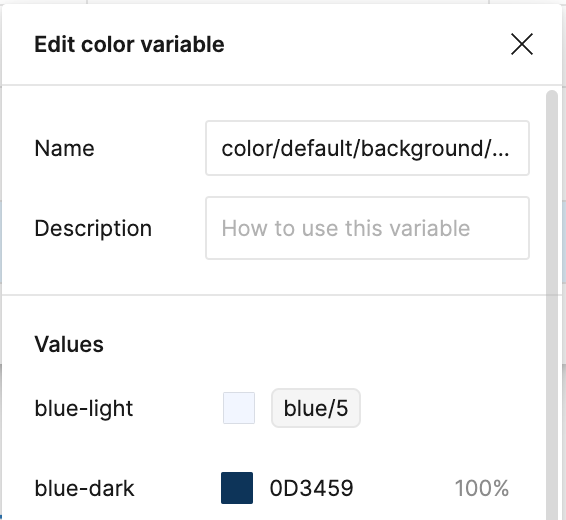
Example how we can fix this in token studio:
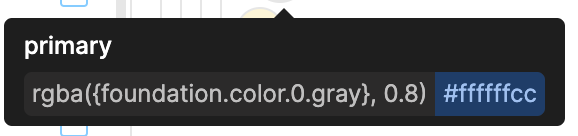
image

So what i want is that i can set blue/5 and then the opacity (which i dont want to capture in another colour variable)
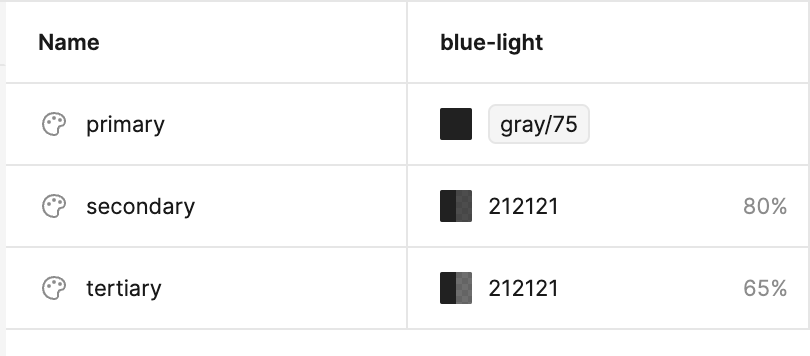

Now its only possible if i break the link with gray/75 - and then i loose the reference to that colour

113 replies

Jeremy_Knudsen
Active Member
September 3, 2026

It has finally arrived…


From Kerry_Johnson:

Nice work!  It, however, doesn’t seem to take into account appearance?  I know I can probably just freely type this into the opacity segment today but I didn’t want to change that just yet as the codified components rely on that opacity token currently.


Root:


Ext. collection:​​


Notice it’s “blind” to any branding until unlinking.  It also works if I set brand appearance directly onto the component, but removing it again (Cmd + Z) returns it to the broken state.


Edit: It fixed itself after flipping through branding color appearances in an ancestor layer to “refresh” the stale value I guess.  Leaving this here anyway in case it’s isolated to this new feature.

xMOx
Active Member
September 3, 2026

this is great progress, but also need it at the design level too, I hope the Figma team is working on adding it there too

xMOx
Active Member
September 4, 2026

Just to be clear, having it in the Design level reduces the amount of custom tokens, so I don’t need to create multiple tokens for one colour in different opacities. We already can do this in code I don’t see a reason why we wouldn’t adopt the same technique in our design tools.