
Thomas_Nabelek
New Member
February 27, 2024

Use inverse of Boolean variable to show/hide layer

  • February 27, 2024
  • 53 replies
  • 6313 views

This has been mentioned here:

I am looking for the availability to HIDE a layer when a Boolean variable is TRUE and SHOW it when it is FALSE. So, the inverse of the default/current behavior. I want to do this without using components.

Use case: When a variable is true, show one frame. When that same variable is false, show a different frame.

I can get basically this by using two different variables:
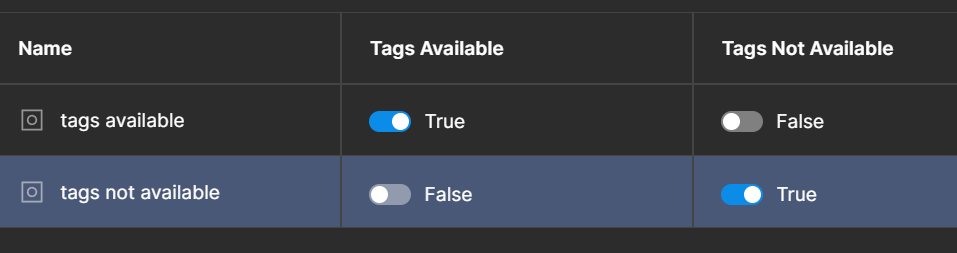

but it would be more convenient to be able to do it with just one. Just give me a Boolean toggle when the variable is used to say if the variable should be inverted or not.

53 replies

y_toku
Figmate
Community Support
February 29, 2024

Thanks for sharing your idea! we would like to gauge the reaction of other members in the community. We may consider it for future enhancements!

Thanks,
Toku

dv.korzhev
New Member
March 15, 2024

I think it’s useful

I have a checkbox that turns the container on and off on the layout.
Right now I have one variable used to switch the checkbox and the other to display the container

For example:
clicked on the checkbox - the jackdaw is enabled, the container is hidden
, clicked again - the jackdaw is missing, the container is shown

Currently, 2 variables are used for this. I really want to be able to see when the layer is displayed: if true, if false

It seems to me that you had something similar. Maybe it can be simplified somehow? I will be glad to help!)

Frame 5
Frame 5

Laurent_Gaulhiac
March 25, 2024

I am building a fairly complex app.
To manage the state of the panels, I rely on the Layer Visibility with booleans. I have to set up almost every booleans twice, like:

  • is_EditModeActive?
  • is_EditModeInactive?

Then I need A LOT of conditional branching and twice the amount of “set variables” to achieve what I need.

A simple custom variable defined like is_EditModeInactive? = !{is_EditModeActive?} or a simple “boolean inverter” while right-clicking the “Eye” icon at the Layer level will make complex work WAY easier. Now it’s a nightmare for advanced prototypes.

April 29, 2024

Would like this too!

andreaszzz
May 7, 2024

This would make prototyping a lot simpler!

Mark_Koh
July 9, 2024

This would be very useful for advanced prototyping. The ability to hide something given a state being True seems like it would be pretty common!

Devang_Patel
New Member
July 31, 2024

+1 much needed feature. We should be able to tie inverted boolean variables to visibility property.

Nirmit_Srivastava
New Member
August 15, 2024

Need this ability really.
Spent almost half day trying to hide/unhide multiple layers based on simple interactive checkbox component.
Tried different IF ELSE conditions with my interactive checkbox component which has got two selected states (yes/no), but the ELSE condition, set up set the values of couple of other Boolean variables to true/false, simply does not get triggered at all. The first set of conditions work which are in the IF part.

(I figured its happening because in essence the second checkbox “click” is actually happening on Variant state B of the instance, while the conditional statements are defined “on click” of the variant state A!)

Jules_Doyle
August 20, 2024

I run into this need pretty much on every project I work on.

Bogdan_Niculae1
August 21, 2024

Hope the community will upvote more so we can get this feature. I use it a lot in my projects but always with workarounds.