

Question

type sizing with mouse dragging

  • August 25, 2026
  • 1 reply
  • 8 views

Wayne Bowman

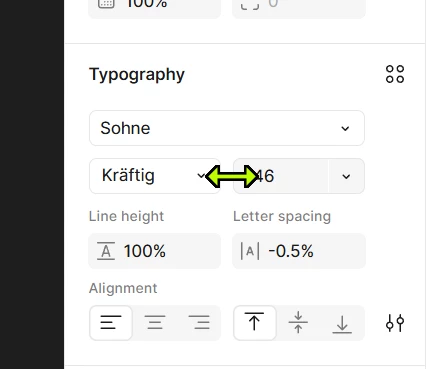
Type sizing consists of mainly dropdown presets, and manual input (type the size) There is a 3rd option, but it so difficult to select, and that is resizing using drag. When placing the mouse over the border to the left of the type size, a double arrow appears and you can drag up and down on the size, but the active area is only about 1px wide and it’s almost impossible to use. Can you widen the active drag area like on the layout width box?  This is particularly useful when a selected work can be resized dynamically to match the width of a different word above or below.

 

1 reply

djv
Figmate
  • Community Support
  • August 25, 2026

Hi ​@Wayne Bowman, thanks for flagging this issue! 
 

I understand how frustrating this must be, but you actually don't have to rely on finding that 1px strip. Hover anywhere over the font size input and hold ⌥ Option (Mac) or Alt (Windows), and the scrub cursor appears to allow you to drag to change the value. This works on any numeric input in the right sidebar, not just font size. You can also change scrub speed by moving your cursor toward the top of the screen (faster) or bottom (slower). More detail here: Scrub fields.


That said, your underlying point still stands. The narrow hover target on inputs without an icon isn't intentional, and making it consistent with inputs like W/H is something the team is aware of. There's an earlier thread raising the same thing. I can't give you a timeline or promise it will be implemented, but we appreciate your honest feedback!