

Carey_Spies1
New Member
Jun 23, 2023 9:34 PM UTC

Reorder variable collections list

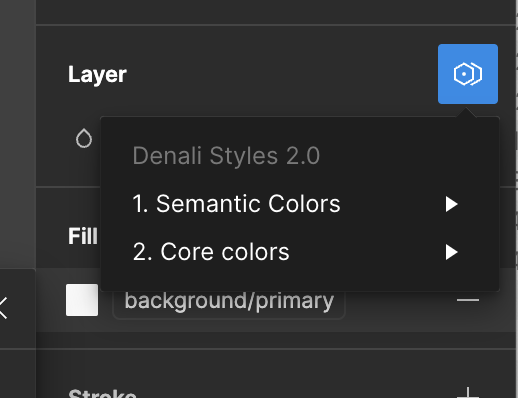
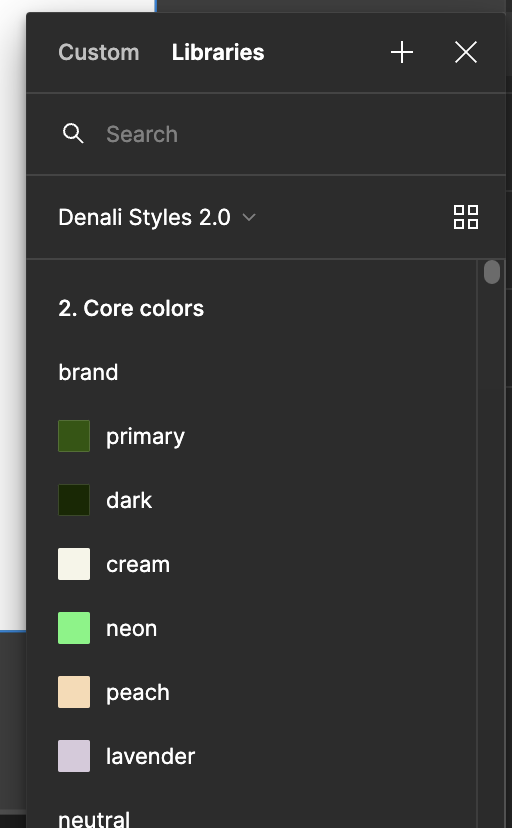
Can anyone figure out how to reorder the list of variable collection in the fill dropdown? The layer ‘mode’ assignment appears to sort correctly alphabetically, but the pick list under the fill menu does not, which is a huge painpoint, and will definitely lead to my designers picking the first color they see instead of the semantic one.

Correctly sorted - numerical
Screenshot 2023-06-23 at 2.28.47 PM

Incorrectly sorted - 2. is at the top instead of 1.
120 replies

Karen
New Member
Feb 28, 2025 12:08 AM UTC

As our multi-brand design system grows, more control over how we display and order our Figma Variables will be a game changer for Designer workflow. I would love this to be made a priority so we can avoid any time consuming workarounds please 🙏

Matt Molloy
New Member
Feb 28, 2025 3:46 PM UTC

Very, very frustrating that a feature like this is missing from an area that power users will all be feeling the pain in.

wgo
Active Member
Mar 4, 2025 4:21 PM UTC

+1 for custom order of collections

Luciano Picozzi
New Member
Mar 6, 2025 12:43 PM UTC

At Air France - KLM we are working on a multi brand, multi theme, multi platform design system. Currently we are rolling out to a variety of products.

We need to be able to change the order of the token / variable layers. We need our designers to choose from our semantic layer and not the foundation layer. Please fix this. Either to not publish a layer, either to change the order.


Beth4
New Member
Mar 7, 2025 2:49 PM UTC

I’m having a hard time believing this isn’t possible. It’s so necessary that I keep thinking I must be missing something, but no. Please make this a priority fix. It’s much more important than adding AI features. It’s a major pain for us designers!

Carey_Spies1
New Member
Apr 11, 2025 9:58 PM UTC

Alright gang it’s been fun, but I think we can finally close this thread. I believe this has been solved with this feature Reorder modes and collections talked about here -> https://www.figma.com/blog/how-to-streamline-your-design-system-workflow-in-figma/

Ariel11
New Member
Jul 10, 2025 6:29 PM UTC

Reordering collections is great but any news on how to reorder the variables in a collection? The bread and butter color selection in my app is the text colors and primary/secondary options, instead I have to scroll or search for them past all these other variables 300x/day. 


Juan_Guzman
New Participant
Nov 6, 2025 11:07 PM UTC

Same here! Reorder is very much needed!


jonoyoung
New Participant
Dec 3, 2025 4:15 PM UTC

My current trick to get around this limitation is to search for the variable I need - e.g. nav/about - and copy “nav/about” so when I apply the variable to the next element, I paste ‘nav/about’ and only see the relevant variables displayed, rather than scrolling past everything.

Only works in some situations, but so far this search, copy/paste method has been a time saver.

A UI can be designed. A UX can be measured.
Byrne.Studio
New Member
Jan 23, 2026 11:45 AM UTC

This is absolutely crazy to me that this still isn’t an option. There’s even a video here that shows how to reorder collections, and yet it doesn’t exist at all within Figma, or at least nowhere I can see.