

mcram
February 1, 2021

Refresh thumbnail

  • February 1, 2021
  • 58 replies
  • 14778 views

I find the thumbnail is slow to update and often doesn’t update for days (at all?). A work around has been to choose “Restore default thumbnail” and then “Set as thumbnail” on the desired frame. The thumbnail has become an important feature to me and I use it to convey information to my team. The inconsistent thumbnail updates are a little problematic.

Suggested solution: an option in the right-click menu for the file to “Refresh thumbnail”.
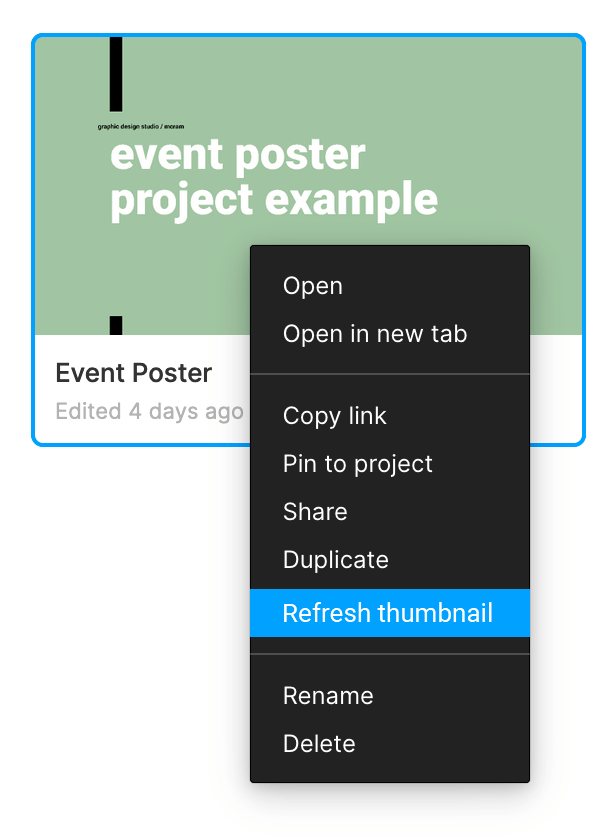
58 replies

February 23, 2024

I was using Figma on Windows and noticed that thumbnails for my projects weren’t refreshing instantly within the software, only after navigating away and returning via the browser. This highlights a need for a dedicated ‘Save Project’ feature, similar to the save functionality in Word and other offline applications. Such a feature would allow changes to be directly saved to the existing project file on the PC, avoiding the inefficiency of creating new files for each modification. This would not only save time but also reduce clutter by preventing the accumulation of multiple file versions, streamlining the workflow and conserving screen space.

Figmate
February 26, 2024

Hi @Andre_Machado Thanks for sharing your thought! I found other community members asking for something similar here.
I’ve merged your topic with this existing feature request from our community to have all the thoughts in one place!
Feel free to post additional comment and vote.

Thank you!

February 27, 2024

thanks Bruno!

Jakob_Schleenvoigt
New Member
March 13, 2024

Would be great to have for our Team as well. We use the File Cover to show Team, Platform, File Type etc.

Betsy_Cowie
New Member
July 24, 2024

Same problem here! This is the third company I’ve worked with that uses thumbnails to show status of files, and it is such a massive pain point at every place. It’s really, really frustrating.

Dont_Panic
New Participant
January 31, 2025


I had the same problem with thumbnails. I use thumbnails and covers to communicate status, ticket, documentation and other information. Currenlty the flow is: right click cover, reset thumb, wait…, right click again, set thumb … omg 🥵 that is a very tedious process.

So I didn’t want to wait for Figma to provide a fix, so I built this plugin.
🔃 Thumbnail Refresher
https://www.figma.com/community/plugin/1467093426060141961/thumbnail-refresher

How it works:
1. Do your changes in your thumbnail/cover
2. Run Thumbnail Refresher (no need to select the frame)
3. Hit refresh
4. Thumbnail cover is updated.

🎁 Works also if you are in a different page. The plugin will find the thumbnail silently and do the update.
This is useful if you want to 1. Change cover details → 2. Do design on a different page →  3. Before closing the file run a final thumbnail refresh without going back to Cover page. 

Note: Depending on app, location, connection, and Figma you might need to wait a few seconds or minutes for new thumb to be applied. 
Sometimes by closing the file and opening it again seems to work. Not guarantee.

Btw, Thumbnail refresher works in Figjam too!
Let me know if you have any feedback. I hope it helps!

Ðönt·Pãniç (GeorgeM)

Danijel_Kurincic
New Member
January 5, 2026

Please fix the thumbnails and make a proper feature out of it: 
Make it a separate library by default.
Make it a different page by default. 
Keep a certain design freedom in the thumbnail canvas.
Force every file to have a thunbnail. 
Autogenerate thumbnail photo (gif) out of latest edits and offer it in the Thumbnail page canvas to be used as a component. 

Obviously fix the “refresh” bug, 

Yezgi_Baha
New Member
April 24, 2026

Sad to report - after 5 years - that this feature is still quite a mess. I spent 30 minutes trying all manner of witchcraft to refresh thumbnails of my cover pages. Please do provide a reliable method to refresh them.