

Keven_Lupien
January 21, 2021

Persistent color picker (when unpinned from right panel)

  • January 21, 2021
  • 58 replies
  • 5479 views

There have been many times where I’m trying to compare the color values between two or more objects. However, every time I select another object the color panel disappears so I have to click on the swatch again and try to remember the values from the previous object. Sometimes I’ll just take a screenshot of the color picker values and paste them back into Figma but that’s not fun at all.

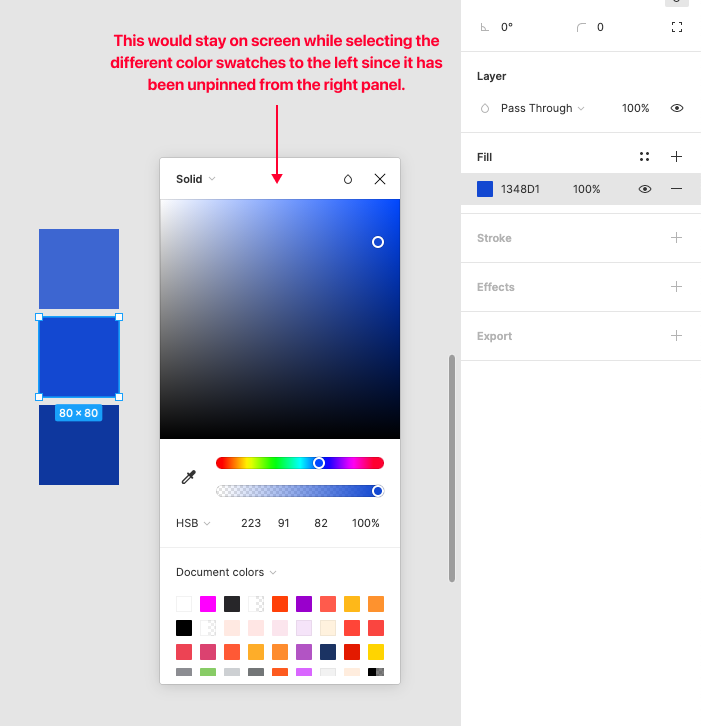
One possible solution would be to make the color picker remain visible if the user ‘unpins’ it (ie. drags it away from the right panel). Then they could select the next object to see the color values and then close the picker when they’re done.
Pinned Reply By djv

Hey All, thank you so much for your continued feedback on this! 

I completely understand how implementing this capability would improve your workflows. To be transparent, while this is on the team’s radar, they haven’t made much progress since working on the color picker updates that shipped last year. It was scoped and discussed, but pinning the picker open turned out to be a bigger technical lift than that work could absorb, so it was ultimately not included.

I don’t have an exact timeline to share, but I’ll be sure to come back to this thread if/when we have a more concrete update. Please keep adding your specific workflows; concrete examples of where this costs you time are the most useful thing for us to carry forward.

58 replies

Laura_Eyres
New Member
May 22, 2025

100% - I think theres a lot of frustrating nuances with the colour picker. It sometimes loads half visible and is hard to move without loosing it altogether. I dont like that is cant be fixed to the HUD - I need a customisable HUD like in adobe. The window to scroll through the custom colours panel is tiny too and cant be expanded. Theres a few more things to add please :) 

Alwan
New Member
August 22, 2025

Would love this feature please.

Naomi_Adkins
New Participant
November 5, 2025

+1 for this, it’s especially frustrating when you’re trying to get contrast ratios for colours, you constantly have to re-open the panel. 

Dusan Tuzinsky
New Member
December 12, 2025

+1 Checking color contrast would be so much easier if the color picker remained open after detaching.

Martin_Hardee
Active Member
February 7, 2026

I guess you could do ⌃C (color picker) and hover through each element you want to compare, I find this to be the fastest way.

If that ^C color picker popup offered the ability to choose between styles and hex codes (like the full color picker) that could work.

Martin_Hardee
Active Member
February 26, 2026

The recent updates to the popup picker (^ C) (showing and allowing copy of style names) are definitely a plus, but a persistent color picker would still be helpful so we don't keep having to reselect the color picker.

Remus_Baltariu
Active Member
August 28, 2026

I was about to create a new thread about this. If the color picker panel is detached, I have no issue keeping it open. This is particularly helpful when creating color palettes, as it allows me to better observe the steps and the ramp.

So yeah, let’s make this a reality Figma team 🙏

djv
Figmate
Community Support
August 28, 2026

Hey All, thank you so much for your continued feedback on this! 

I completely understand how implementing this capability would improve your workflows. To be transparent, while this is on the team’s radar, they haven’t made much progress since working on the color picker updates that shipped last year. It was scoped and discussed, but pinning the picker open turned out to be a bigger technical lift than that work could absorb, so it was ultimately not included.

I don’t have an exact timeline to share, but I’ll be sure to come back to this thread if/when we have a more concrete update. Please keep adding your specific workflows; concrete examples of where this costs you time are the most useful thing for us to carry forward.