

Keven_Lupien
January 21, 2021

Persistent color picker (when unpinned from right panel)

  • January 21, 2021
  • 58 replies
  • 5479 views

There have been many times where I’m trying to compare the color values between two or more objects. However, every time I select another object the color panel disappears so I have to click on the swatch again and try to remember the values from the previous object. Sometimes I’ll just take a screenshot of the color picker values and paste them back into Figma but that’s not fun at all.

One possible solution would be to make the color picker remain visible if the user ‘unpins’ it (ie. drags it away from the right panel). Then they could select the next object to see the color values and then close the picker when they’re done.
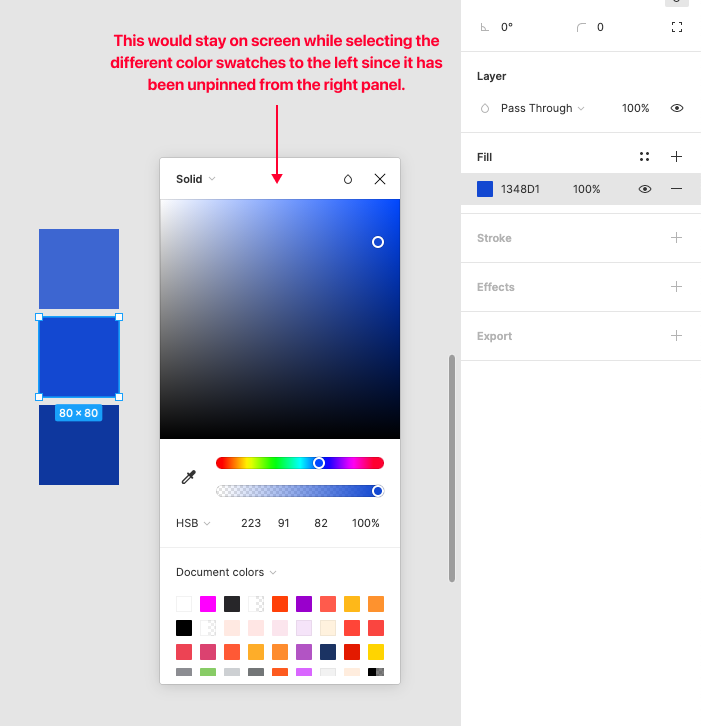
Pinned Reply By djv

Hey All, thank you so much for your continued feedback on this! 

I completely understand how implementing this capability would improve your workflows. To be transparent, while this is on the team’s radar, they haven’t made much progress since working on the color picker updates that shipped last year. It was scoped and discussed, but pinning the picker open turned out to be a bigger technical lift than that work could absorb, so it was ultimately not included.

I don’t have an exact timeline to share, but I’ll be sure to come back to this thread if/when we have a more concrete update. Please keep adding your specific workflows; concrete examples of where this costs you time are the most useful thing for us to carry forward.

58 replies

Emile_S
New Participant
March 4, 2024

Building palettes is so incredibly tedious. Also the colour picker could do with remembering that which tab i was last in. So when i’m assigning colours I don’t have to switch the tab, every… single… time…

MatteoAb
March 4, 2024

Having a persistent color picker would make creating palettes a breeze 😮‍💨

Mike_Nino
New Member
March 15, 2024

Really need this!

Jonathan_Wells
April 29, 2024

Please Please Pleases Please Please Please Add this feature.

-Click a frame,
-Click color pallet
-Scroll
-Scroll
-Scroll,
-Click a swatch.

vs.

-Click a frame
-Click a swatch

Carlos_Ruiz
New Member
May 9, 2024

Upvoting. Having to work out colour tints and shades and omg this is painful… Persistent colour panels (and probably other windows) please!

May 31, 2024

Need this +1

Henrique_Dellazeri1
New Member
June 14, 2024

+1 this would be very nice to have

kiprou
New Participant
September 25, 2024

Get this problem solved please.

Emile_S
New Participant
November 11, 2024

Currently to edit an elements style, or even view what style settings it has, I have to open up 2 sublevels of pop-overs to edit a style, which dissapears if I then click somewhere else.

The same goes for when your editing colours. Incessenatly hiding the panels that contain the information i’m trying to process when I switch elements is straight up crazy.

Please for the love of god allow us to pin these views or dock them in an additional vertical panel.

I wonder if you did any user testing for your new UX. Because the fact you think this is good and haven’t changed it yet, is crazy. Its like your more focused on it looking good than being actually funcational.

CamilaB
Active Member
May 2, 2025

Any updates on this? It's still a hassle...