

Keven_Lupien
January 21, 2021

Persistent color picker (when unpinned from right panel)

  • January 21, 2021
  • 58 replies
  • 5479 views

There have been many times where I’m trying to compare the color values between two or more objects. However, every time I select another object the color panel disappears so I have to click on the swatch again and try to remember the values from the previous object. Sometimes I’ll just take a screenshot of the color picker values and paste them back into Figma but that’s not fun at all.

One possible solution would be to make the color picker remain visible if the user ‘unpins’ it (ie. drags it away from the right panel). Then they could select the next object to see the color values and then close the picker when they’re done.
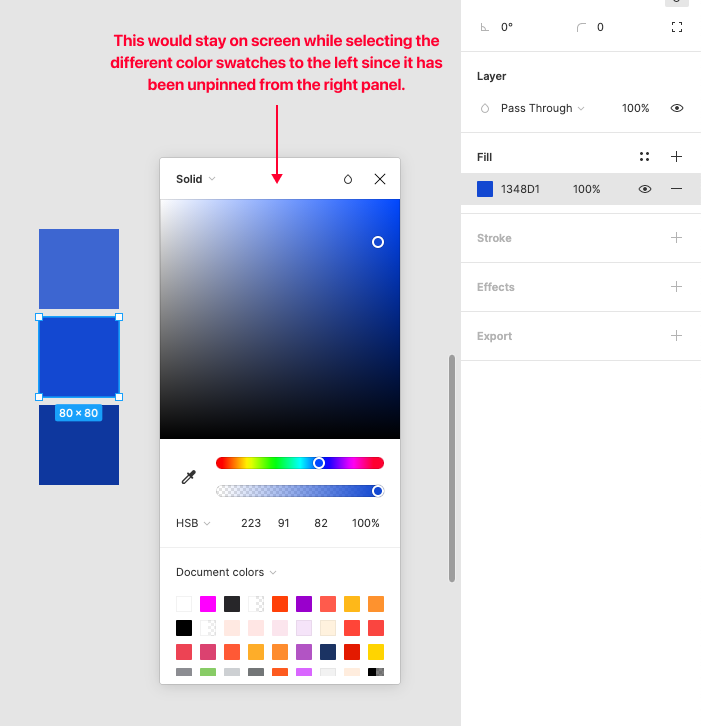
Pinned Reply By djv

Hey All, thank you so much for your continued feedback on this! 

I completely understand how implementing this capability would improve your workflows. To be transparent, while this is on the team’s radar, they haven’t made much progress since working on the color picker updates that shipped last year. It was scoped and discussed, but pinning the picker open turned out to be a bigger technical lift than that work could absorb, so it was ultimately not included.

I don’t have an exact timeline to share, but I’ll be sure to come back to this thread if/when we have a more concrete update. Please keep adding your specific workflows; concrete examples of where this costs you time are the most useful thing for us to carry forward.

58 replies

Mr.Biscuit
New Participant
January 23, 2021

I guess you could do ⌃C (color picker) and hover through each element you want to compare, I find this to be the fastest way.

Keven_Lupien
January 25, 2021

Wow, I can’t believe I didn’t notice the color values in the magnification view when using the ⌃C (color picker) and I use that all the time. Thanks for pointing that out. I’ll definitely be using that for comparing values.

I still think the persistent picker is still valuable so you can select an object, adjust the color, then select the next object and adjust, etc.

Gleb
Power Member
January 25, 2021

Yep, I think that still would be valuable. Not just for comparing colors, but for picking colors for multiple objects, for example. When you are in search of that perfect color combination, you would switch a lot between objects and opening the color menu every time isn’t nice.

Ginny_Wood
New Participant
March 15, 2021

Please, please build this soon. Developing color palettes is very tedious when I have to open three menus to adjust a style. Every time I check color contrast, the menu goes away and I have to start all over. Or, at least add a keyboard shortcut to open the color menu? It is fiddly to have to click, hover, and click again on these small targets. Screen Recording 2021-03-15...

dustavsson
November 3, 2021

I really miss it when comparing colors. I’ll choose one to check its hue, then another to compare it, then the color picker automatically hides when changing layers. A workaround is to select multiple and click the different “Selection colors” list, but this is too time-consuming and sometimes cumbersome, especially when comparing more than two or three colors.

Ronghui_Cai
December 1, 2021

After selecting the color in the shape state and switching to the font, the color palette will disappear. You need to click the color palette again, and the experience is not very good

Constantine_Georgiadis
New Participant
October 15, 2022

In general, Figma’s workflow involves too many clicks, which is literally a physical pain point for those of us with carpal tunnel neuropathy—it’s getting to be a blocker. Having the color palette go away with each selection gets to be too much work. It’s even more steps when dealing with styles.

While we are at it, and in the same vein, it would be a life changer to display color using my last-used color system. Thank you.

Christopher_Coleman
October 26, 2022

This behaviour shouldn’t just apply to the color palette. There’s no reason all palettes shouldn’t remain open after detaching them.

I want to detach the palettes so they’re more convenient to access. What’s the point of detaching it from the sidebar if it’s going to disappear the moment I select something else?

Keven_Lupien
October 26, 2022

@Christopher_Coleman I completely agree. That makes total sense to make them all function the same.

M_Olsen_Alyshia
December 6, 2022

Came here to say I would love this too! I’ve been creating a palette and it’s very tedious to keep opening the picker. I actually expected detaching it would keep it open like a plugin and was surprised when it closed.