

Aalok_Trivedi
Jan 29, 2021 6:26 PM UTC

Option to NOT create subfolders when exporting assets

It really annoys me that Figma automatically creates subfolders when you export an element that’s inside a component and has a ‘/’ naming convention. I always have to go back into the folder and delete the folders or rename everything. It would be great to have a simple checkbox toggle in the exports panel to enable/disable creating subfolders, similar to Illustrator.
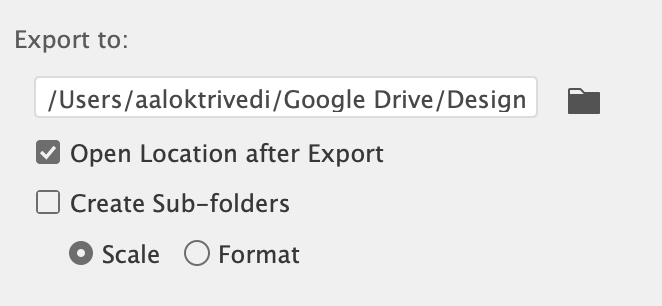
Screen Shot 2020-09-08 at 5.49.33 PM.png

38 replies

David_Cuesta
Jan 29, 2021 8:34 PM UTC

Here here!

Lishay
Jan 30, 2021 12:59 PM UTC

Little but great suggestion, voted!

kolyba
New Participant
Jan 30, 2021 9:42 PM UTC

Yes! I hate it when Figma does this

Chase_Stubblefield
Aug 3, 2021 5:37 PM UTC

please add this

Oleksandr_Hulak
Aug 5, 2021 4:17 PM UTC

true, those subfolders are annoying

Aug 5, 2021 5:38 PM UTC

Fully agree! Being allowed to choose NOT to auto-create subfolders would be amazing and save me time and hassle on a regular basis. Thank you for considering this!

Patrick_Perkins
Aug 24, 2021 9:56 PM UTC

Oh my god PLEASE. It’s so annoying—just put the files where I asked figma to put them

Ryan16
New Member
Sep 28, 2021 8:10 PM UTC

this issue just caused me a big pain when trying to quickly export for a presentation. big +1 to this request.

Marcel_Schulz
Sep 29, 2021 3:03 PM UTC

I can’t state just how annoying this is. Exported files will just not “show up” where you told it to export. Instead you have to figure out which folder it thought it should go, open Finder individually and stupidly navigate there. It’s just so annoying.

Michael_Dusing
New Participant
Dec 2, 2021 4:59 PM UTC

Yes, this. So annoying when the exported screens or assets are nested in 3 or 4 folders.

- Michael Dusing; COO @ Design Like You Mean It