
vsathishkumar
New Member
July 8, 2022

Option to duplicate/copy styles, not just cut them

  • July 8, 2022
  • 50 replies
  • 4884 views

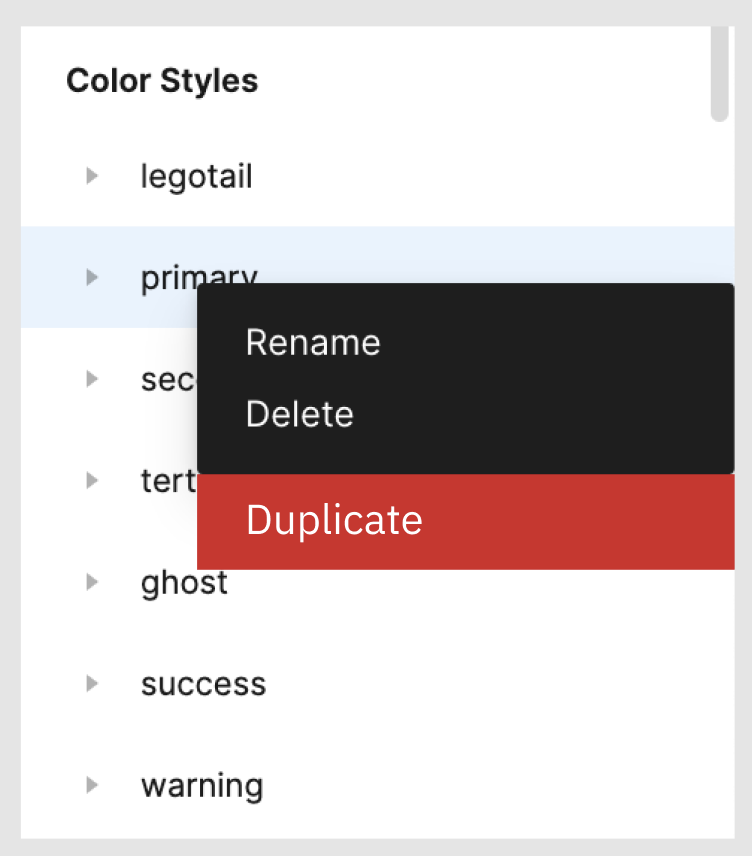
If there is an option to duplicate the Text Styles / Color Styles folder then it makes it easy when creating design systems. Attached is a screenshot of the idea.

50 replies

Lara_Graziela
June 24, 2024

Haries, this also happened to me several times, it was precisely the reason I opened this topic, I lost several styles and had to recreate everything again, I contacted Figma support about this but received a response that they were unable to reproduce the error, so I came here

Jessie_MA
New Member
August 14, 2024

how is this not a thing already???

Jacopo_Marrone
New Member
August 24, 2024

With this plugin you can can duplicate color styles folder

https://www.figma.com/community/plugin/1407542856104422582/duplicate-color-styles

Good to know: I’m the author of the plugin, feedbacks are welcome 😁

Jacopo_Marrone
New Member
August 24, 2024

With this plugin you can can duplicate color styles folder

https://www.figma.com/community/plugin/1407542856104422582/duplicate-color-styles

Good to know: I’m the author of the plugin, feedbacks are welcome 😁

Ivan_M1
September 24, 2024

great thanks, can this be done for text styles as as well?

Won_Sun_Parque2
October 4, 2024

+1

I couldn’t believe that this feature is missing, given how much Figma advocates its ability to help us create and manage design system… Like… seriously?

Please add this to your next software update. Thanks!

Simone_Salvucci
New Member
October 10, 2024

The solution is this plugin to copy/paste style between files.
Works with any type of styles. Colors, typography, effects and even grids styles!

https://www.figma.com/community/plugin/1424844302061301564/copy-styles

Give it a try!

Kyle_Johnson
New Participant
October 31, 2024

agreed, looking for a plugin-free solution to this

Dominic
Active Member
November 5, 2024

@ryan_luce 's hack works, just make sure you undo one or two steps… draw a random shape before cutting the styles to get a baseline of what step you’re on.

Also you can take extra step and rename the pasted styles folder in the new file before cut + pasting them back again into your original file.

Saeid Safapishe
New Member
April 8, 2025

It’s been two years since this idea was given. PLEASEEEEE do this for us. it would help a lot to create new design file. this could same so much time from us in the start of the design of a new project.