

Alborz_Heydaryan1
August 27, 2021

Make text follow a path or a circle

  • August 27, 2021
  • 44 replies
  • 39556 views

I’m trying to create the text effect in this image. The odometer’s text wraps around the circle very nicely.
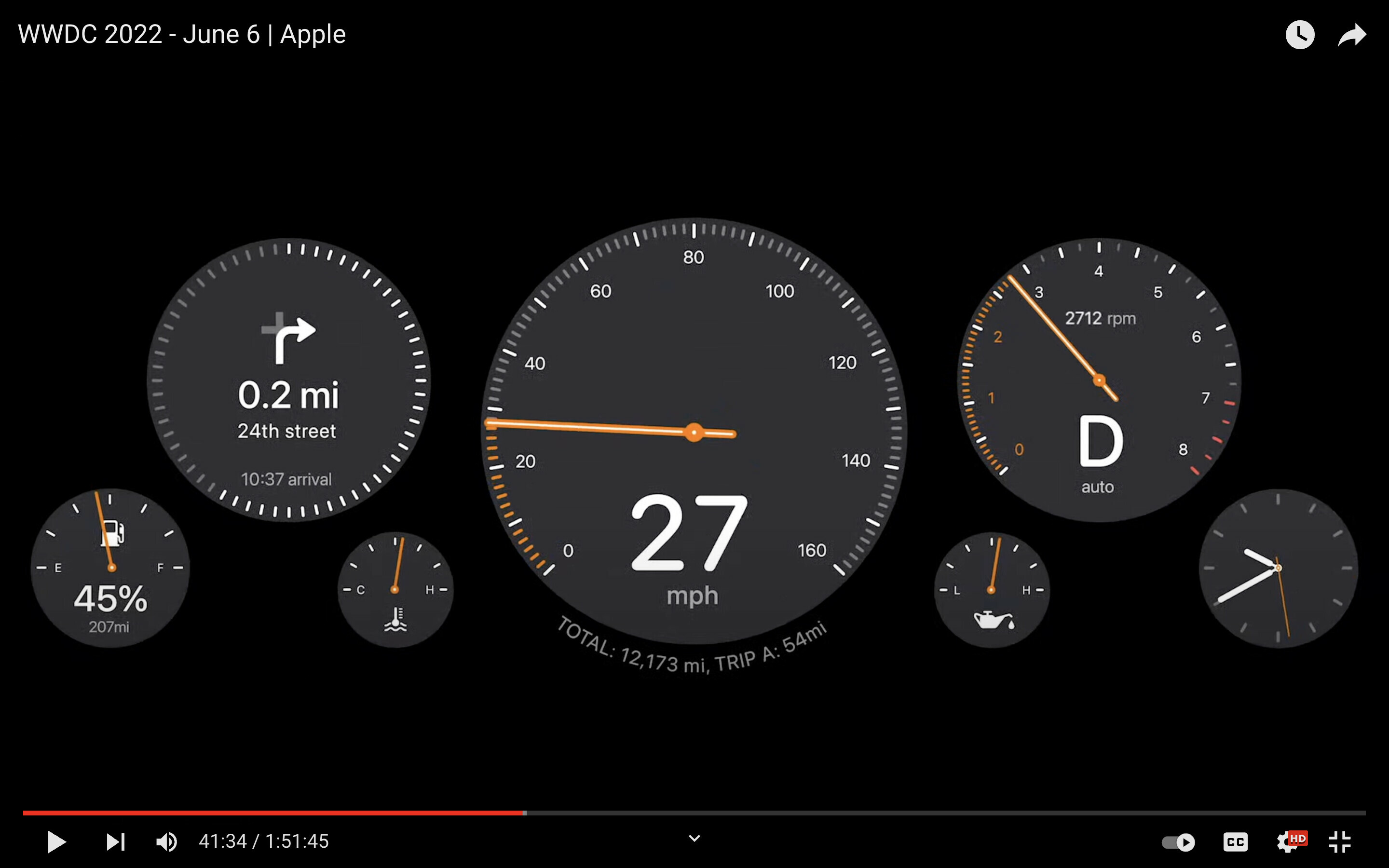
Imgur

Right now I have to use a plugin, but I lose the ability to edit the text afterwards and there is no preview so I have to try a few times to get the text to wrap nicely.

Sketch had a feature where if you dragged a text on top of a path it would snap to it and would follow the path. A similar feature (perhaps with a better implementation) would be very welcome on Figma.

Pinned Reply By djv

Hey All, sorry for the confusion here! 

We officially launched the native Text on a path tool as part of the Figma Draw release on May 7, 2025 during the Config 2025 conference last year. 
 

You can create text layers that follow the path of a vector object, such as a shape or brush stroke. Use this to create text that flows along curves, circles, or other custom shapes.

To type text on a path:

  1. Select the  Text on a path tool from the toolbar.
  2. Hover your cursor over the path of a vector object until the  text on a path cursor appears.
  3. Click to add a new text layer and start typing.


As you type, the text layer will wrap around the chosen path. You can use the blue handle to determine where the text layer begins. To switch the text layer to the other side of the path, select Flip text orientation In the Typography section of the right sidebar. Hope this helps clarify! 

44 replies

djv
Figmate
Community Support
December 13, 2024

Hey All, thanks for your continued votes and feedback!

The team confirmed that this is on the roadmap. We can’t provide an exact timeline, but we appreciate your patience - stay tuned!

Anthony_Sudol
December 19, 2024

Commenting to say I find myself searching “Figma text on path” at least once a month just to double-check that it’s still not a thing. Happy to see it’s in the works and looking forward to it being implemented!

zvlad
New Member
January 20, 2025

plz

New Member
February 7, 2025

Really need this!!

Luciano
Active Member
March 6, 2025

Adding one more vote to this. It's been 3 years since the first suggestion. My suggestion: do an MVP of this feature ASAP, either text on a path or on a circle, whatever is easier to implement. We can live with just one until the feature is fully implemented for both, but it's really hard to not have either option natively…


By the way, I'm seeing two different features conflated into one: text being contained inside a non-rectangular shape, and text around a shape (or following an open path/curve). Those are different features. Right now I care more about text following along a path.

Americarnaud
New Member
April 18, 2025

A must-have!!

Not having that makes designing anything almost impossible if you need curved text. All the existing plugins do a terrible job at replacing a feature that is needed.

Christina_Stensby
June 6, 2025

Adding a vote here as this is table stakes in illustrator, inkspace, photoshop, gimp and others. Please add the feature! 

Antony_Smith
New Participant
June 24, 2025

I came here first to realise this still isn’t an option then wasted a bunch of time discovering not a single of the text to path plugins actually work - I’d guess only around 20% of plugins actually do - to finally end up using an alternative app and doing what I needed in 5 minutes. I *really* hate Figma at times.

Luciano
Active Member
June 26, 2025

Now all it's missing is the stairstep text orientation option https://helpx.adobe.com/illustrator/using/creating-type-path.html

Filipe Varela
New Member
July 3, 2025

Hey, folks! Heads-up that it’s now possible to place text along a path.

All you have to do is create a path and then select the Text tool and place your mouse over the path. You’ll immediately see the cursor change, indicating the new placement.