Mr.Biscuit
New Participant
January 23, 2021

LAUNCHED: True Aspect Ratio Lock

  • January 23, 2021
  • 214 replies
  • 31503 views

Can we get a true aspect ratio lock when the ‘Constrain Proportions’ is on?WX20210123-114719@2x A true aspect ratio lock means two things:
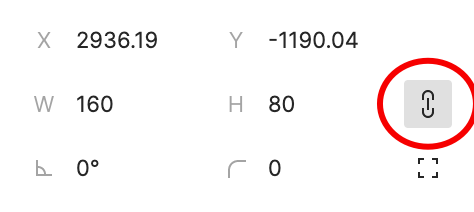
  1. When dragging on a node with ‘constrain proportions’, its width and height always stay in their original ratio no matter which direction you drag it.
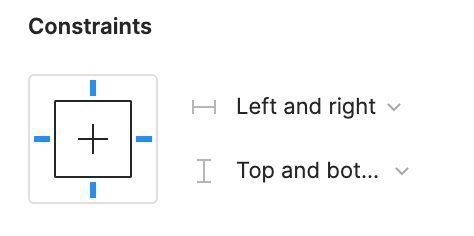
  2. When resizing on the parent of a node with ‘constrain proportions’ that happens to be constrainedWX20210123-112532@2x, the node takes on the smallest of its supposed width and height, and calculates its ratio accordingly.

This would be so very helpful to polygon shapes that want to stay in that shape. Consider a spider chart. When you resize its parent, you don’t want the ‘spider net’ to squish squash; neither will you want a doughnut to turn into an oval.

*Resizing of the node’s parent layer is inevitable if you need responsive designs.

Pinned Reply By Celine_

Hey everyone, thanks for your patience! It’s fully rolled out now!

You can now lock the aspect ratio of almost any object in Figma – including frames, shapes, images, videos, vectors, and text – so that the proportions of that object are respected as you scale the object or its parent container.

 More info in the release notes here.

214 replies

Craig P.
New Member
January 21, 2025

New figma user here frustrated that I can’t figure out how to get my icons to have a fixed aspect ratio.

Uhl
Active Member
February 6, 2025
ahainen
Active Member
February 6, 2025

Holy llamas, they finally did it!? 🙌

https://www.figma.com/release-notes/?title=aspect-ratio-locked

FINALLY. INSANE HOW LONG THIS TOOK

David_Simpson
New Participant
February 7, 2025

Nice job Figma, thanks for getting round to this :)
an evolution i would like to see is aspect ratio variables we could apply to the lock

  • designers could pick from predefined ratio’s
  • developers could see that ratio in dev mode with either a raw aspect ratio value or a semantically referenced ratio
  • we could have code parity to aspect ratio tokens
Sayful_Islam_Shakib1
New Participant
February 7, 2025

Didn't get this feature Figma please give me that! I really need it.

Celine_
Figmate
Celine_Pinned
Community Support
February 7, 2025

Hey everyone, thanks for your patience! It’s fully rolled out now!

You can now lock the aspect ratio of almost any object in Figma – including frames, shapes, images, videos, vectors, and text – so that the proportions of that object are respected as you scale the object or its parent container.

 More info in the release notes here.

AntoineP
Active Member
February 10, 2025

The release is great (finally!) but it seems like the new ratio lock weirdly rounds up dimensions to the nearest pixel value (when you input a round value in width, height is round up causing a break in the aspect ratio, especially at very small, sub-pixel dimensions).

Anyone who worked with aspect ratio lock hacks knows that it’s annoying to have non-round heights but it should be the user’s choice to round or not. This currently makes the work of resizing vectors for icons very difficult.

Celine_
Figmate
Community Support
February 10, 2025

Hey ​@AntoineP ,

Thanks for your detailed feedback! Does this occur with specific files or all files? And does it happen in the browser, desktop app, or both?

Can you try using the quick actions menu to turn off "Snap to pixel grid"? 

Please let us know if this resolves your issue!


Apolline
Active Member
February 11, 2025

The update is great, I wish the old icon was kept though, as it’s universal.

AntoineP
Active Member
February 12, 2025

Hey ​@AntoineP ,

Thanks for your detailed feedback! Does this occur with specific files or all files? And does it happen in the browser, desktop app, or both?

Can you try using the quick actions menu to turn off "Snap to pixel grid"? 

Please let us know if this resolves your issue!


Thanks, disabling snap to pixel indeed solves the issue. I’m a little surprised because this wasn’t necessary to do the same kind of actions before the update. So now we have a slightly confusing behavior with snap to pixel enabled (which I would say is the default setting for most):

  • When using locked aspect ratio, dimensions are rounded to the nearest pixel value
  • In “free” aspect ratio constraints, they aren’t

Nothing indicates that this will happen, at least a tooltip would be welcome.