

Sean14
New Member
July 2, 2024

LAUNCHED: Toggle Constraints

  • July 2, 2024
  • 22 replies
  • 7358 views

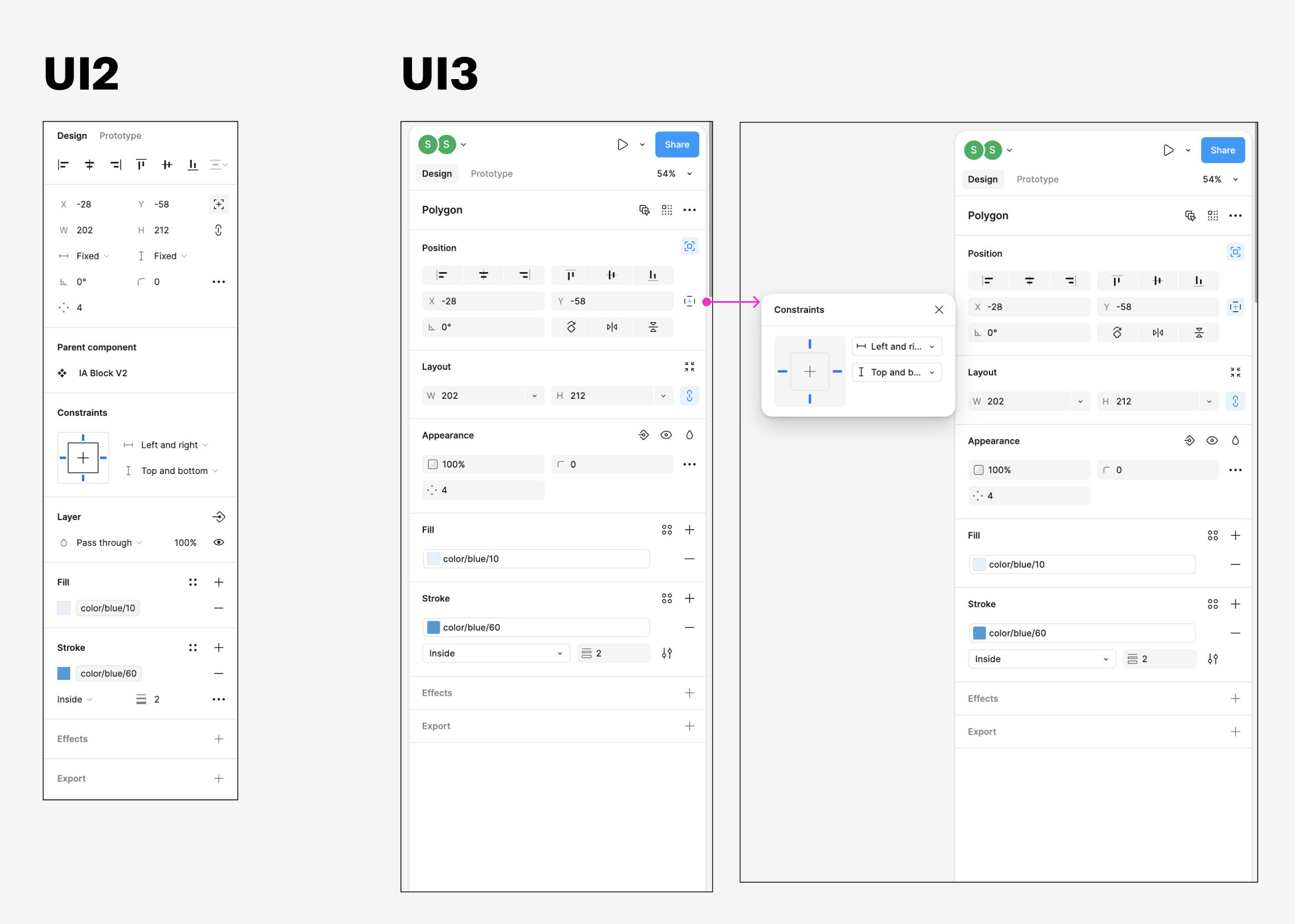
I noticed something frustrating with the UI3 updates. The “Constraints” settings are hidden behind a tiny button within the Position section of the right sidebar. Maybe the Figma team felt like these settings were rarely used, but they are critical when you’re working with items that are absolutely positioned, and want to control how they resize relative to their parent.

It would be nice to see these settings surfaced at the top level when the selected item is either absolutely positioned within an auto-layout frame, or the child of a frame without auto-layout.
22 replies

djv
Figmate
Community Support
September 4, 2024

Hey All, thanks for your patience!

Constraints can now be toggled on and will display inline! 🚀

x.com
The
Active Member
September 9, 2024

Hi, is this a bug or did you do it on purpose: now in constraints it is not possible to remove the side snapping by shift+click.
Now in order to remove the snapping, I have to switch the snapping to the center and only then remove it by shift+click
I think it’s a bug because it’s a known pattern that’s been around since Sketch 🤔

I tried to show it in the video. The moments when the cursor stops on the left and top snapping option - I frantically click the shift+click combination 🙂

upd. It fixed itself, I didn’t even reboot Figma 👀