

LuisPaico
February 9, 2021

LAUNCHED: Allow modifying "Decoration" to the text styles already defined

  • February 9, 2021
  • 97 replies
  • 24359 views

One option that could be useful is to allow modifying the decoration of a text that has already been defined as a text style, because that way you do not have to create two or more text styles to simply add the decoration. As with alignment, it could be added below. thanks
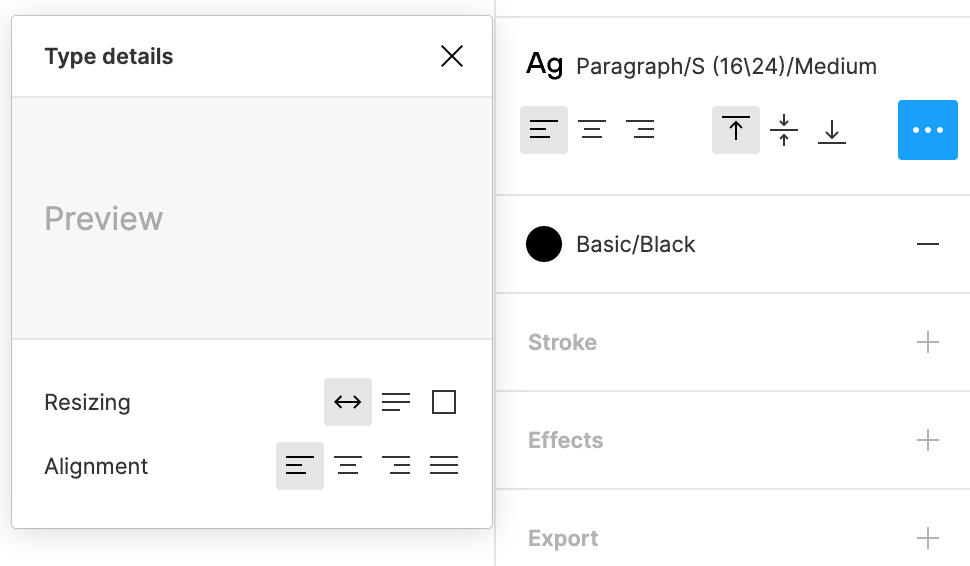

Captura de pantalla 2021-02-11 a las 18.43.18

97 replies

Weirdo
Active Member
June 25, 2024

ctrl/cmd+b to make the text bold.
ctrl/cmd+i to make the text italic.
ctrl/cmd+u to make underline.

I have no idea why they still hide the buttons, so unintuitive.
@dvaliao

Apolline
Active Member
June 25, 2024

I agree with @Weirdo , it’s unintuitive.
I will forget about this update when I need it because it’s not visible and it looks like nothing has changed.

I had to google this to find out how it works. What’s the point?

djv
Figmate
Community Support
June 25, 2024

Hey @Daniel_Cullinan and @Vale_Ria, thanks for the feedback!

This is a feature limitation the team is aware of, but they hope to staff an effort to support semibold (and other weights) in the future! 🙏

djv
Figmate
Community Support
June 25, 2024

Hey @Petr_Siroky, @Weirdo, and @Apolline, thanks for the feedback!

This was actually a mini launch to see who in the community might find this update ahead of Config. Users started discovering the capability last Tuesday, so they gave me the green light to share and update this feature request.

The team planned to formally share post-config with all of the necessary updates to the Help Center, Release Notes, etc. The shortcuts were listed within Miggi’s tweet in-thread above, but I understand the confusion. I edited my previous reply for clarity.

July 5, 2024

@dvaliao Decorations do not work on text in components.

For example I wanted to create “text-link” component with two variants for states: rest and hover. Then I applied underline decoration to the text in the hover variant. Underline shows in the main component, but it’s missing from any instance of that component.

Julius_Klaus
New Participant
July 5, 2024

So there is no way of currently telling it which weight to choose if i bolden it? I tried using a Mode to declare a different variable for “(B)”, but it wouldn’t pick it up.

Ashlee_Williams
Active Member
July 16, 2024

I came here to post about this bug. I can set all the style overrides I want in the main component, but the instances don’t retain them. I have to redo the formatting manually and it’s tedious.

djv
Figmate
Community Support
July 17, 2024

Hey @Bart_K, thanks for flagging this and sorry for the delayed reply!

Our team tried to reproduce the issue, and we found that it should work if you set the underline before changing any text on the instance.

You can also set the override onto the instance manually too, as @Ashlee_Williams mentioned, we agree that this would be tedious.

djv
Figmate
Community Support
July 17, 2024

Yes, @Julius_Klaus - that is correct.

Right now, the feature wasn’t built to support all types of bold weights, and sorry for the delayed reply!

AntoineP
Active Member
July 25, 2024

Hi,
Applying Bold or Italic through the shortcuts aptly shows a (B) or (I) after the styles’ name. Unfortunately, no such indicator is present when applying Strikethrough. Shame!