

LuisPaico
February 9, 2021

LAUNCHED: Allow modifying "Decoration" to the text styles already defined

  • February 9, 2021
  • 97 replies
  • 24359 views

One option that could be useful is to allow modifying the decoration of a text that has already been defined as a text style, because that way you do not have to create two or more text styles to simply add the decoration. As with alignment, it could be added below. thanks
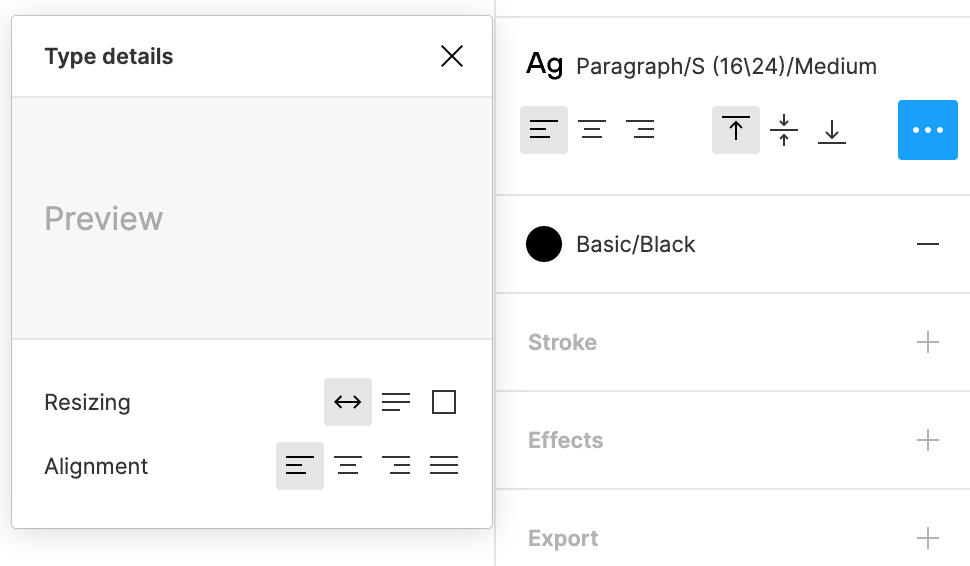

Captura de pantalla 2021-02-11 a las 18.43.18

97 replies

Karl_Martin
May 13, 2024

+1 I need to add superscript to a text style without detaching it.

May 29, 2024

+1 still waiting for this feature. I need to edit text underlines, not just borderlines.

S_Goltsov
New Member
May 30, 2024

Hi! I’ve created a plugin Underline It. It can add underlines to text styles without detaching the style.

Fredrik_Broman1
June 7, 2024

+1 need this! Please add underlines as style overrides, just like is already possible with e.g. list style and truncation.

Gisela_Coulson
June 13, 2024

We need this!!! 😩

Julia57
Active Member
June 20, 2024

This seems to have been implemented this week… I can hit cmd+B to bold a text without breaking the text style. BUT I can’T find any official mention of it anywhere in Figma’s changelog. I want to see all the possible options for this kind of formatting

djv
Figmate
Community Support
June 20, 2024

Hey All,

Applying italics, bolding, and underline to text on top of a text style will now override the text style to apply the decoration. You no longer have to detach decorated text from its text style or create multiple text styles to incorporate italics, bolding or underlines! 🎉

⌘B or Ctrl+B = bold
⌘I or Ctrl+I = italicize
⌘U or Ctrl+U= underline
⌘⇧X or Ctrl+⇧X = strikethrough

x.com
Daniel_Cullinan
Active Member
June 21, 2024

Cool to see this implemented – is there any way to control what font weight the ‘bold’ override uses? For instance using a semi-bold weight rather than full bold.

Vale_Ria
June 21, 2024

This feature is super useful 🙂 , but it doesn’t solve much for those who use fonts that require semibold weights 😦

Petr_Siroky
New Participant
June 24, 2024

Am I the only person here who doesn’t know how on earth are you doing that? I can’t find a way to do this anywhere, not even in the video… there are no new icons, no anything, is it some shortcut I am not aware of? I really love having to google how new features work, because they are so unintuitive, only to end up on forums, where I get to see a short clip with absolutely no explanation.