

Adelina3
New Member
August 10, 2026

Folders: I'm missing Folder contents preview/thumbnails

  • August 10, 2026
  • 40 replies
  • 939 views

Hello,

some feedback from my side regarding Folders, I like the options of a nestable folder, but I find it hard to navigate to the files I’m looking for. The folders are named, but the file thumbnails that were visible with Projects were a huge readability feature that I’m really missing now.

I was searching for it in settings, but couldn’t find a way to set it. I actually added a description to a folder, but did not actually see not one place that the description was shown? This part is especially confusing.

If I could make an improvement suggestion to a current implementation it would be to have a setting to show or not to show some folder contents thumbnails, similar to the previous implementation.

Fingers crossed this can be done!
Pinned Reply By Tom Reem

Hey ​@Jeff27 and everyone following this thread — glad you're seeing them back! 🙌🏻

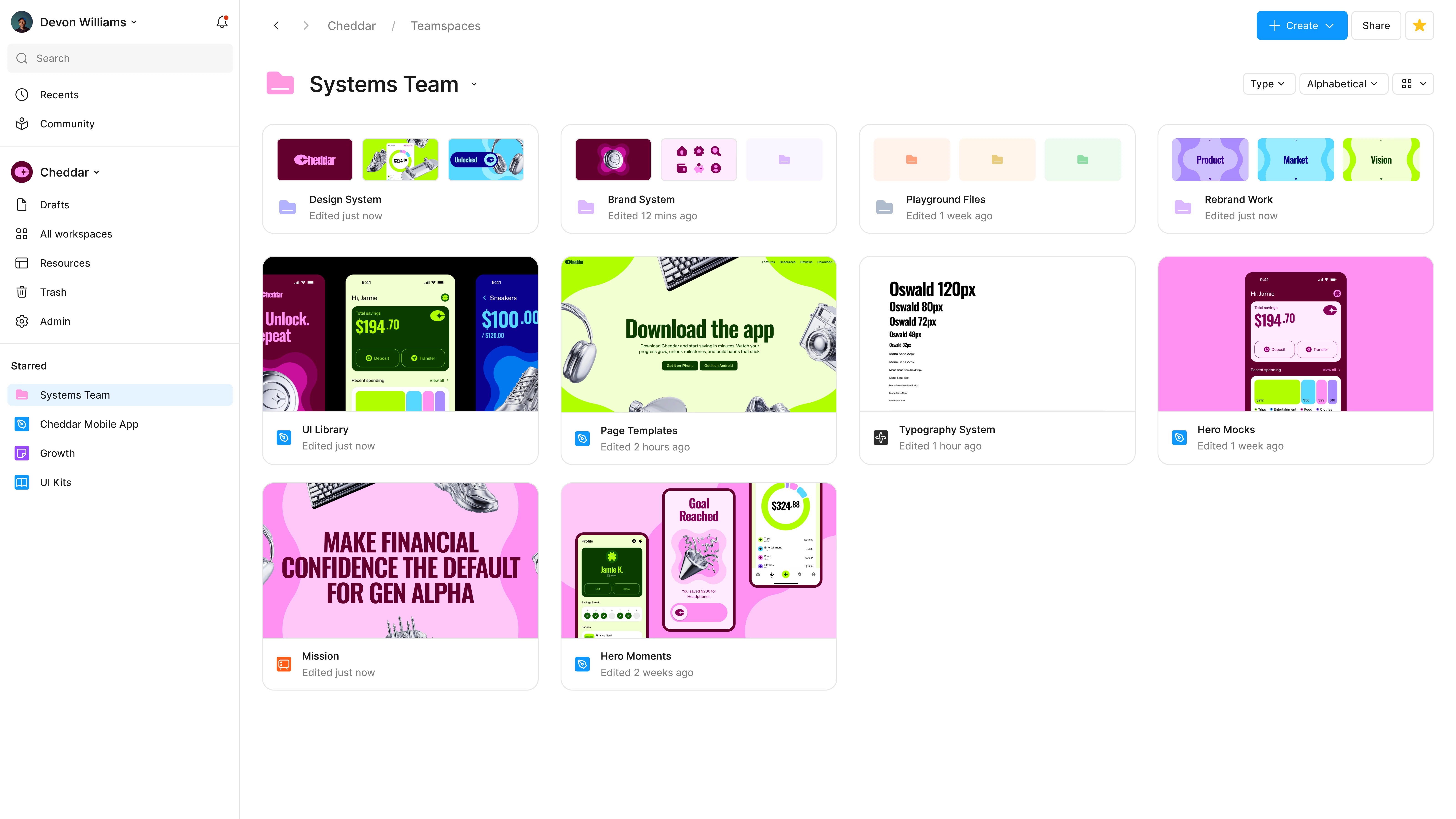
Updated folder preview.

Update: As of today, folder tiles again show a preview of the files inside — the thumbnails many of you said you relied on to scan and navigate. It's rolling out across plans now, so if it hasn't reached your account yet, it should shortly. ✅

Thanks again for keeping this in front of us, and for sharing your feedback along the way.

40 replies

Pilgreen_Ian
New Participant
August 28, 2026

Was there any user testing put into this new view for folders?! I haven’t seen a single comment saying “You know what, I actually like the project thumbnails being taken away from folders!”


This is a remarkably poor update; you guys need to push a hotfix to either revert it or add a toggle to show or hide thumbnails.

JudeHUB24
New Member
August 30, 2026

100% agree. Scanning folders for files is overly frustrating now, taking away or not proving an option for thumbnails is taking away functionality we relied on. Iwork across multiple teams and need to be able to pick up snippets from files. I spend much more time opening folders, realising it is the wrong one & going in circles to get what I need.

Huy Luu
New Member
September 3, 2026

Hi Figma team,

I’m a designer, and I truly appreciate the continuous improvements you’ve made to Figma.

However, I recently noticed that in the All folders view, projects no longer display previews of the Figma files inside them. This change has made it significantly harder and more time-consuming for me to find the files I need.

There are two main reasons why file previews are essential to my workflow:

  1. Alongside my current work files, I have many personal and older files that I may want to revisit. Since I often don’t remember their exact names, visual previews help me recognize them immediately without opening every project individually.

  2. I have around 500 Figma files that I may need to access at any time. Without previews, navigating such a large library becomes slow and frustrating.

The folder icons do not provide enough visual information to help designers locate their work quickly. In fact, the current interface feels less user-friendly and has reduced my productivity compared with the previous experience.

I appreciate everything the Figma team is doing to improve the product, but I strongly hope you will consider bringing back file thumbnails or visual previews in the All folders view. This would make navigation much faster and improve the experience for designers managing a large number of files.

Thank you for taking this feedback into consideration.

Vimbai Mushayikwa
New Member
September 4, 2026

Agreed. The old way allowed us to use recognition instead of forcing us to recall what the folder name is and which files are where. This change has made what would have taken me about 5 seconds take about 30 seconds to a minute as I try and figure out which folder the respective file is in.


Thank you all for your continuous work on improving Figma.

makoeva
New Member
September 7, 2026

This is particularly painful for larger Enterprise teams. In one of our teams, we now have 28 visually identical folders. Because they are sorted by recent activity and constantly change position, there is no visual or spatial cue to help us find the right one.

Previously, file cover previews made it possible to scan the team quickly, even when items moved. Now, finding a particular folder means reading through the entire list each time. Folder colours are not an adequate replacement for meaningful previews, particularly at this scale.

Ideally, folders should support manual organisation through drag and drop, with the option to pin important folders in place. At a minimum, the selected sorting order should persist rather than reverting to “Last modified”.

Please consider restoring folder previews and giving teams more control over how folders are organised.

cporten
New Member
September 9, 2026

Upvoting this!! This is a major downgrade, especially for Org customers!

Ilva K
New Member
September 15, 2026

It has been a month since you decided to do this. And frankly speaking yall should fire the dude that suggested this would be a great idea. Instead of me taking 10sec to know where i have to go, I can now look 10 mins at 30 identical folders trying to remember which one was the right one. This was the one feature I loved about figma… tnx 

Jeff27
New Participant
September 16, 2026

Just refreshed my screen and as if by magic, thumbnails in folder view are back. THANK YOU Figma for listening to us!

Tom Reem
Figmate
Tom ReemPinned
Figmate
September 16, 2026

Hey ​@Jeff27 and everyone following this thread — glad you're seeing them back! 🙌🏻

Updated folder preview.

Update: As of today, folder tiles again show a preview of the files inside — the thumbnails many of you said you relied on to scan and navigate. It's rolling out across plans now, so if it hasn't reached your account yet, it should shortly. ✅

Thanks again for keeping this in front of us, and for sharing your feedback along the way.

Ciaran Doyne
New Member
September 22, 2026

Appreciate the preview coming back.

To take it one step further for better accessibility, an option to increase the size of the previews inside the folders would be much welcomed.

When I’m working on my 27” Mac screen, the previews inside each of the folders are tiny and it’s very hard to make out what is what a lot of the time.

I understand that the new preview option is thinner/narrower so you can fit more folders on screen at a time, but having the option to increase the size of the previews would be fantastic.