

Adelina3
New Member
August 10, 2026

Folders: I'm missing Folder contents preview/thumbnails

  • August 10, 2026
  • 40 replies
  • 939 views

Hello,

some feedback from my side regarding Folders, I like the options of a nestable folder, but I find it hard to navigate to the files I’m looking for. The folders are named, but the file thumbnails that were visible with Projects were a huge readability feature that I’m really missing now.

I was searching for it in settings, but couldn’t find a way to set it. I actually added a description to a folder, but did not actually see not one place that the description was shown? This part is especially confusing.

If I could make an improvement suggestion to a current implementation it would be to have a setting to show or not to show some folder contents thumbnails, similar to the previous implementation.

Fingers crossed this can be done!
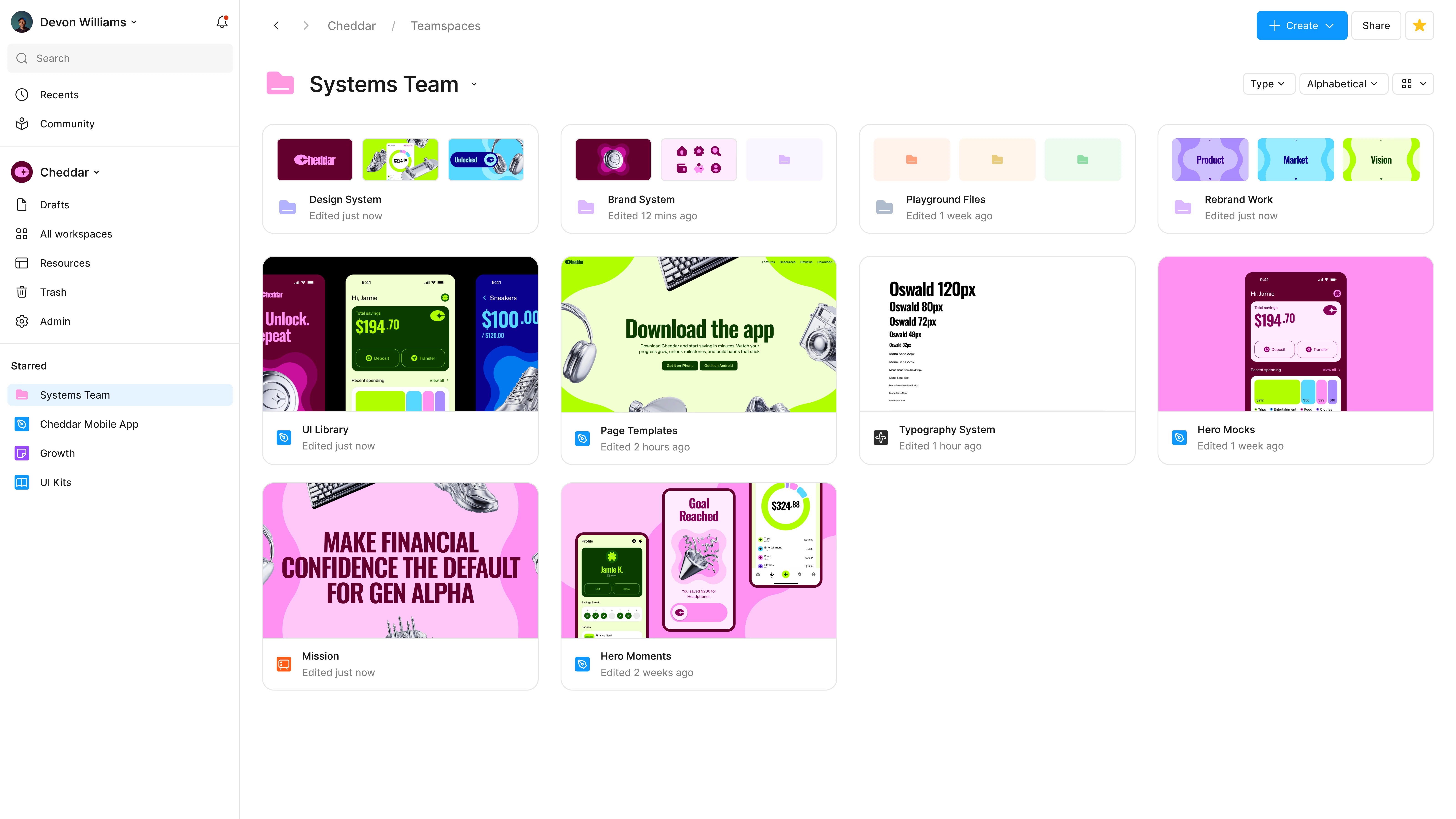
Pinned Reply By Tom Reem

Hey ​@Jeff27 and everyone following this thread — glad you're seeing them back! 🙌🏻

Updated folder preview.

Update: As of today, folder tiles again show a preview of the files inside — the thumbnails many of you said you relied on to scan and navigate. It's rolling out across plans now, so if it hasn't reached your account yet, it should shortly. ✅

Thanks again for keeping this in front of us, and for sharing your feedback along the way.

40 replies

tomli
New Member
August 24, 2026

​@djv How was this change previously communicated to the community before rollout?

Perhaps I missed a memo somewhere but it seems like removing/changing a feature without wide and advanced notification is counter-intuitive to good UX practice especially from a company who builds tools for good UX and design. 

Antonio Moton
New Member
August 24, 2026

Yes, please bring back thumbnail previews, or at least give us the option to toggle between thumbnail and list views. The current view is difficult to navigate.

Tai Terry
New Member
August 24, 2026

In addition to being an organizing feature, folders are a valuable navigation tool to give things a consistent “home”. Because Figma default sorts by most-recent, the order constantly changes, making folder organization not valuable for navigation. And because changes to the default sort order are not retained when a user navigates away, visual cues become incredibly important to see where the folder you are looking for moved to. This change is a regression in usability. As I think this feedback is illustrating, there are still quite a few of us who don’t rely solely on search for navigation. 

djv
Figmate
Community Support
August 24, 2026

Hey All, thanks for answering my question and for your continued feedback! 

To be transparent, Folders went through an early access program before general availability, and the change was announced here alongside an AMA thread. We understand that what you want isn't an indicator that a folder isn't empty, it's live thumbnails of the files actually inside, the way it worked before, with no manual upkeep. The team is now actively working on a solution now, and this thread is a direct reason why. 

While I don’t have a specific timeline to share, I’ll provide another update once we have something more concrete to share from the team. In the meantime, keep the use cases coming. How many folders you're managing and what you're scanning for is still the most useful thing you can add here.

Jeff27
New Participant
August 25, 2026

Just had the update pushed for myself. Absolutely agree with everyone else: please bring back the thumbnail version view or some ability to toggle to it. At the very least, the thumbnail summary view should be available at the parent level of a project. If neither of those are an option, a third idea would be the ability to add custom “designs/thumbnails” to replace the folder icon (similar to what you can do with the Teams Favicon-esque images, albeit it would be nice to have these read “Larger” in tile view).


Another HUGE advantage of how this worked originally beyond the visual cues was that it allowed you to click into your 4 most recent files within a “project/folder,” bypassing additional navigation. Now you have to click a folder before you can jump into a project, or navigate the big mess that is the “most recent” page if you want that similar experience. For an org with many different brands, where I’m jumping between Teams, this update makes navigation much more cumbersome. 


Finally, covers/thumbnails are a huge positive differentiator for Figma as a tool in general. Me and my teams spend a lot of time designing our thumbnails to help us visually navigate different workspaces/projects, so having that view missing from folder nesting is frustrating to say the least. I’d go as far as saying I’d rather revert to a non-folder structure in favor of maintaining the “thumbnail view.” 

Tyler_DeHague
New Member
August 26, 2026

First off, thank god for nested folders! Second, for the love of god can we add thumbnails or at the very least icons to them? They basically recede into the background, it’s so hard to navigate.  

Michelle_Gao
New Member
August 26, 2026

PLEASE, please, please bring back the thumbnail version or at least gives people’s ability to toggle on/off. HUGE readbility and navigation issue with the new text-base compact view. I cant believe they just changed it without giving users the option to toggle to it - what a terrible user experience!  

James_Willoughby
New Participant
August 27, 2026

Figma clearly don’t do any user research. As usual, he comes an update that makes things worse.

As you can see from their reply they are clearly clueless when they ask what we actually used these thumbnails for. 🤦

Oleg Bilyi
New Member
August 27, 2026

Hey ​@Adelina3  ​@Will Weaver 👋 Thanks for the feedback. I’ll share this with the team that owns Folders. Keep the feedback coming 🙌 — Jaycee

Hello,

some feedback from my side regarding Folders, I like the options of a nestable folder, but I find it hard to navigate to the files I’m looking for. The folders are named, but the file thumbnails that were visible with Projects were a huge readability feature that I’m really missing now.

I was searching for it in settings, but couldn’t find a way to set it. I actually added a description to a folder, but did not actually see not one place that the description was shown? This part is especially confusing.

If I could make an improvement suggestion to a current implementation it would be to have a setting to show or not to show some folder contents thumbnails, similar to the previous implementation.

Fingers crossed this can be done!

yes, please back again preview of folders. Its impossible to navigate now

Dmitrii_Moskovskii
New Member
August 27, 2026

The new folders are a big step backward for navigation.

I used to recognize projects instantly by their cover images and thumbnails. Now every folder looks almost identical, so instead of visually scanning the page, I have to read folder names one by one and open them to understand what’s inside.

Colors don’t solve this. Images are much faster to recognize, especially when you work with dozens or hundreds of projects.

Please bring back visual previews for folders — ideally automatic thumbnails based on the files inside, similar to how project covers worked before.