

adamlunn
March 23, 2021

Conditional Variant Properties

  • March 23, 2021
  • 27 replies
  • 14245 views

Variants have become one of the most important features I use within Figma. They are incredibly powerful! As they are so useful, I find myself looking for the ability to have properties show ONLY when another property is a certain value.

A quick example of what I mean is like this:

Let’s assume you have a button, and the top level of the properties are set up to be Primary and Secondary:

Let’s now assume I have an icon added to my buttons, but they are ONLY available to my Secondary button:
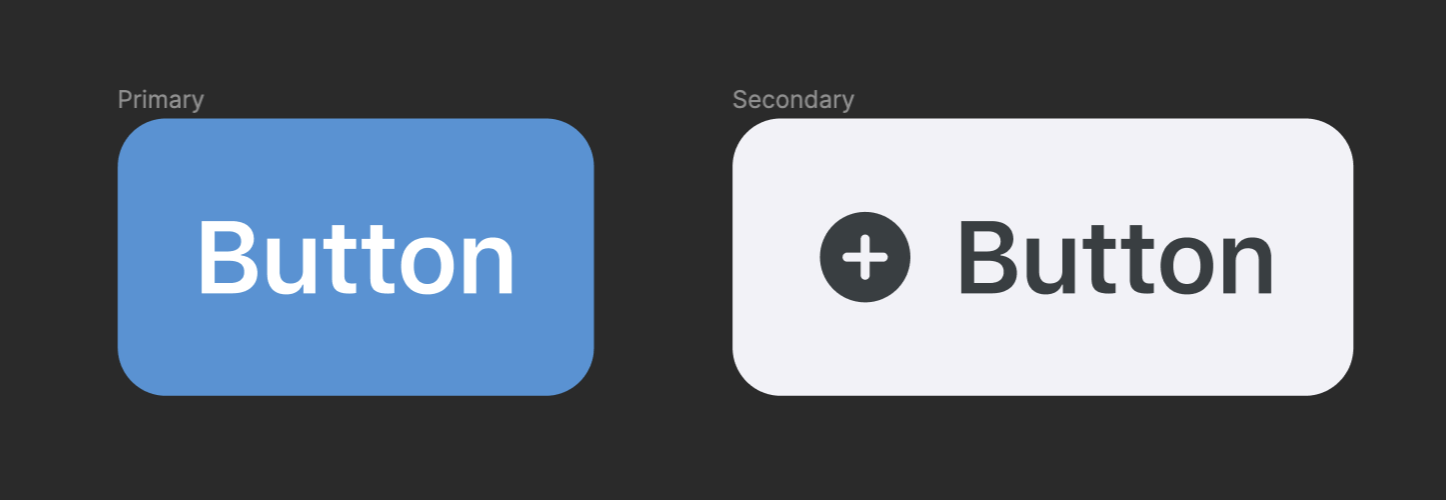
It would be so helpful here if this was possible:

  1. Select “Secondary” as my Property on the button variant.
  2. When “Secondary” is the active Property, I can then see ANOTHER Property where I can choose the icon for this example.
  3. That icon Property is only visible because I have said that it belongs to the “Secondary” Property.

Apologies if I have not explained this very well, but I think this could really be helpful when working with Variants.

27 replies

February 3, 2024

Please see the image below. Not sure if Figma will get to solve this any time soon, it’s either a technical limitation, or it’s intentional, but it can be a bit more intuitive.

If Type A is selected, please show options for Type A only, vs also showing from type B.

The current behaviour is, if you imagine a country selector, you select Japan, and in province selector you also see provinces from other countries, doesn’t really make sense. Figma is still a fantastic tool, and hope it gets even better.

Brandon_Spencer
February 5, 2024

You can achieve conditional component properties if you take instances of your separate components. For example in the post from Radu4, if you separate Type A and Type B into two separate components, and then take the default instance from each, then make those variants of a component, and show their nested properties, the options for each will show up conditionally. See below for how an example like this would show up in the properties panel.

image

image

April 30, 2024

Thanks Brandon, I appreciate the reply. What you explained is how Figma works today, and what I ended up doing of course. But to take all these steps to work around for the lack of a simple select filter, is a bit unintuitive.

June 6, 2024

I don’t follow Brandon. Are you suggesting to create two variants - with one for Type A and one for Type B?

July 19, 2024

Yes I’ve also been waiting on this subfiltering feature for quite a while now! Hoped they would’ve announced it at config! As trying to solve it with the boolean property is not enough.
I work for a sports betting bookmaker, and we are visualizing the many different sports teams using either their official logos or shirts.
So my current setup looks like this:

Screenshot 2024-07-19 at 17.37.11

So ideally, when you choose UK, the expected behavior would be that you would only be able to see the UK teams, as now every single team shows up… this is a huge component consisting of many countries and their national teams, but very needed to keep this same structure.

Additionally, it needs to be easily syncable using a spreadsheet so it cannot be split up in multiple components per country.

Solving this by wrapping it inside another component and then using nested instance swapping is not great either as this will automatically rescale it to its default size.
Since this component has an insane amount of instances, they need to be small but scaled up when used, as it’s loaded onto every possible display format you can think of, all with other dimensions…

You would just expect it to behave like how everyone else has described it.

Has anyone found a plugin that does this, maybe? As a workaround?
Hope this becomes a default feature very very soon!

Anyway thanks for reading and considering

Koen3
New Member
October 8, 2024

Upvoted! I’m building an address form which should have different properties based on the selected country variant. This would declutter my component dramatically!

Emi Rodriguez
New Member
April 16, 2026

5 years and counting - we need this!!!!