

Mike_Shamberg
February 5, 2021

Call up plugins in a quicker menu system on the right sidebar like Adobe

  • February 5, 2021
  • 22 replies
  • 10277 views

Problem:
Currently, you can only have 1 plugin at a time. Having the ability to access multiple plugins like Unsplash, Content Reel, etc… would make it so much quicker when filling in dummy content or about a million other tasks.

I would imagine the same type of system that Adobe integrates makes the most sense. This way you could expand/collapse plugins from the right sidebar by clicking on their icon.

They could anchor like seen below.
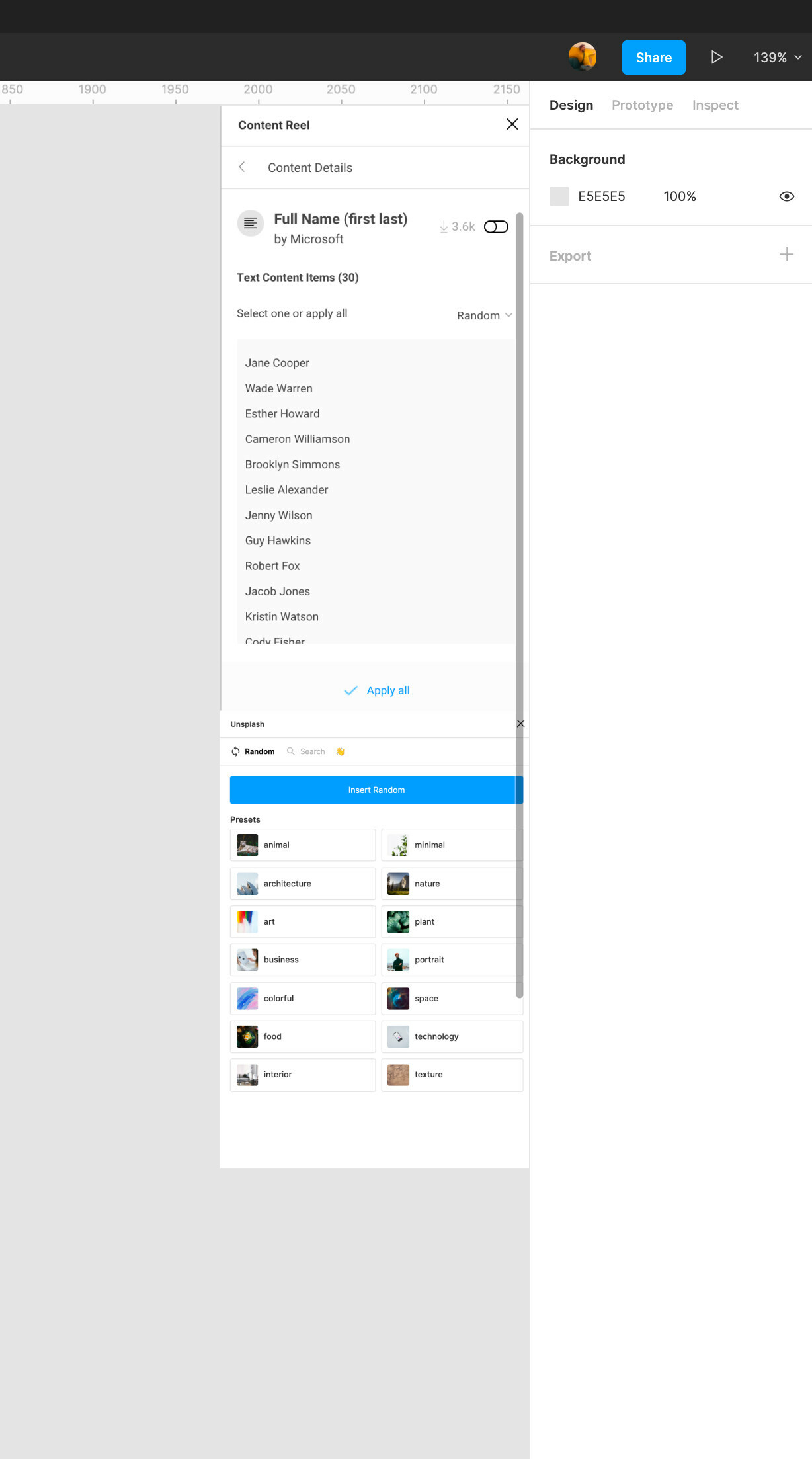
Are there any major reasons why this is not a part of the current software?

22 replies

ravid.aloni
July 19, 2021

The current integration of the plugin is laborious. it is hidden and requires too many clicks.
Would it be possible to make it easier and faster to find? Inegrate it as a top-level menu item / sidebar?

Best,
Ravid

KoronaLift
August 27, 2021

Why Figma blocks good things?
How about to add FigmaEx as a native feature?
It’s good and convenient addons panel

Nitin_Prajapati
September 14, 2021

I find my self using plugin a lot. For data syncing, or color design or zeplin export. But everytime it goes like first right-click then hover on plugin and then select the plugin. Please provide a separate pan or at least a direct icon on the top bar. On clicking the icon we can get all the plugin list.

Would be very very helpful.

Jeremy_Parmenter
September 14, 2021

1. Describe the problem your experiencing and how your idea helps solve this
When I use a plugin, I often close the plugin window when I’m done using it at any time, and spend a second deciding how to open it again when I need it moments later.

I’m getting into the habit of not closing plugins and just moving them to the bottom of the screen (though can’t open more than one plugin).

This works, I like this, though maybe it could be more intuitive? Also it’d be great to open multiple plugins at once.

2. Add as much context as possible (screenshots, Figma files, mockups, etc.)


3. Ask questions to bring the community into the conversation
(e.g. Does anyone else experience this? Is anyone using a plugin or workaround to help solve this?, etc.

Would it be possible for plugin authors to implement a minimise button or would it be a figma implementation?

What does everyone think of this in general? Maybe someone has another idea, like… a “plugin dock” or something?

Roger_Wong
September 29, 2021

I love this idea! I was thinking of something similar.

An additional reference would be 3D programs. While their interfaces are normally incredibly complex, I do appreciate how customizable their interfaces are. For example, in Cinema 4D, nearly every menu item has a corresponding icon button that you can throw into a custom palette and dock it to the UI where you want it. Additionally, you can have multiple layouts—just like in Adobe CC products—for modeling, animation, lighting, etc.

Keegan
October 7, 2021

I love this idea!

Gui_Seiz
November 19, 2021

I keep having to switch between two or three plugins in quick succession - do do different functions altogether.

Would be great to do something as simple as a pin window or a a don’t dismiss window feature that would allow me to have all three little plug-in windows up at the same time// so that I don’t have to go back and forth between launching each one in turn over and over again

KelseyONeill
New Participant
January 10, 2022

Another comment here in hopes of bumping this idea. Please add one of these good ideas here. Even just being able to “pin” the most used plugins would be great. Or an option to add a section above or below the layers panel.
Thanks!

gabrieldib
May 15, 2022

on a mac if you press command+/ then type “p” + the first letters of the plugin name’s words, you get to it pretty quick. For instance, your plugin name is JSON Exporter.
type in this order: command+/ then “p j e” letter “p”, space, letter “j”, space, letter “e”

the plugin you want will come up on top of the list. If not, just be more specific on the typing, if you have two plugins with very close names.

I have plugins “color guide” and “color styleguides”. If I type command+/, “p c g” I get “color guides” as the first on the list (just press to open the plugin)
but if I type “p c s” I get another plugin called “Automated Color Guides” as first on the list and “color styleguides” as third. Not too bad, just press arrow down two times and .
This is the fastest plugin open method I found so far.

June 2, 2022

I LOVE Figma, just frustrated with the lack of a good way to access plugins. Every couple of months I search the Forum in hopes that some solution will appear for this pain point!

I have so many plugins that I cannot remember their names, so searching by name is inefficient. It breaks my flow to have to recall what something is called. And, as many have pointed out, some plugins close on their own so repetitive tasks are tedious.

Simply doing something like XD is not my preference. It’s another (though prettier) list and still requires hunting for plugins, but it would still be a huge improvement. In XD, some plugins expand to show a menu of options, super nice because the expanded menus stay open even if interacting with another plugin.

Ideally, I would also like to pin favorites, and/or have the option to ‘pop out’ a plugin into a floating or dock-able panel so I can access more than one at a time. Also, create my own tags or create folders for easier searches. 🙂

Figma, please, please, please—with sugar on top—consider improving the workflow for plugins! It would be a huge win!!