

A_Gussenberg
July 13, 2023

Calculation formula within variable input

  • July 13, 2023
  • 74 replies
  • 11482 views

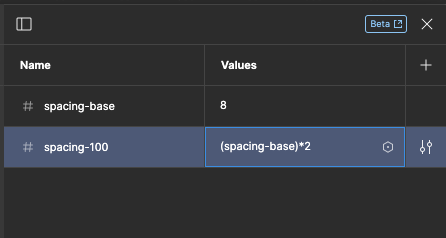
Hey folks, first of all I love the new variable function. Within the setup of spacings I want to reference my base value (“8”) and do calculations, e.g. (spacing-base)*2". This works fine and the value is calculated properly within the input to add a new variable. But I expected not that the calculation string changes to the absolute value. With this behaviour I loose the connection/ reference to my base value and the calculation is some how obsolete.

Does anybody feel the same?
Will there be an update?
image

Thanks

74 replies

Maxwellll
New Member
July 3, 2025

For creating any kind of prototype with data generating from adjusting in-flow variables, we need this feature. Prototyping with variables in a kneecapped feature without Maths.

Even basic Maths, like addition, in the Variable browser or the text field itself.


We already have conditionals with operators, so I know the underlying logic has been considered, but Figma have yet to roll this piece of work out. I need it!!

Leo4411
New Member
December 11, 2025

Hey @A_Gussenberg, I just wanted to let you know that my new plugin Dynamic Variables does exactly what you’re looking for!
Here’s a quick video to show you how it works:


https://www.figma.com/community/plugin/1365339609215368041/dynamic-variables

@Josh_Mitchell your request is super close to this one, I posted video there too:

When creating variables, it would be really useful to be able to include maths and text when defining a variable, which are kept up-to-date based on current values. E.g. With a shopping basket, I have the following variable • Subtotal# (numeric) Into which I add the value of each product selected in the basket. From this value I would like to calculate • VAT# (numeric) = Subtotal * 20%, truncated to 2 decimal places And then display these variables in a currency • Subtotal£ (String) = “£…

Let me know if you have any questions!

Thanks for sharing, this looks perfect! I’ll try the Dynamic Variables plugin seems to do exactly what we need.

Elias Finn22
New Member
February 9, 2026

Hi,


I’ve found the most effective calculators are the ones that instantly reflect input changes without overcomplicating the interface. That’s why simple tools like https://easygradecalculators.com/ feel so practical  enter the numbers, get immediate results. Clean variable handling plus real-time output is what makes any calculator genuinely useful.

Variables Plus
New Member
March 2, 2026

Hi everyone,

As a product designer working with a large internal design system, I’ve always had this exact pain: variables are great as static values, but the moment you want a scalable system (spacing scale, type scale, radii, opacities, responsive values, etc.), you quickly end up maintaining dozens of “derived” variables manually… or in spreadsheets.

That’s why I built Variables Plus: a plugin that lets you define relationships between variables using formulas, so your derived variables stay in sync automatically when the base value changes.

Example use-cases:

  • space_2 = space_1 * 2, space_3 = space_1 * 3

  • h1 = base_font * 2.25, h2 = base_font * 1.75

  • Keep values consistent across modes by “copying” from one mode to another (instead of duplicating + updating by hand)

If you’d like to try it, you can start here:

Not affiliated with Figma — just trying to help while we wait for native formula support. If you share your main use-cases, I’m happy to point you to the best pattern/examples.