Maria Andreeva
New Member
April 9, 2025

Bring back the view/hide icon for Grid styles

  • April 9, 2025
  • 21 replies
  • 2239 views

When creating grid as a style (in design system) and applying to a screen, I cannot hide it. The ‘eye’ for visibility is missing. It really bugs me because I can’t see my design properly and have to remove ad place the grid again. 
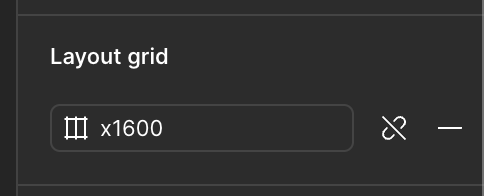
 

Grid when it is style
Grid when it is not a style


21 replies

Nellya
Power Member
April 9, 2025

As an option, you can use Shift+G and hide all the grids when you need it

MikeA
New Member
April 10, 2025

Same. But this only doesn’t appear for only some on our team.

djv
Figmate
Community Support
April 10, 2025

Hey All, thanks for flagging this! 

The team recently implemented a change, so this is now expected for grid styles. The Hide icon will not be visible if you have a grid style applied. You will now need to Detach style first in order to see the option to Hide.


To clarify why the team decided to implement this change, when a grid style has been applied, the old icon was the same as the shortcut to disable grids globally, which ​@Nellya also mentioned above. You can simply use the shortcut: Shift + G to toggle layout grid visibility. The behavior is still the same as it was before, only the entry point is different.

MikeA
New Member
April 10, 2025

Is there a Feature request to bring back this ability?

djv
Figmate
Community Support
April 10, 2025

Hey ​@MikeA, 

I updated this topic into a feature request, and I also passed this over to the team who made this change to possibly reevaluate.

Alexandra_Radoulova
New Member
April 15, 2025

Yes, please bring the eye back for grid styles.

but out of curiosity i really wonder, what led to the decision to remove such a useful, frequently used, low cost, min use of real-estate feature?

Andrei Tiberiu Doca
New Member
April 16, 2025

Hey All, thanks for flagging this! 

The team recently implemented a change, so this is now expected for grid styles. The Hide icon will not be visible if you have a grid style applied. You will now need to Detach style first in order to see the option to Hide. As ​@Nellya mentioned above, you can also simply use the shortcut: Shift + G to toggle layout grid visibility. 

Bring back the hide eye icon! If I use SHIFT + G the thing that happens is just that my design flips XD… Its annoying that I can not hide anymore the grids by simply pressing the eye icon if its used on the entire screens...

LFT
New Member
April 16, 2025

Absolutely agree - bring this back please. It makes absolutely no sense to me why this would be removed, or only available for detached grid. Wouldn't this encourage detaching grid, and possibly breaking design systems and libraries? There seem to have been a few incomprehensible UI changes like this lately...

Apolline
Active Member
April 17, 2025

No offense but do you guys ever test your design? With people that actually use your product? Every change to the UI is more appalling than the last, and the threads with 300+ replies for (small) feature requests keep being ignored

Also remember that keyboard shortcuts aren’t universal, some people don’t use a qwerty layout and they have to dig to find what’s the shortcut for them (no, figma still doesnt display the right shortcuts in the menu) (edit : thought the shortcut thing was fixed but it still isnt lmao, i still cant do half of them with my azerty keyboard)

Apolline
Active Member
April 17, 2025

Ok, related to my previous comment, I’m going to make another thread because I found out the azerty keyboard in Figma is only mapped to the mac azerty keyboard which is why it doesnt work for me 🙄