

Maria Andreeva
New Member
April 9, 2025

Bring back the view/hide icon for Grid styles

  • April 9, 2025
  • 21 replies
  • 2239 views

When creating grid as a style (in design system) and applying to a screen, I cannot hide it. The ‘eye’ for visibility is missing. It really bugs me because I can’t see my design properly and have to remove ad place the grid again. 
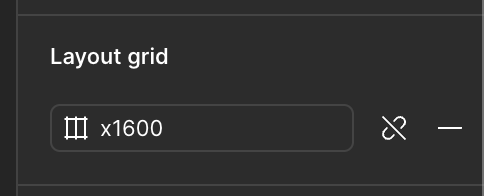
 

Grid when it is style
Grid when it is not a style


21 replies

st. 1187
New Participant
April 26, 2025

I can’t wait for another design tool to take over figma. It’s only downhill from here. Breaking this whole grid view/hide option BS is so unessary and annoying.

Kpez
New Member
April 30, 2025

Yes, would love to see the research done to give reasoning to this. It really seems hindering in everyway and I see no benefit for changes like this. Please pass along the message that we do not want these changes without some reasoning as to why. 

Microsoft updated their UI for Onedrive earlier this year and it is HORRENDOUSLY unusable. It really makes me wonder what is driving these decisions….Please do not be like Microsoft.

New Member
May 5, 2025

I'd like to register how much I dislike this change, and how challenging it is when you're working on a file with mulitple team members. Now I have to choose if I want to have a style attached so that I can make wholesale changes OR be able to hide or show individual frames so that I don’t interrupt every other person working in my file. 

I would also be interested in knowing the reasoning behind this change. I can gaurantee no one using Figma at a high level would want this change. We pay a lot to use Figma, and we will treat you like Adobe and leave for the NKOTB if you enshittify your product.

Margaret_Hogg2
New Member
May 28, 2025

I’m really wondering why this was removed. Shortcuts are great but they’re not accessible to everyone and they’re definitely not obvious. Couldn’t you have at least put it in the right click menu? This and a number of the UI 3 updates feel a LOT like you’re prioritizing look over actual functionality, and it doesn’t give me confidence in continuing to use your software.

naeim
New Member
July 8, 2025

I have to unlink the layout guide style to be able to hide it? why?

Katarzyna_Kowalczyk
New Member
July 17, 2025

I’m absolutely stunned as to why would you remove the hide icon and make it so troublesome to make us 1 - detach the layout to hide. 2-to use yet another shortcut to remember, while it’s also not accessible to everyone. That is poor UX to be honest… cannot fantom that…. why spoil something that was working just fine…. and to be clear.. I generally love figma… but changes that you make make it less intuitive with every change… it’s harder when so many people use your product and get used to certain things.. it lessens our efficiency when we have to learn so many things anew….  I honestly thought with this one that it’s a bug… because it’s not a feature….

st. 1187
New Participant
July 17, 2025

​@Katarzyna_Kowalczyk Agree, but in case you haven’t seen the “ Shift + G “ does hide and unhides it. I’d lose my mind if that goes away as well

Katarzyna_Kowalczyk
New Member
July 17, 2025

​@st. 1187  totally.. I would too <;   That’s a weird move right? And I have not seen anyone from Figma asking - what would you like…we can react just when stuff change.. 

flauridsen
New Participant
August 19, 2025

+1 for this. Completely silly that the hide icon was even removed in the first place.

khompitoon
New Member
September 2, 2025

When creating grid as a style (in design system) and applying to a screen, I cannot hide it. The ‘eye’ for visibility is missing. It really bugs me because I can’t see my design properly and have to remove ad place the grid again. 
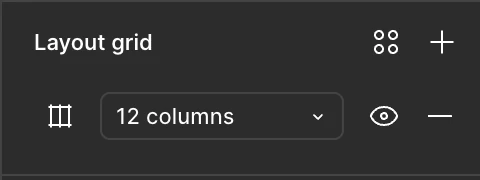
 

Grid when it is style
Grid when it is not a style


เฉลิมคำพิฑูรย์