

RG_man
February 11, 2021

Better plugin window management (fixed sidebar, multiple windows, stacking etc.)

  • February 11, 2021
  • 50 replies
  • 7655 views

1. Describe the problem your experiencing and how your idea helps solve this
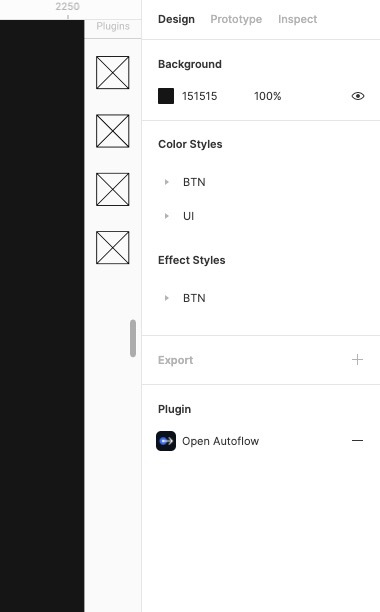
I can open 1 plugin at time, the plugins are located only in plugin section. I don’t have any possibility to add plugin to UI (exp. sidebar). Also plugin windows can be opened only in Figma webview window.

2. Add as much context as possible (screenshots, Figma files, mockups, etc.)
example of sidebar for plugins
3. Ask questions to bring the community into the conversation
Does anyone else have same problems?

50 replies

stfn_07
June 25, 2024

Or being able to detach plugin windows from the main window. Multi monitor support 💜

Bobbi_Bjornholt
June 25, 2024

It would be super helpful if we could keep the plugins open and docked on the screen, much like the Adobe Photoshop menu kind of experience, where you can open up different menus and stack them together, keeping them on the desktop for future use.

ux1ishan
New Member
July 24, 2024

Can you Please introduce new Figma feature of , Minimize Figma plugin to bottom of Figma with logo so whenever needed i should not have to open plugin window again and again, its so painful, i have idea to redesign the thing, if you need you can contact me i will help for free, but just add plugin minimize option and after minimize it will go to bottom of Figma

Like in the bottom

davestewart
July 24, 2024

I’m working with a lot of plugin panels at the moment, and it seems really strange that something like window management / panel stacking is not implemented.

To see a panel you have to move ones in front of it, rather than just clicking:

Can this be solved?

djv
Figmate
Community Support
July 24, 2024

Thanks for the feedback, @ux1ishan!

We’ve merged your reply into this similar, existing topic in the community. We’ll pass this idea onto our team for future consideration.

yves.moncisbays
September 19, 2024

September 2024… After 3 years and 7 months… still nothing 😵

Robin_Poort
New Member
November 14, 2024

Here’s my 2 cents for a temporary ‘solution’ for plugins that run either in the background, just once, or are created to change elements inside the Figma file:

Open a separate Figma instance (cmnd+shift+n - this works on OSX at least) and run the plugin you want to run in a separate window there. You can make this separate Figma instance as small or big as you’d like. And Since Figma files are updated in real-time; you will see the changes in real time as well.

This method is useless for plugins that select layers etc. But at least it could come in handy for plugins that either run continously (and scan for changes, like this one I use for example https://www.figma.com/community/plugin/1365339609215368041 and this one https://www.figma.com/community/plugin/801195587640428208/design-lint) or that have a separate sync button that will change some layers content 🙂

It could also be handy for just having your local variables window separate 🙂

chris.mccurry
New Member
June 10, 2025

Plug-in windows management is definately a need.  My idea would be to allow minimizing and/or docking plug-in windows to get them out of the way without the need to close and reopen (slow for some plugins) continuously. 


Certain plug-ins I’d like to have at my fingertips but don’t want it to cover my workspace all the time.

Nick89
New Participant
July 8, 2025

Yes, same here, I need to run multiple plugins at the same time to increase efficiency. 

Vinicius Alves
New Member
January 25, 2026

4 years later and we still don't have a decent plugin experience. The save function is essentially useless, i have to manually remember the names of every plugin I've ever used on the project. There's no dedicated area where I can pin my favorite plugins or keep them easily accessible. Instead, I'm forced to rely on the actions tab, which provides one of the worst user experiences ever implemented on history. It's extremely frustrating and unnecessarily complicated. 👏